REFERENCE
- Gallery page: https://magpui.com/en/i/teardown-simulator-dashboard-for-a-robot-bee-359a07
- First frame (image): https://dnioievkvxejjbxgwvko.supabase.co/storage/v1/object/public/media/teardown-simulator-dashboard-for-a-robot-bee-359a07/shot.jpg
- Clip (mp4): https://dnioievkvxejjbxgwvko.supabase.co/storage/v1/object/public/media/teardown-simulator-dashboard-for-a-robot-bee-359a07/clip.mp4
- Original post: https://x.com/elvar_official/status/2116192984299344372 by @elvar_official
Before building, download the first frame and look at it. If ffmpeg is available, download the clip and extract frames (ffmpeg -i clip.mp4 -vf fps=2 frame-%02d.png), then study the motion frame by frame. Match what you see; the text below describes it, the frames are the truth.

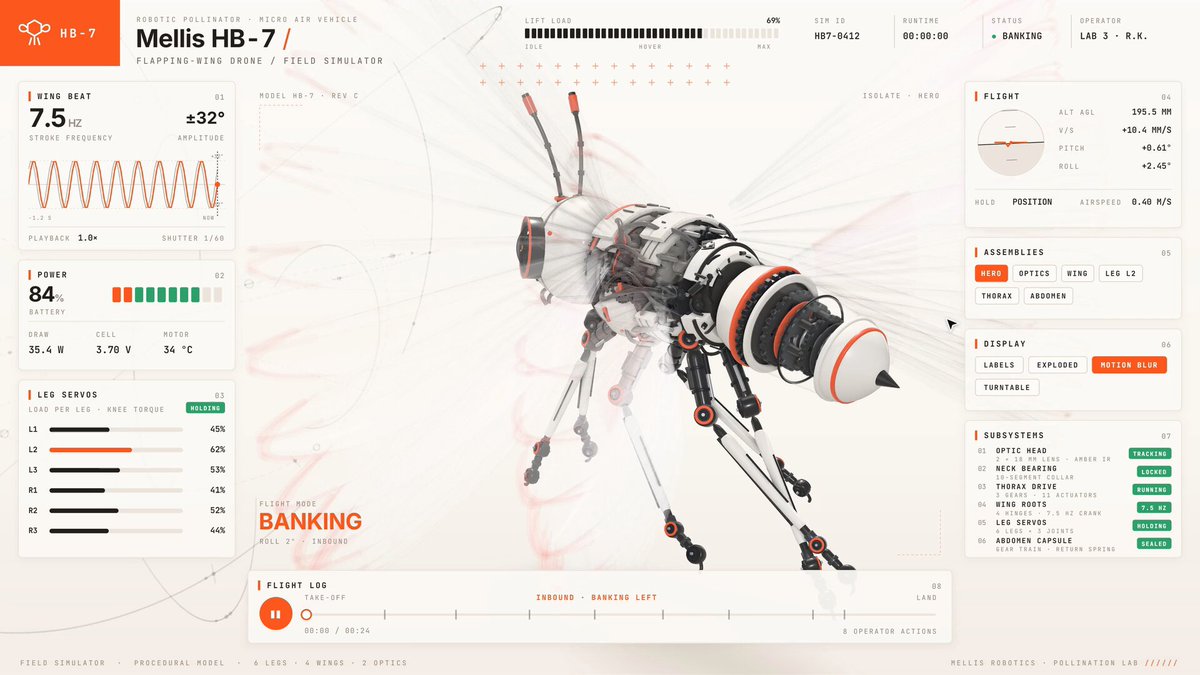
BUILD: Build a full-viewport 3D product simulator page in which a detailed white-shelled robotic bee with black joints and orange accents hovers at the center and cycles through labeled states while a technical instrument-panel UI frames it. The model flies, banks, opens its optics, detaches a wing, opens a leg or the thorax, tears down into floating parts and reassembles, then departs. It should feel like precise engineering software: calm, airy, high-detail.

DESIGN SYSTEM: Layout is a 3-zone grid on a warm off-white background #f3f0ea with a faint radial vignette. Top-left a solid orange #f2492a tab (about 90x40px) holding a small logo glyph, next to the product name in a medium sans about 20px ('Model HB-7 /') with a tiny uppercase mono caption below. Top-center a thin tick-mark ruler strip and small mono readouts. Left rail (about 220px): stacked instrument cards with 1px #d9d4cb hairlines, no shadows, no radius: a large numeric readout (about 28px, e.g. 7.5) with a tiny unit, an animated sine-wave line chart in orange, a segmented battery bar in green #3cc47c, and four horizontal bar meters (black bars on light track) with mono labels. Right rail (about 300px): panels with uppercase mono headings (10-11px, letter-spacing 0.08em): a small polar gauge, a segmented control (e.g. Idle / Hover / Cruise) with the active segment filled orange and white text, a Subsystems list where each row has a label and a small green OK pill, and a Display toggle group. Bottom: a full-width timeline scrubber with a round orange play button, a thin track, an orange progress fill, a thumb and tiny phase labels. Center-bottom-left a big orange uppercase state label (about 18px, bold, tracked) that changes with each phase (HOVER, BANKING, OPTICS OPEN, WING OFF, LEG L2 OPEN, THORAX OPEN, TEARDOWN, REASSEMBLY, DEPARTING). Typography: a neutral grotesk sans for names and values, a monospace for labels and numbers; mostly 10-12px, with only the readout and title larger. Colors: ink #14110f, orange #f2492a, green #3cc47c, hairline #d9d4cb, background #f3f0ea. Thin dashed orbit rings and crosshair marks float around the model.

MOTION: (1) Idle hover: the bee bobs on a sine path, amplitude about 6px, period 1800ms, ease-in-out (cubic-bezier(0.45,0,0.55,1)), wings buzz as a motion-blurred translucent shape. (2) State change: every 2-3s the label crossfades (opacity and 6px upward slide, 250ms, cubic-bezier(0.22,1,0.36,1)) while the camera orbits 15-30 degrees over 1200ms with the same easing and the matching part animates: optics ring slides forward, wing detaches and rotates away, leg or thorax shell hinges open 40-70 degrees. (3) Teardown: all parts translate outward along their normals by 60-200 units with 12-20ms stagger per part over 1400ms, slowly drifting and rotating, thin leader lines connecting parts to the origin; reassembly reverses it in 1000ms with cubic-bezier(0.65,0,0.35,1). (4) HUD: readouts tick to new values every state change, counting over 400ms; bar meters animate width over 500ms; the sine chart scrolls continuously; the timeline progress fill follows the loop (about 24s total).

SECTIONS: Header tab and title; left telemetry rail (readout, waveform chart, battery bar, four bar meters); central 3D canvas with state label and orbit rings; right control rail (polar gauge, segmented control, subsystems list with status pills, display toggles); bottom timeline with play/pause and phase markers. States: idle, playing, scrubbing, paused, each part open/closed, teardown exploded. Clicking a subsystem row or toggle jumps the model to that state.

IMPLEMENTATION: Use Three.js (or React Three Fiber) with a GLB model or procedurally built meshes grouped per part (each part has a closed position and an exploded position), MeshPhysicalMaterial for glossy white shells with an environment map, soft contact shadows and light post-processing. Drive all states from one timeline (GSAP timeline or a state machine with Motion) so the scrubber can seek. Render the HUD as plain HTML/CSS above the canvas; sine chart as SVG or canvas. Respect prefers-reduced-motion: stop the idle bobbing and wing buzz, use instant state changes and keep the scrubber manual. Keyboard: space toggles play, arrow keys step states, all controls are focusable buttons with visible 2px orange focus rings. Performance: cap pixel ratio at 2, target 60fps, instance repeated screws and bolts, dispose geometries on unmount.

ADAPT TO THE PROJECT: Reuse the project's existing design tokens, components and fonts; map the orange, green and neutral colors to the closest existing tokens; never copy logos, brand names, product names or the original model; use a placeholder model of your own subject.

SUCCESS CHECK:
- The 3D model cycles through at least five labeled states and the on-screen state label, gauges and timeline stay in sync with it.
- Teardown explodes every part outward with a stagger and reassembly returns them exactly to the closed pose.
- Controls are keyboard operable, and with reduced motion enabled the idle animation stops and states change instantly.