REFERENCE
- Gallery page: https://magpui.com/en/i/interval-wheels-with-live-duration-f1cb06
- First frame (image): https://dnioievkvxejjbxgwvko.supabase.co/storage/v1/object/public/media/interval-wheels-with-live-duration-f1cb06/shot.jpg
- Clip (mp4): https://dnioievkvxejjbxgwvko.supabase.co/storage/v1/object/public/media/interval-wheels-with-live-duration-f1cb06/clip.mp4
- Original post: https://60fps.design/shots/dropset-interval-slider-picker by Dropset
Before building, download the first frame and look at it. If ffmpeg is available, download the clip and extract frames (ffmpeg -i clip.mp4 -vf fps=2 frame-%02d.png), then study the motion frame by frame. Match what you see; the text below describes it, the frames are the truth.

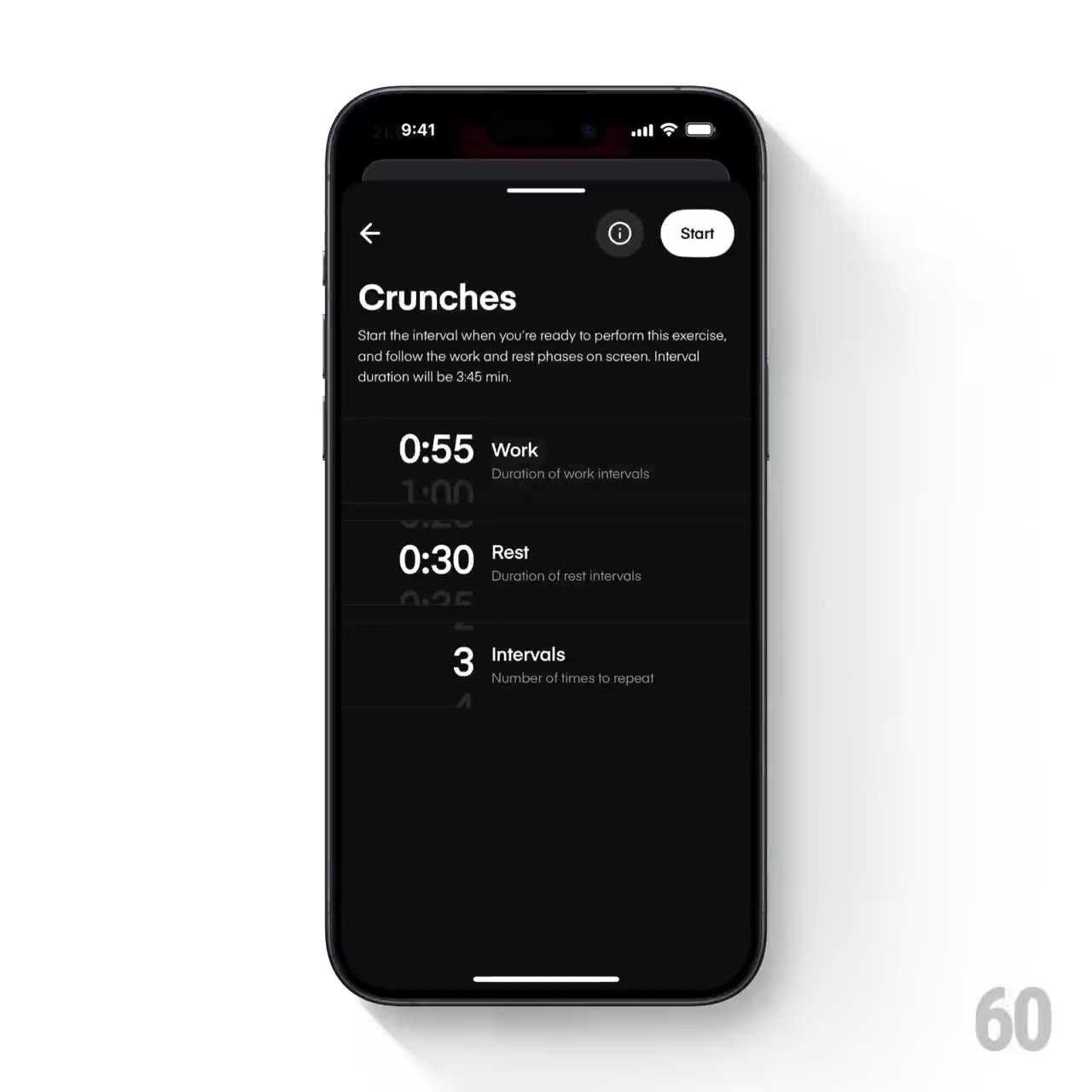
BUILD: Build only an interval configuration control with three independently scrollable number wheels for work time, rest time and number of intervals. Keep a short calculated duration sentence above them. The selected number sits beside a static label and muted explanatory line. Make the movement tactile but visually restrained; do not build a phone frame or whole fitness app.
DESIGN SYSTEM: Use a near-black #101010 surface with a 320px content width and 20px side padding. Arrange three rows roughly 64px tall. Give the value column 68px width, right-aligned 26px medium sans numerals, with 15px labels and 11px #858585 helper text to the right. Selected values are #F4F4F4; adjacent values fade toward #353535. Use a thin divider only where needed and no decorative shadows. Summary text is 12px gray and wraps to two lines.
MOTION: On vertical drag or wheel input, translate each clipped numeric strip with the pointer. On release, snap to the nearest allowed value in approximately 220ms using cubic-bezier(0.22,1,0.36,1). Fade neighboring values and reduce their scale to about 0.9 outside the center. Fade the calculated summary between values over 140ms using cubic-bezier(0.2,0,0,1). These timings are reconstruction targets, not measured source constants. Avoid looping animation.
SECTIONS: Duration summary; work-time row; rest-time row; interval-count row. Include idle, dragging, snapping and focused states. Keep time formatting consistent as m:ss and counts as integers. The duration calculation must match the configured work and rest rules, including whether the final rest is included.
IMPLEMENTATION: Use React and Motion for the clipped transforms and settling animation, with pointer capture and explicit bounded values. Provide equivalent keyboard spinbutton behavior with ArrowUp/ArrowDown and useful aria-valuetext; do not rely on dragging alone. Keep touch hit areas at least 44px. Render only nearby values, avoid animating the entire panel, and make summary announcements polite rather than repeated on every drag pixel. Under prefers-reduced-motion, replace values immediately with no translation or scaling.
ADAPT TO THE PROJECT: Reuse the project existing design tokens, components and fonts. Map color estimates to the closest existing tokens. Never copy logos, brand names, photos or illustrations from the original; use neutral placeholders.
SUCCESS CHECK:
- Each wheel snaps to a valid value and keyboard input produces the same result.
- The calculated summary stays consistent with all three controls without moving the layout.
- Reduced-motion mode preserves editing and visible focus without animated scrolling.