REFERENCE
- Gallery page: https://magpui.com/en/i/interactive-black-hole-lessons-app-d863bc
- First frame (image): https://dnioievkvxejjbxgwvko.supabase.co/storage/v1/object/public/media/interactive-black-hole-lessons-app-d863bc/shot.jpg
- Clip (mp4): https://dnioievkvxejjbxgwvko.supabase.co/storage/v1/object/public/media/interactive-black-hole-lessons-app-d863bc/clip.mp4
- Original post: https://x.com/techartist_/status/2118387240535793724 by @techartist_
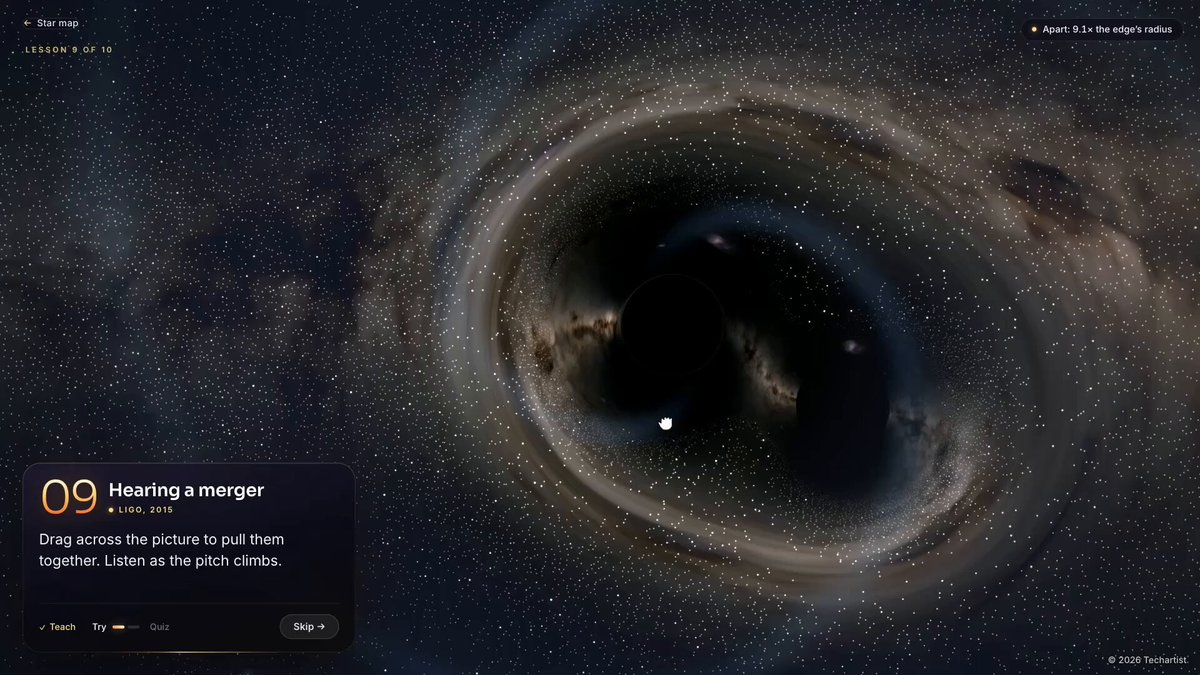
Before building, download the first frame and look at it. If ffmpeg is available, download the clip and extract frames (ffmpeg -i clip.mp4 -vf fps=2 frame-%02d.png), then study the motion frame by frame. Match what you see; the text below describes it, the frames are the truth.

BUILD: A multi-lesson interactive science app about black holes. A map screen shows the title in large bold white type top-left and, in the center, a glowing black hole with a lensed accretion disk inside a thin gold circle; ten lesson nodes sit around the circle as small gold dots with a two-line label (lesson name and year), and the current lesson glows. Each lesson opens a full-screen live visualisation with one compact control card in the bottom-left: a big serif number (01-10), the lesson title, a small caption with the historical study and year, one instruction line, one or two sliders or segmented buttons, a live readout, and footer controls (Back, step dots, Next). Lessons, for example: a sun-like star you squeeze until it turns into a dark star; light bending around the hole over a real starfield; finding an invisible companion by its wobbling star; the disk wrapping over the top as you slide gravity; slowing a clock near the horizon; a merger whose pitch climbs; the first glowing orange ring photo. Each lesson ends with a short quiz. It should feel like a quiet planetarium: deep black, warm light, very little chrome.

DESIGN SYSTEM: Background #030306 with a sparse starfield, and a photographic Milky Way band in some lessons. Accent gold #F2B24C to amber #FF8A1F; hot disk white #FFF2D6; blue-shifted side #BFE3FF; first-photo ring #FF6A1A on #1A0300. Control card: 300-340px wide, bottom-left with 24px margin, background rgba(20,18,16,0.72) with backdrop blur 16px, 1px border rgba(255,255,255,0.08), radius 14px, padding 16px. Typography: lesson number in a large light serif (40px, gold), title in a sans at 15px semibold white, caption 10px uppercase gold with a small dot, body 12px #C9C4BC. Sliders: 2px track #3A352E, filled part gradient gold to amber, 14px white thumb with glow. Buttons: small pills, primary gold #F2B24C with dark text, radius 999px. Top bar: tiny 'Star map' link top-left and a contextual hint top-right, both 11px, 60% white.

MOTION: Lesson change: the card slides up 12px and fades in, 420ms cubic-bezier(0.22, 1, 0.36, 1), stagger 40ms per line; the scene cross-fades over 600ms while the camera eases to its new framing over 1200ms cubic-bezier(0.65, 0, 0.35, 1). Sliders drive the scene continuously (star radius, gravity strength, time), smoothed with a 120ms lerp. Accretion disk rotates continuously (about 20s per turn) with Doppler brightening on the approaching side. Map: the gold circle draws on 800ms, nodes pop in with 60ms stagger and scale 0.6 to 1 with cubic-bezier(0.34, 1.56, 0.64, 1); hovering a node brightens it and shows the label. Quiz answer: correct option turns gold with a 200ms pulse.

SECTIONS: Map screen (title, ring of lessons, central render, footer hint). Lesson screen (top bar, full-screen visual, control card with number, title, caption, instruction, controls, readout, quiz state, footer nav). End screen with score.

IMPLEMENTATION: Three.js or a raw WebGL full-screen fragment shader per lesson: ray-marched Schwarzschild lensing for the hole and disk (bend rays by a 1/r^2 step), a starfield or equirect sky texture sampled through the bent rays, procedural disk with noise bands and Doppler beaming. Simpler lessons (star squeeze, orbits) can be 2D canvas. One lesson renderer mounted at a time; lessons are data (number, title, caption, controls, quiz). All controls are real HTML inputs with labels, keyboard arrows on sliders, left/right arrows for lessons, visible focus rings. prefers-reduced-motion: stop disk rotation and camera moves, cross-fade only. Lower ray-march steps on mobile, cap devicePixelRatio at 1.5, pause when the tab is hidden.

ADAPT TO THE PROJECT: Reuse the project's existing design tokens, components and fonts; map colors to the closest existing tokens. Never copy logos, brand names, the original lesson text or photos from the original; write your own copy and use placeholder sky textures.

SUCCESS CHECK:
- The map shows a lensed black hole inside a gold ring of ten lesson nodes and each node opens its lesson.
- Moving a slider changes the render live (for example, the disk visibly warps over the top as gravity increases).
- All lessons and quizzes work from the keyboard, and reduced motion removes rotation and camera moves.