REFERENCE
- Gallery page: https://magpui.com/en/i/black-hole-data-erasure-d32476
- First frame (image): https://dnioievkvxejjbxgwvko.supabase.co/storage/v1/object/public/media/black-hole-data-erasure-d32476/shot.jpg
- Clip (mp4): https://dnioievkvxejjbxgwvko.supabase.co/storage/v1/object/public/media/black-hole-data-erasure-d32476/clip.mp4
- Original post: https://x.com/Anuar_DesignX/status/2115729695010422784 by @Anuar_DesignX
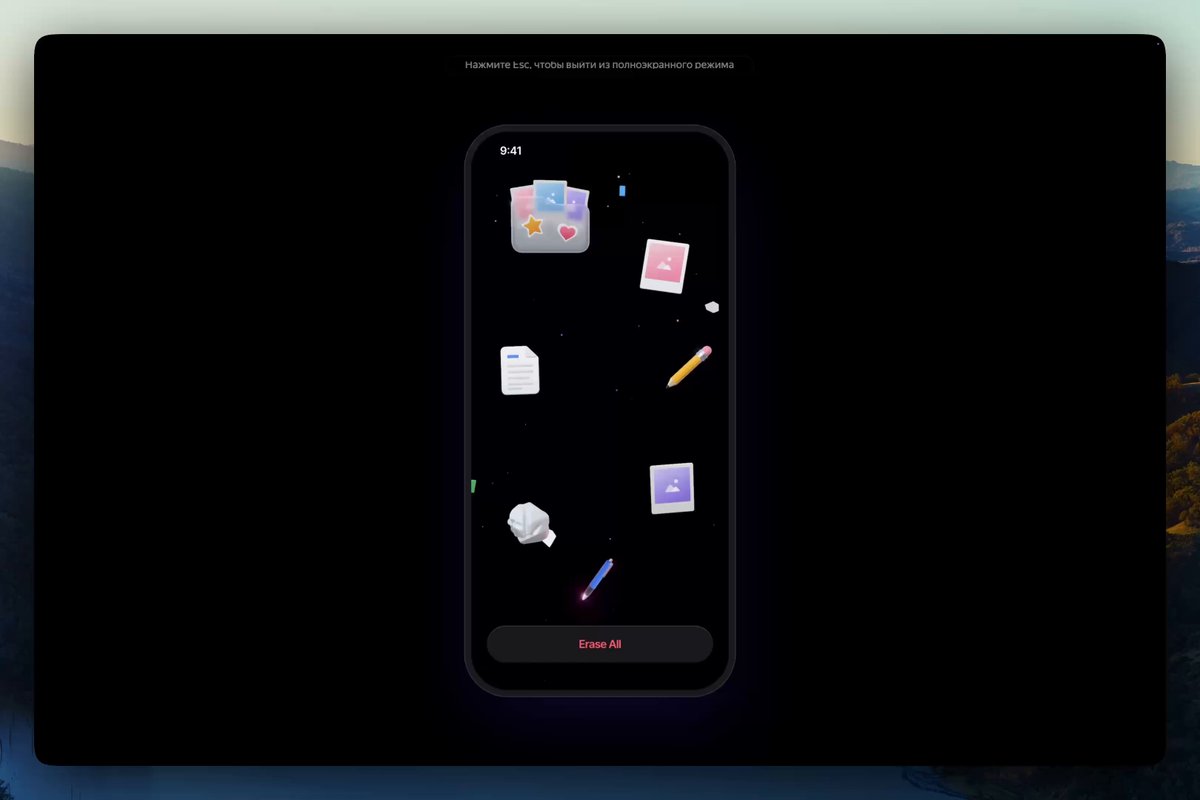
Before building, download the first frame and look at it. If ffmpeg is available, download the clip and extract frames (ffmpeg -i clip.mp4 -vf fps=2 frame-%02d.png), then study the motion frame by frame. Match what you see; the text below describes it, the frames are the truth.

ASSETS
This needs real artwork, not shapes drawn in code. Use the files the user gives you (ask where they are). If you have an image generation tool, generate them with these prompts; otherwise leave clearly marked placeholders.
- Glossy file icons: Set of six glossy 3D app-style icons (folder, photo stack, document, pencil, cloud, picture frame), soft pastel lavender, pink and white, smooth clay-like render, soft studio lighting, transparent background, 1:1 each

BUILD: Build a mobile erase-data interaction. A dark phone screen shows a handful of glossy 3D-style file icons (folder, photos, document, pencil, cloud, image) floating gently at different depths, with an "Erase all" button at the bottom. Tapping the button opens a glowing violet-and-pink black hole in the middle of the screen: the icons spiral inward, stretch and shrink into it, sparks streak toward the center, then the hole collapses to a point and vanishes, leaving only the centered text "All data erased" and a "Replay" button. It should feel cinematic, final and a little magical, not scary.

DESIGN SYSTEM: Full-screen mobile layout (390x844 reference), background #000000. Icons about 44-64px, glossy pastel 3D renders (lavender #c4b5fd, pink #f9a8d4, white) with soft shadows, scattered with slight rotation. Bottom button: full width minus 24px margins, height 44px, radius 14px, background #1a1a1f, label 15px medium in #ff4d6d. Black hole: core disc #000 about 120px with a hard edge, surrounded by an accretion ring glowing from #f0abfc to #a855f7 to #6d28d9, outer haze rgba(168,85,247,0.35) blurred, faint star specks. Final text: 17px medium, #e9d5ff with a soft glow (text-shadow 0 0 12px rgba(192,132,252,0.7)); Replay button same style as the erase button but with #e5e7eb text.

MOTION: (1) Idle: each icon floats on its own loop (translateY plus or minus 6px, rotate plus or minus 3deg, 3000-5000ms, ease-in-out, random phase). (2) Hole opens: scale 0 to 1 over 600ms, cubic-bezier(0.16,1,0.3,1), while the background tints violet; the ring rotates continuously (one turn per 4000ms). (3) Suction: icons are pulled along a spiral toward the center over 900-1400ms, staggered 80ms, accelerating with cubic-bezier(0.55,0,1,0.45); they stretch along their path, shrink to 0 and fade as they reach the core; small sparks streak inward with motion trails. (4) Collapse: the hole contracts to a point in 400ms ease-in, with a brief white flash and a soft shockwave ring expanding and fading in 500ms. (5) Done: "All data erased" fades in with blur 8px to 0 and a slight letter-spacing settle over 600ms; the Replay button rises 12px and fades in after 200ms.

SECTIONS: Status bar; floating file icons; Erase all button; black hole (core, accretion ring, haze, sparks); done state (message, Replay button). States: idle, erasing (hole open, suction), collapsing, done; Replay returns to idle with icons fading back in.

IMPLEMENTATION: Render the black hole and sparks on a canvas or a WebGL fragment shader (radial gradient ring with angular noise and swirl distortion) via three.js or OGL, and animate the icons as DOM or sprites with GSAP (a timeline makes the spiral, stagger and collapse easy to sequence). Compute spiral paths in polar coordinates (radius shrinks while angle increases). Keep the status message in an aria-live region and the buttons as real buttons with focus rings. prefers-reduced-motion: icons simply fade out in 300ms and the message appears, no hole or flash. Performance: cap devicePixelRatio at 2, under 200 spark particles, pause the loop when the hole is gone.

ADAPT TO THE PROJECT: Reuse the project's existing design tokens, components and fonts; map colors to the closest existing tokens; never copy logos, brand names, photos or illustrations from the original; use placeholder icons.

SUCCESS CHECK:
- Every icon visibly spirals into the hole and disappears before it collapses.
- The sequence ends on the All data erased message, and Replay restores the idle screen.
- Reduced motion replaces the black hole with a simple fade and still announces completion.