REFERENCE
- Gallery page: https://magpui.com/en/i/segmented-gauge-metric-card-1276fd
- First frame (image): https://dnioievkvxejjbxgwvko.supabase.co/storage/v1/object/public/media/segmented-gauge-metric-card-1276fd/shot.jpg
- Clip (mp4): https://dnioievkvxejjbxgwvko.supabase.co/storage/v1/object/public/media/segmented-gauge-metric-card-1276fd/clip.mp4
- Original post: https://x.com/alixasssan/status/2115540260826591651 by @alixasssan
Before building, download the first frame and look at it. If ffmpeg is available, download the clip and extract frames (ffmpeg -i clip.mp4 -vf fps=2 frame-%02d.png), then study the motion frame by frame. Match what you see; the text below describes it, the frames are the truth.

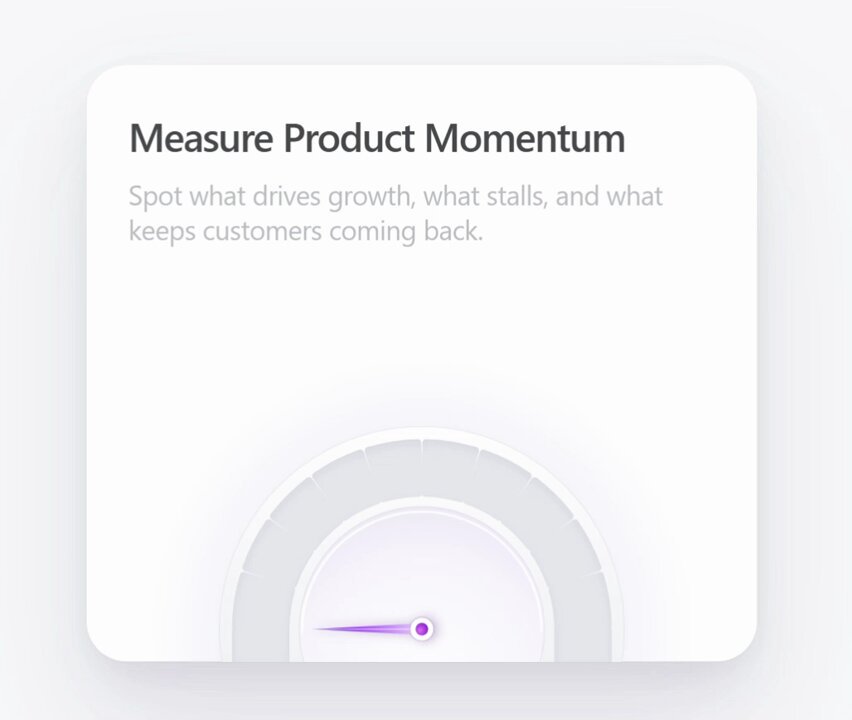
BUILD: Build a soft-UI metric card with a semicircular segmented gauge. A heading and a short description sit at the top; the gauge rises from the bottom edge of the card. On load, a slim needle sweeps from 0 and settles exactly at 80%, lighting up each segment it passes in a violet-to-magenta gradient. Two small floating badges (one for a negative metric, one for a positive metric) bounce in, wobble slightly, then level out and lift on hover. It should feel precise, premium and tactile.

DESIGN SYSTEM: Card about 420x360px, radius 24px, white #ffffff on a page of #f4f4f6, soft shadow (0 1px 2px rgba(0,0,0,0.04), 0 24px 48px rgba(17,24,39,0.07)), padding 28px. Heading 22px semibold #111827, description 15px regular #6b7280 with 1.4 line height, max two lines. Gauge: half ring about 300px wide, ring thickness about 44px, made of about 10 segments separated by 2px light gaps; unlit segments #e5e7eb, lit segments a gradient from #5b21b6 through #7c3aed to #d946ef; the ring sits on a soft lavender glow (radial gradient rgba(167,139,250,0.25)) and has a thin white inner bevel. Inner disc: white with a faint inset shadow. Needle: 3px wide, tapered, gradient #a78bfa to #7c3aed, pivot dot 10px #7c3aed with a white 2px ring. Badges: white pills with shadow (0 6px 16px rgba(17,24,39,0.08)), radius 10px, 13px label in #374151 plus a tinted value chip (negative: #f3e8ff background, #7c3aed text with a down arrow; positive: #dcfce7 background, #15803d text with an up arrow), each rotated about -6 and 4 degrees at rest.

MOTION: (1) Needle sweep: rotate from -90deg to the target angle (80% of 180deg) with a spring (stiffness 90, damping 14) that overshoots by about 4deg and settles, about 1400ms total. (2) Segments: each segment lights when the needle passes it, background crossfades from gray to its gradient slice in 180ms, ease-out cubic-bezier(0.16,1,0.3,1). (3) Badges: drop in from 24px above with opacity 0 to 1 and a bouncy spring (stiffness 300, damping 12), staggered 120ms, starting 300ms after the needle; then rotate from their tilted angle to 0deg over 500ms cubic-bezier(0.34,1.56,0.64,1). (4) Card hover: badges lift -6px and their shadow grows over 220ms, ease-out; the needle trembles by plus or minus 1deg once. (5) Glow under the ring fades in with the lit segments.

SECTIONS: Heading and description; gauge (track, lit segments, glow, inner disc, needle, pivot); left badge (Drop-off, down value); right badge (Retention, up value). States: idle before entering the viewport, sweeping, settled, hovered, value changed (needle springs to the new value and segments update).

IMPLEMENTATION: React with Framer Motion springs for the needle and badges; draw the gauge as SVG arcs (one path per segment with a shared linearGradient) so it stays crisp at any size. Derive which segments are lit from the needle's live motion value with useTransform, not from a timer. Trigger on first viewport entry with an IntersectionObserver. Expose the value as text (visually hidden or as a large number) with role meter, aria-valuenow, aria-valuemin and aria-valuemax. prefers-reduced-motion: render the settled state with no sweep or bounce. Badges are focusable if interactive, with visible focus rings. Performance: animate only transform and opacity, a single SVG.

ADAPT TO THE PROJECT: Reuse the project's existing design tokens, components and fonts; map colors to the closest existing tokens; never copy logos, brand names, photos or illustrations from the original; use placeholder copy and metrics.

SUCCESS CHECK:
- The needle overshoots slightly and settles exactly on the target value, and segments light only as it passes them.
- Changing the value prop animates the needle and segments to the new value.
- Screen readers get the value through role meter, and reduced motion shows the final state instantly.