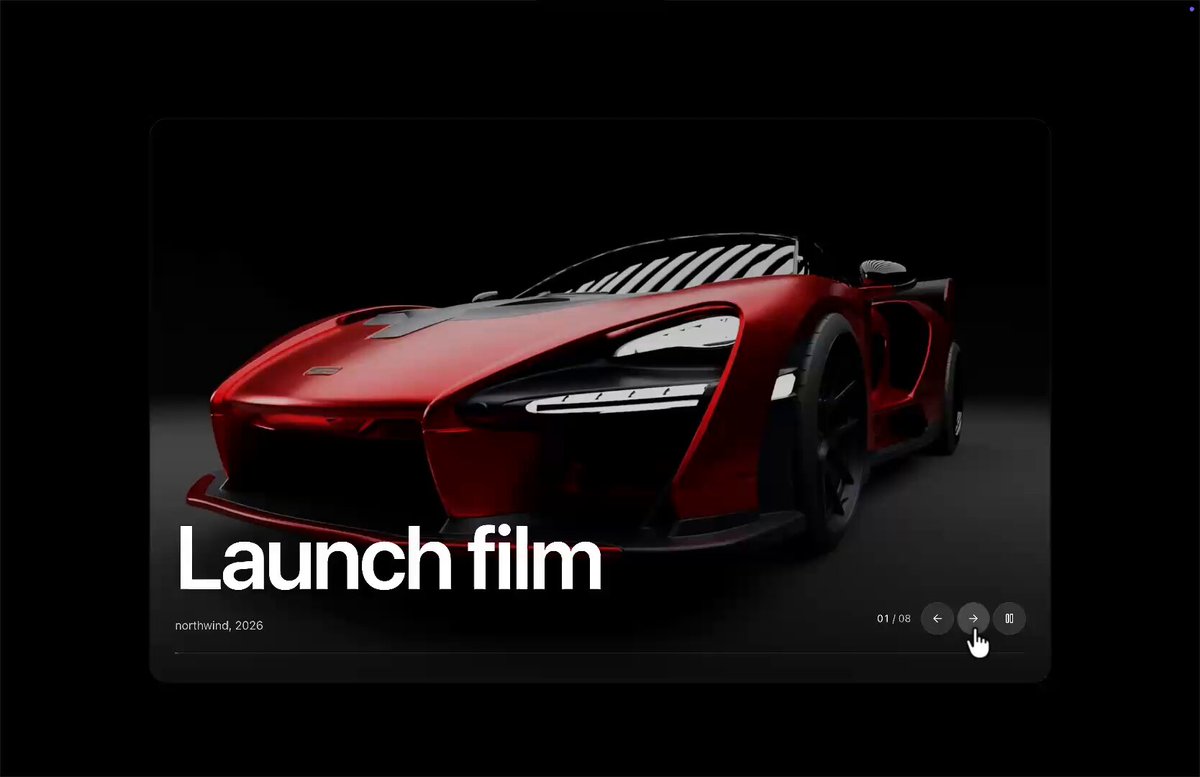
REFERENCE
- Gallery page: https://magpui.com/en/i/webgl-lens-warp-carousel-37e8c9
- First frame (image): https://dnioievkvxejjbxgwvko.supabase.co/storage/v1/object/public/media/webgl-lens-warp-carousel-37e8c9/shot.jpg
- Clip (mp4): https://dnioievkvxejjbxgwvko.supabase.co/storage/v1/object/public/media/webgl-lens-warp-carousel-37e8c9/clip.mp4
- Original post: https://x.com/Ashishgogula/status/2118338641219170631 by @Ashishgogula
Before building, download the first frame and look at it. If ffmpeg is available, download the clip and extract frames (ffmpeg -i clip.mp4 -vf fps=2 frame-%02d.png), then study the motion frame by frame. Match what you see; the text below describes it, the frames are the truth.

BUILD: A reusable full-bleed image carousel component. You pass an array of slides { src, title, meta }. Each slide fills a rounded media frame on a pure black page. Large bold white title sits bottom-left; smaller meta under it. Bottom-right: index "01 / 08" plus three circular ghost buttons (prev, next, pause/play). A 1px horizontal line along the bottom of the media is the autoplay timer — it fills left-to-right over the configured interval, then advances. The signature move: on slide change, a liquid-glass lens warp ripples across the frame, magnifying and refracting both the photograph and the typography like thick curved glass, then settles. Feel: premium, cinematic, tactile — luxury product gallery, not a generic slider.

DESIGN SYSTEM: Media frame ~16:9 or full viewport width with ~12–16px corner radius, 1px #FFFFFF10 border optional. Title: 42–64px bold geometric sans, white, tight tracking; meta: 12–14px regular, #FFFFFF99. Controls: 36px circles, fill #0A0A0ACC, 1px #FFFFFF22 border, 14px icons. Timer line: 1px height, track #FFFFFF22, fill #FFFFFF. Background outside frame: #000000. Spacing: title inset 24–32px from left/bottom of media; controls inset 24–32px from right/bottom. No brand marks.

MOTION: Autoplay interval default 4000–5000ms; timer width animates 0→100% linear over that duration; pause freezes timer. Next/prev or timer complete: lens warp transition 700–900ms — displacement scale peaks mid-transition (~0.4–0.7 UV offset) with a soft radial/elliptical lens traveling across, chromatic micro-aberration optional (±1–2px RGB split), easing cubic-bezier(0.4,0,0.2,1); title/meta crossfade or share the same warp (preferred). Hover on circular buttons: scale 1.06 over 150ms cubic-bezier(0.22,1,0.36,1). Click: 100ms press scale 0.96. Keyboard arrows change slide; Space toggles pause.

SECTIONS / PARTS: (1) WebGL canvas plane(s) showing current+next textures. (2) DOM or canvas-drawn title + meta (must warp with the lens if possible, or sit in a synced overlay). (3) Timer line. (4) Control cluster. States: playing, paused, transitioning, reduced-motion.

IMPLEMENTATION: OGL or Three.js full-bleed plane with custom fragment shader: dual textures + progress uniform + displacement/lens SDF. Prefer OGL for a lean carousel. Keep DOM controls accessible above the canvas. Preload adjacent slide textures. DPR capped at 2. prefers-reduced-motion: instant crossfade or cut, no warp, timer still works or disable autoplay. Focus rings on buttons (2px white). Aria-live for slide title on change.

ADAPT TO THE PROJECT: Map type sizes and radii to project tokens. Use the project's button/icon set if present. Never copy cars, logos or photos from the reference — use the caller's image URLs or plain placeholders. Do not name any third-party library product in the UI copy.

SUCCESS CHECK:
- Passing an array of {src,title,meta} renders full-bleed slides with index, timer line and prev/next/pause.
- Slide changes show a visible liquid-glass lens warp on image (and title if implemented); pause stops the timer fill.
- Reduced-motion skips the warp; controls remain keyboard accessible.