REFERENCE
- Gallery page: https://magpui.com/en/i/tear-the-lace-to-see-the-poster-fb0089
- First frame (image): https://dnioievkvxejjbxgwvko.supabase.co/storage/v1/object/public/media/tear-the-lace-to-see-the-poster-fb0089/shot.jpg
- Clip (mp4): https://dnioievkvxejjbxgwvko.supabase.co/storage/v1/object/public/media/tear-the-lace-to-see-the-poster-fb0089/clip.mp4
- Original post: https://x.com/ann_nnng/status/2115780819142979978 by @ann_nnng
Before building, download the first frame and look at it. If ffmpeg is available, download the clip and extract frames (ffmpeg -i clip.mp4 -vf fps=2 frame-%02d.png), then study the motion frame by frame. Match what you see; the text below describes it, the frames are the truth.

ASSETS
This needs real artwork, not shapes drawn in code. Use the files the user gives you (ask where they are). If you have an image generation tool, generate them with these prompts; otherwise leave clearly marked placeholders.
- floral posters: Bold risograph-style floral poster, giant hibiscus or camellia blooms, oversized condensed magazine title type, saturated yellow and hot pink palette, flat print texture, portrait 4:5

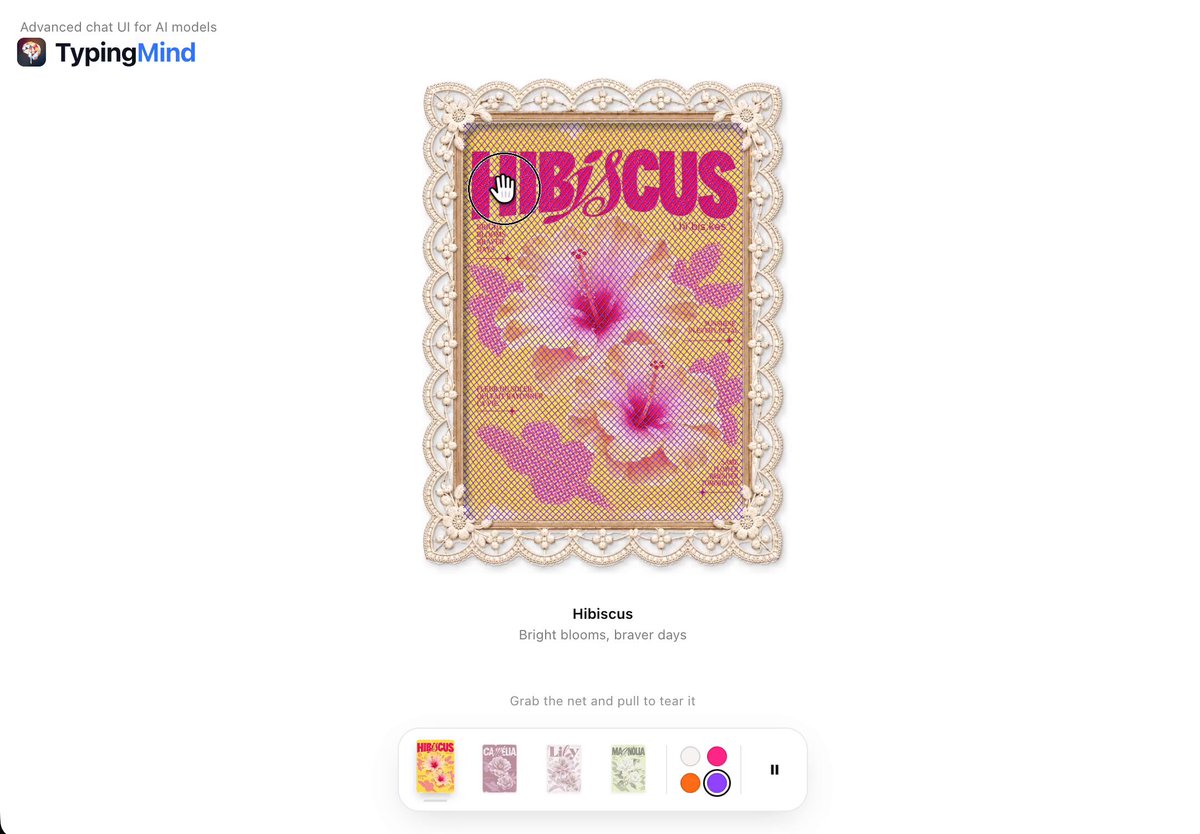
BUILD: An interactive poster viewer where each artwork hides behind a lace mesh you physically tear open. A tall poster sits inside a cream scalloped doily frame with a lace pattern. A fine translucent mesh covers the art. Dragging across it tears the mesh along the pointer path: threads stretch, snap and hang down as loose flaps that sway, revealing the bright poster underneath. Below the frame sit a poster name, a one-line caption, a hint line ("Pull on the mesh to tear it open") with a small "Mend the veil" link, and a floating dock of small poster thumbnails plus mesh color swatches and a reset button. Choosing another thumbnail swaps posters: the new framed card slides up from below, tilted about -6deg, overlaps the old one and settles, with a fresh untorn mesh. It should feel tactile, delicate and a bit mischievous.

DESIGN SYSTEM: White page #FFFFFF, everything centered. Frame about 300x380px, doily border 24px with scalloped edge and lace holes, color #EDE3D6 with soft shadow 0 10px 24px rgba(0,0,0,0.12). Poster inside with 6px inset; posters are bold, saturated floral prints (yellow #F6D23C with magenta #E2187A type, or hot pink #E0337D). Mesh: diamond net of 1px threads, default lilac #8B5CF6 at 55% opacity, other swatches magenta and orange. Title 13px semibold #1A1A1A, caption 11px #7A7A7A, hint 10px #9A9A9A with an underlined link. Dock: white pill, radius 14px, shadow 0 6px 20px rgba(0,0,0,0.1), thumbnails 22x30px radius 4px, active one raised, 12px color dots.

MOTION: Mesh is a cloth simulation (verlet points about 8px apart, distance constraints, gravity). Pointer drag: constraints within 14px of the cursor break once stretched past 1.6x; torn flaps fall and swing with damping 0.98. Hovering the mesh slightly pulls the nearest points toward the cursor. Poster swap: old card rotates to +4deg and drops 20px, new card enters from y +120px at -6deg and springs to 0 over 600ms (stiffness 220, damping 22), mesh rebuilt intact. "Mend the veil" re-knits: torn points tween back to rest over 500ms ease-out. Swatch click recolors threads over 200ms.

SECTIONS: Framed poster with mesh canvas on top; title and caption; hint with mend link; dock with thumbnails, color swatches and reset. States: intact, tearing, torn, swapping, mending.

IMPLEMENTATION: Plain JavaScript or React with one canvas over the poster running a small verlet cloth sim at 60fps; the doily frame as an SVG or image with a mask. Motion for the card swap springs. Touch drag supported. Keyboard: thumbnails are buttons, arrow keys switch posters, a "Reveal" button removes the mesh for keyboard users. prefers-reduced-motion: tearing removes mesh cells instantly with no swinging, swap is a fade. Keep the sim under about 1500 points.

ADAPT TO THE PROJECT: Reuse the project's fonts, dock or toolbar component and color tokens. Do not copy the original posters or brand; use placeholder artwork.

SUCCESS CHECK:
- Dragging across the mesh tears it along the path and loose threads hang and sway.
- Picking a thumbnail swaps the framed poster with a tilted spring and a fresh mesh.
- Mend restores the mesh, and touch, keyboard and reduced motion all work.