REFERENCE
- Gallery page: https://magpui.com/en/i/selected-text-becomes-a-reply-7bd4c4
- First frame (image): https://dnioievkvxejjbxgwvko.supabase.co/storage/v1/object/public/media/selected-text-becomes-a-reply-7bd4c4/shot.jpg
- Clip (mp4): https://dnioievkvxejjbxgwvko.supabase.co/storage/v1/object/public/media/selected-text-becomes-a-reply-7bd4c4/clip.mp4
- Original post: https://x.com/alimdesigner_/status/2112076284172136933 by @alimdesigner_
Before building, download the first frame and look at it. If ffmpeg is available, download the clip and extract frames (ffmpeg -i clip.mp4 -vf fps=2 frame-%02d.png), then study the motion frame by frame. Match what you see; the text below describes it, the frames are the truth.

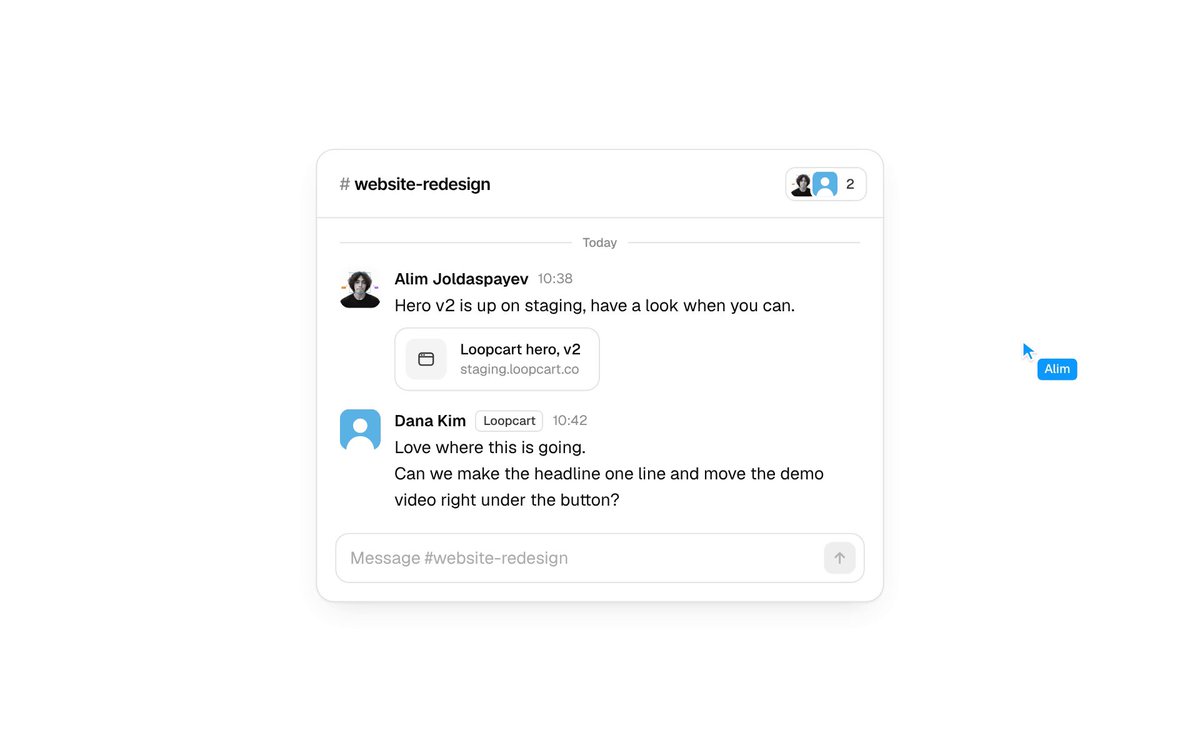
BUILD: Build a compact team-chat card where selecting part of a message turns that text into an attached quote in the reply composer. Sending produces a new message with the same quote inset above the reply. Keep the interaction quiet, precise and contextual; build only this component.
DESIGN SYSTEM: Use a white card approximately 360px wide, a 12px radius, a fine #E8EAED border and soft 0 4px 16px shadow. A 40px channel header contains a small channel label and stacked participant avatars. Use a neutral sans-serif, 13px body text, 11px metadata and 12px semibold names. Message rows have 24px avatars, 10px gaps and 16px horizontal padding. Use #202226 text, #959BA2 metadata and a #40ACD1 quote accent. The composer is inset 10px, with a thin gray border, 8px radius and black square send button.
MOTION: On text selection followed by quote activation, animate a lightweight duplicate of the selected text from its message bounds into the composer quote area over 320ms, cubic-bezier(0.22,1,0.36,1). Expand the composer quote region over 220ms with the same easing. On send, move the quote and reply into the appended message row over 280ms and clear the composer; animate the list layout over 240ms, cubic-bezier(0.22,1,0.36,1). These timings are implementation targets.
SECTIONS: Compact channel header; date divider; two existing messages, one with an attachment chip; selectable message body; idle composer; composer containing a quoted author and selected sentence; typed reply with enabled send button; sent message with a slim blue quote rule and reply below. Provide quote dismissal and prevent empty submissions.
IMPLEMENTATION: Use React selection ranges to capture selected text and its bounding rectangle; use Motion layout/shared-element animation for the quote transfer and message insertion. Keep content selectable instead of using a canvas. Animate transforms and opacity, with at most one flying text layer. For reduced motion replace movement with an immediate state change. Support keyboard selection plus a visible Quote action, labelled send and dismiss buttons, clear focus rings and a polite sent-message announcement. Do not depend on dragging or pointer-only gestures.
ADAPT TO THE PROJECT: Reuse the project's existing design tokens, components and fonts. Map colors to the closest existing tokens. Never copy logos, brand names, photos or illustrations from the original; use placeholder initials and generic chat content.
SUCCESS CHECK:
- Selecting a sentence and activating Quote attaches only that sentence to the composer.
- Sending appends a message with both the quote and typed reply, without duplicating the source message.
- Keyboard-only and reduced-motion use preserve the same workflow.