REFERENCE
- Gallery page: https://magpui.com/en/i/immersive-photo-wall-portfolio-fbabc1
- First frame (image): https://dnioievkvxejjbxgwvko.supabase.co/storage/v1/object/public/media/immersive-photo-wall-portfolio-fbabc1/shot.jpg
- Clip (mp4): https://dnioievkvxejjbxgwvko.supabase.co/storage/v1/object/public/media/immersive-photo-wall-portfolio-fbabc1/clip.mp4
- Original post: https://moments-template.modulify.website by Moments
Before building, download the first frame and look at it. If ffmpeg is available, download the clip and extract frames (ffmpeg -i clip.mp4 -vf fps=2 frame-%02d.png), then study the motion frame by frame. Match what you see; the text below describes it, the frames are the truth.

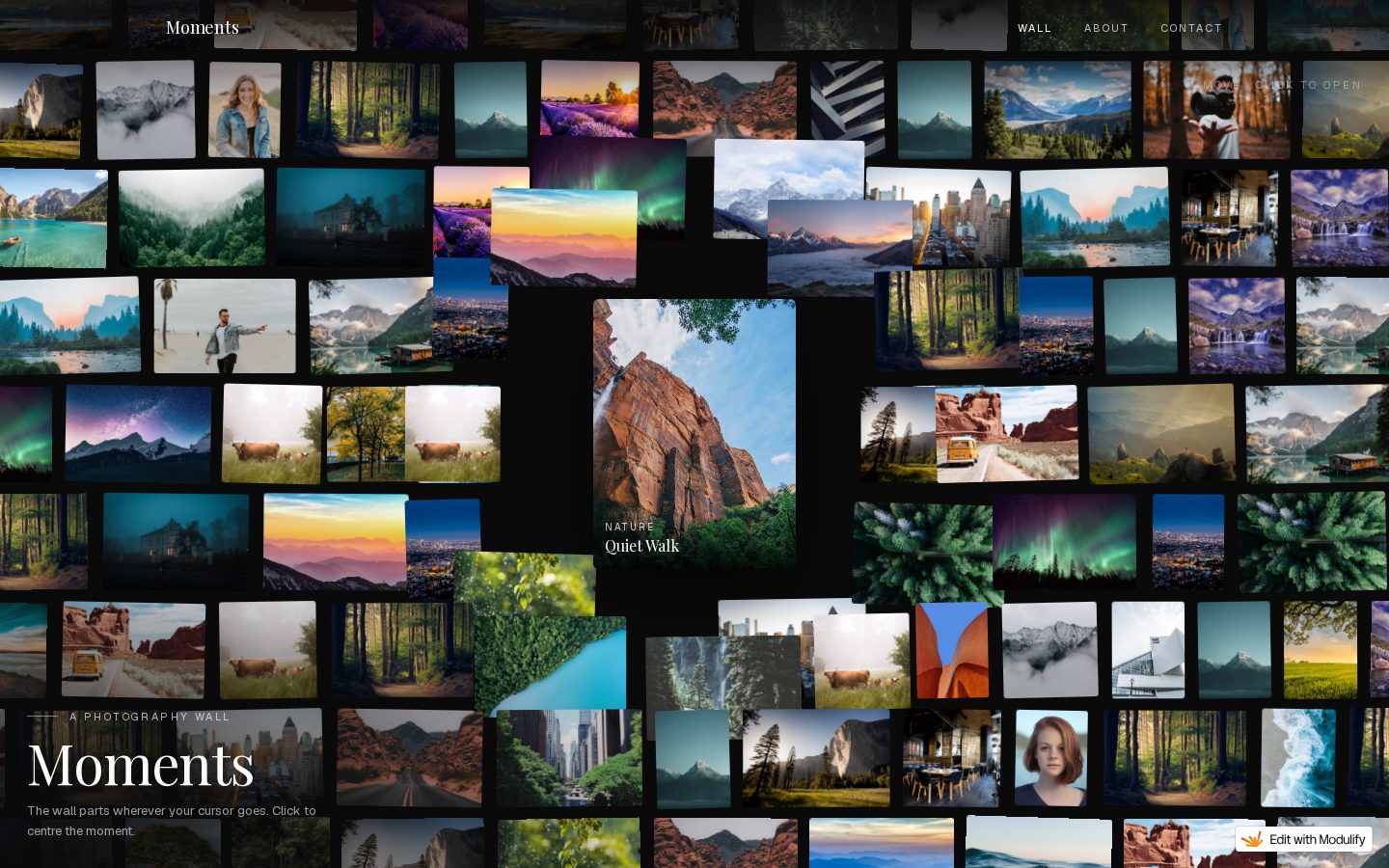
BUILD: Build an immersive photography portfolio landing viewport. Fill the screen with a tightly packed mosaic of differently sized photographs on black. Leave a deliberate black pocket near the center around one featured vertical image and its small caption. Anchor a large serif portfolio title and short introduction at bottom left. The result should feel like stepping into an expansive contact sheet, not a uniform card grid. Only the opening viewport is evidenced; do not invent lower sections.

DESIGN SYSTEM: Use a #080908 canvas and off-white #F1EEE7 type. At a 1440 by 900 desktop reference, arrange roughly 60 to 90 rectangular image tiles with 6 to 10px black gutters. Mix landscapes, squares and portrait crops with widths around 80 to 200px, avoiding rounded cards, borders and shadows. Let the mosaic overflow the viewport edges. A featured portrait roughly 200 by 260px sits near the center inside a larger black negative-space area. Use a high-contrast editorial serif at approximately 52px for the lower-left title, with a small 12px sans-serif introduction. Place a small identity at upper left and compact 11px navigation along the upper edge. Slightly dim peripheral imagery so white text remains legible.

SECTIONS: 1. A compact header over the collage, with a small identity at left and understated navigation toward the right. 2. A full-height photographic mosaic spanning the opening viewport, mixing scenery and portrait placeholders without repeated card chrome. 3. The central featured project: vertical photograph, small centered caption beneath, and surrounding black breathing room. 4. A bottom-left title and short two-line introduction over a darkened patch of the collage. No other sections were visible.

IMPLEMENTATION: Use semantic HTML and CSS Grid with explicit spans or a responsive positioned tile map for the art-directed desktop composition; code does not require an animation library. The six captured frames show essentially the same composition, so do not add unverified entrance sequences or scroll choreography. On mobile, reduce tile count and preserve the featured project and readable heading rather than shrinking all tiles. Use responsive image sources, lazy-load offscreen photographs and avoid mounting hundreds of full-resolution assets. Make project links and navigation keyboard reachable with a 2px visible focus outline; label image links and use empty alt text for purely decorative duplicates. Keep the composition static under prefers-reduced-motion.

ADAPT TO THE PROJECT: Reuse the project's existing design tokens, components and fonts, map these colors to the closest existing tokens, and never copy logos, brand names, photos or illustrations from the original; use placeholders or properly licensed project imagery.

SUCCESS CHECK:
- At desktop size, mixed photo rectangles reach every viewport edge while a black pocket isolates the central featured project.
- The lower-left heading and small header remain readable without generic card backgrounds.
- At 375px width, the featured project and title remain legible and every interactive link is accessible by keyboard.