REFERENCE
- Gallery page: https://magpui.com/en/i/file-browser-that-grows-branches-e1092a
- First frame (image): https://dnioievkvxejjbxgwvko.supabase.co/storage/v1/object/public/media/file-browser-that-grows-branches-e1092a/shot.jpg
- Clip (mp4): https://dnioievkvxejjbxgwvko.supabase.co/storage/v1/object/public/media/file-browser-that-grows-branches-e1092a/clip.mp4
- Original post: https://x.com/FinnoTaylor/status/2112286571999428676 by @FinnoTaylor
Before building, download the first frame and look at it. If ffmpeg is available, download the clip and extract frames (ffmpeg -i clip.mp4 -vf fps=2 frame-%02d.png), then study the motion frame by frame. Match what you see; the text below describes it, the frames are the truth.

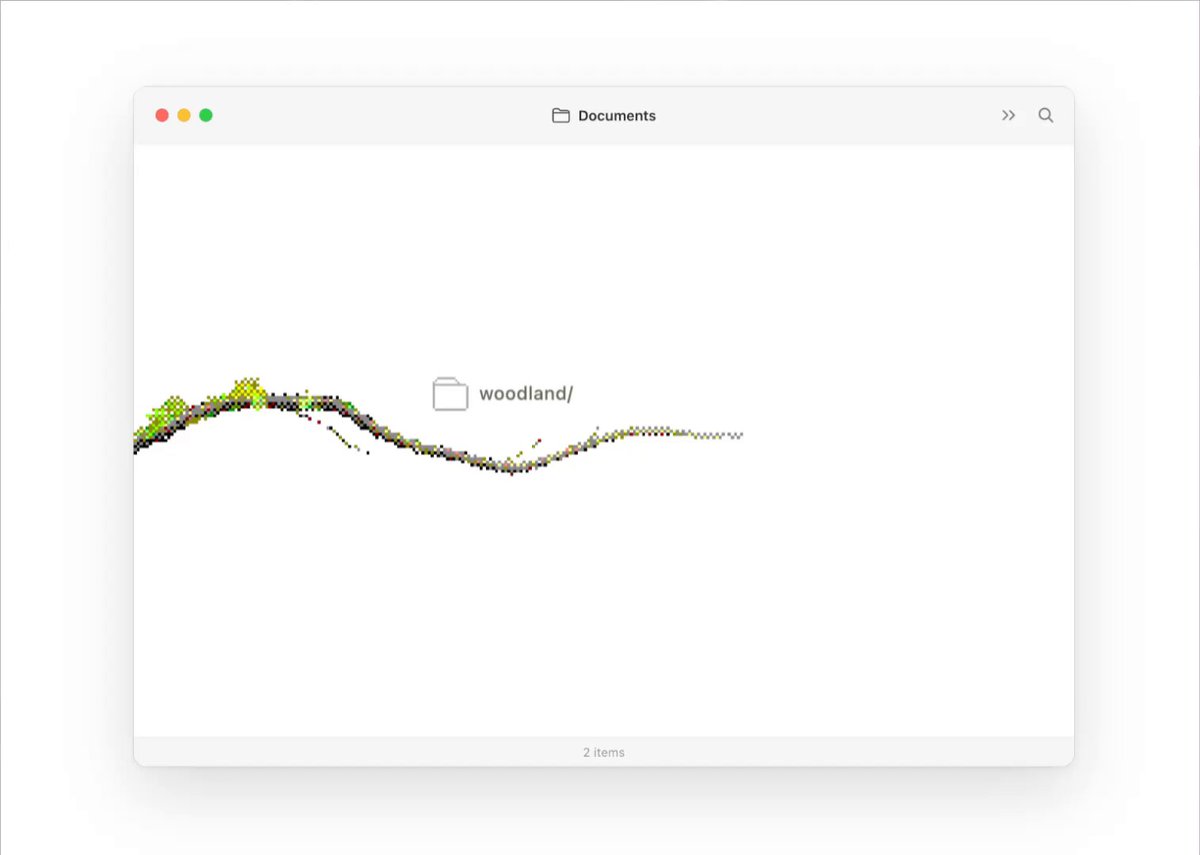
BUILD: A desktop-style file browser window where the folder hierarchy is drawn as a living tree. The window starts empty; a branch grows in from the left edge and the root items (folders and files) appear attached to points along it. Clicking a folder grows a new branch out of that folder icon toward the upper right, and its children sprout along the new twig with small labels; the view pans smoothly so the newest branch stays centered while older branches drift off the edges. It should feel organic, slow and a bit magical, like watching a time-lapse of a plant, while still being a usable file list.

DESIGN SYSTEM: One window, about 760x540 px, centered on a #FFFFFF page with a soft drop shadow (0 20px 60px rgba(0,0,0,0.12)), radius 12px. Title bar 36px tall, background #F6F6F6, 1px bottom border #E8E8E8, three traffic-light dots (12px, #FF5F57 / #FEBC2E / #28C840) on the left, a centered folder icon + 'Documents' label in 12px medium grey #333, chevron and search icons on the right. Footer bar 24px with a centered item count in 10px #9A9A9A ('3 items', '12 items'). Canvas area pure white. Branches are made of tiny square dots (2-3px) like stipple or cross-stitch: trunk and thick parts dark brown #3B2F2A with lime leaf clusters #9BE52A and #C6F24E scattered along the top edge, thin twigs fade to grey-brown #6B5E57 dots at the tips. Item icons are 16px outline glyphs (folder, document) in #8A8A8A, labels 11px regular sans-serif in #555, folder names end with '/'. Hovered item icon darkens to #111 and the cursor becomes a pointer.

MOTION: Initial load: the trunk grows from the left edge along a gentle S-curve over 1200ms, cubic-bezier(0.22, 1, 0.36, 1); dots are revealed along the path in order, leaves appear 80ms after the stem point they sit on. Root items fade in (opacity 0 to 1, translateY 4px to 0) when the growing tip passes their anchor point, 240ms, cubic-bezier(0.16, 1, 0.3, 1). Folder click: the folder icon swaps to an open-folder glyph (120ms), then a new branch grows from it over 900-1100ms with the same easing, tapering toward the tip, with 1-3 short side twigs that grow 150ms after the main stem passes their fork. Children attach along the branch with a 90ms stagger. Camera: the whole scene translates so the new branch tip ends near 60% of the canvas width, 900ms, cubic-bezier(0.65, 0, 0.35, 1), starting together with the growth. Older branches that leave the viewport are clipped, not faded. Footer item count updates when growth ends.

SECTIONS: Parts: window chrome (title bar, footer count), scene layer (branches + items, translated as one group), branch paths, item nodes (icon + label). States: idle (tree at rest, leaves still), hover item (icon darkens, label to #111), folder opening (icon swaps, branch grows), opened (children visible, folder label greyed to #9A9A9A to mark it as visited path), file click (small 1.05 scale pop on the icon, 160ms, no branch).

IMPLEMENTATION: Render branches on a single <canvas> scaled for devicePixelRatio: generate each branch as a cubic Bezier from the parent folder position with randomized control points (seeded per folder so it is stable), sample it every 2px, and draw square dots with thickness tapering from 6 dots wide to 1. Animate growth with requestAnimationFrame by drawing samples up to progress t. Items are absolutely positioned DOM buttons placed at sampled points on the curve (so they stay accessible and crisp), inside a scene wrapper that gets the camera transform (translate3d). Use Motion or plain WAAPI for item fade and camera pan. prefers-reduced-motion: draw branches fully at once and jump the camera with a 150ms opacity crossfade. Keyboard: items are focusable buttons in tree order, Enter opens a folder, arrow keys move between siblings, visible focus ring 2px #9BE52A offset 2px; mirror the hierarchy in an aria tree (role=tree/treeitem, aria-expanded). Performance: cap dots per branch around 600, cache finished branches to an offscreen canvas and only redraw the growing one each frame.

ADAPT TO THE PROJECT: Reuse the project's existing design tokens, components, icons and fonts; map the greys, brown and lime to the closest existing tokens. Do not copy logos, brand names or any original artwork; use placeholder folder and file names.

SUCCESS CHECK:
- Clicking any folder grows a new branch from that exact icon in about 1s, its children appear staggered along it, and the view pans to keep the new branch in frame.
- Branch shapes are identical every time the same folder is opened (seeded randomness), and the canvas is sharp on retina screens.
- With reduced motion on, folders open instantly with no growth, and the whole tree is navigable with Tab, arrows and Enter.