REFERENCE
- Gallery page: https://magpui.com/en/i/flip-through-travel-sketchbook-site-15d25d
- First frame (image): https://dnioievkvxejjbxgwvko.supabase.co/storage/v1/object/public/media/flip-through-travel-sketchbook-site-15d25d/shot.jpg
- Clip (mp4): https://dnioievkvxejjbxgwvko.supabase.co/storage/v1/object/public/media/flip-through-travel-sketchbook-site-15d25d/clip.mp4
- Original post: https://x.com/shivanimatla/status/2115108611869573161 by @shivanimatla
Before building, download the first frame and look at it. If ffmpeg is available, download the clip and extract frames (ffmpeg -i clip.mp4 -vf fps=2 frame-%02d.png), then study the motion frame by frame. Match what you see; the text below describes it, the frames are the truth.

ASSETS
This needs real artwork, not shapes drawn in code. Use the files the user gives you (ask where they are). If you have an image generation tool, generate them with these prompts; otherwise leave clearly marked placeholders.
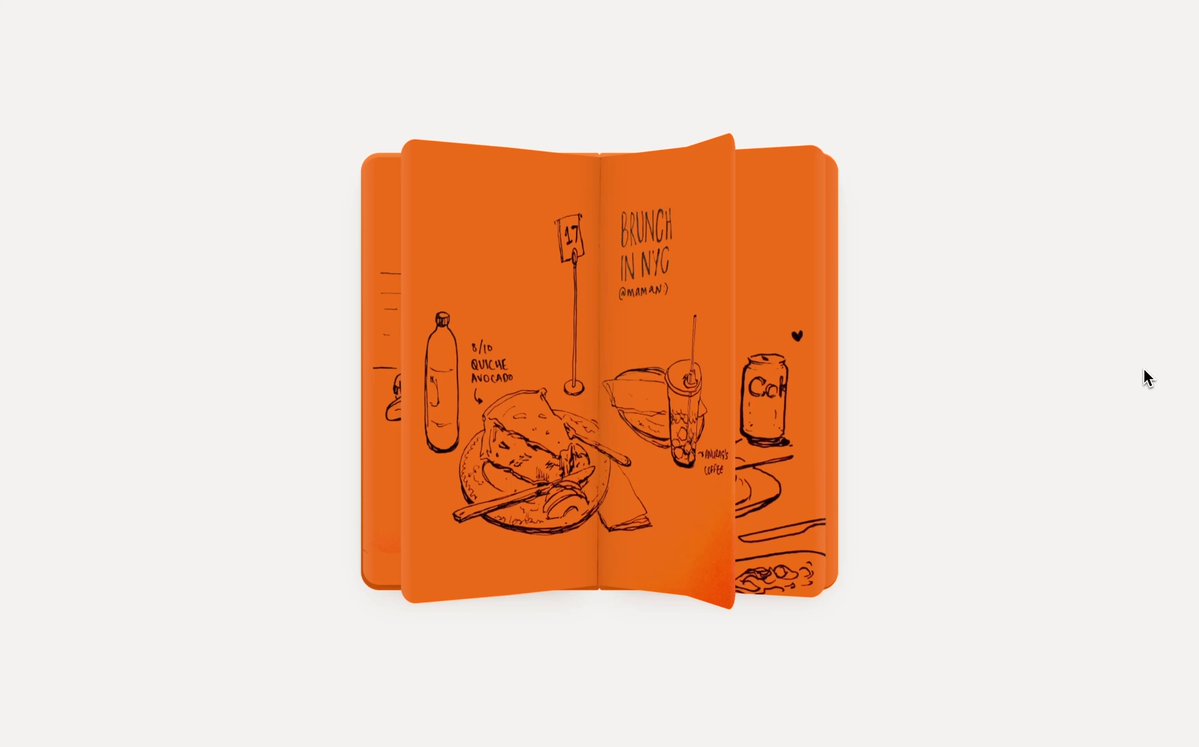
- ink food sketches: Black ink line drawings of meals on a restaurant table (plates, cups, bottles, cutlery) with small handwritten labels, loose confident travel-sketch style, drawn on a flat saturated orange paper background, square 1:1, no shading beyond hatching

BUILD: Build a small personal site that presents a set of travel sketches as a physical sketchbook. In the center of a quiet off-white page sits a closed orange notebook; clicking or dragging opens it and flips through two-page spreads of black ink drawings, each page turn curling like real paper. A second Gallery view shows the current spread in the middle of a horizontal row of photos of the moment it was drawn, so drawing and reality sit side by side. It should feel personal, handmade and calm, with the sketchbook as the only loud object on the page.

DESIGN SYSTEM: Background #f1f0ee, full viewport, no scrolling on the home view. Minimal top bar 12-13px sans: left a small segmented toggle "Sketchbook | Gallery" (active item in a light grey pill #e4e3e0, radius 999px), right two text links "About" and "More" in #333. Notebook: about 420x420px closed (scale with viewport, max 44vw), cover and pages a saturated orange (#ea6a1f) with slightly darker edge #d65c15, corner radius 10px, layered page edges visible at the sides, soft shadow 0 18px 40px rgba(0,0,0,0.12). Drawings are black ink line art (#1a1a1a) with handwritten labels. Under the open book a caption row 11px: small icon + place name at left, dish name at right, grey #777. Small chevron arrows at the left and right of the book, 30% opacity until hover.

MOTION: (1) Intro: the closed book scales from 0.96 to 1 and fades in over 600ms, cubic-bezier(0.22, 1, 0.36, 1). (2) Open: the cover rotates around the spine (rotateY 0 to -180 deg) over 800ms, cubic-bezier(0.65, 0, 0.35, 1), while the book slides right by half its width so the spread centers. (3) Page turn: the page lifts from the corner with a curl (bend along a moving fold line), rotates over the spine in 700ms with the same easing, shading darkens on the curling side by up to 25% and a thin highlight runs along the fold; the next page underneath is revealed progressively. Dragging the corner scrubs the turn and releases with a spring (stiffness 180, damping 22). (4) Gallery switch: the book shrinks into a card at the center and photos slide in from both sides, staggered 60ms, each scaling 0.9 to 1 and fading in over 500ms; neighbors are smaller and lower opacity (0.6) in a coverflow row. (5) Captions crossfade 200ms on each page change.

SECTIONS: Top bar with view toggle and links; Sketchbook view (closed cover state, open spread state, page-turn state, end of book state, caption row, arrows); Gallery view (center spread card with caption, horizontal row of 3-4 photos on each side, arrow and swipe navigation); About page as a short text column.

IMPLEMENTATION: Use a page-flip approach with CSS 3D transforms for the cover and a canvas or WebGL page-curl for inner pages (a library like a page-flip engine, or a custom shader bending a plane along a cylinder) since a plain rotateY looks stiff; Motion (Framer Motion) for the view switch and coverflow layout animations. Preload the next two spreads. Keyboard: left and right arrows turn pages, Tab reaches arrows and the toggle with visible focus rings; announce the current spread and caption in an aria-live region. prefers-reduced-motion: replace curls with a 200ms crossfade. Keep images lazy-loaded and capped at 2x resolution.

ADAPT TO THE PROJECT: Reuse the project's existing design tokens, components and fonts, map the orange and greys to the closest existing tokens, and never copy logos, brand names, photos or illustrations from the original; use placeholder sketches and photos.

SUCCESS CHECK:
- Clicking or dragging a page corner turns it with a visible paper curl and shading, and the drag can be scrubbed and released.
- Switching to Gallery morphs the book into the center card with photos sliding in on both sides.
- Arrow keys turn pages, and with reduced motion pages crossfade instead of curling.