REFERENCE
- Gallery page: https://magpui.com/en/i/cosmic-voice-orb-component-d23dc4
- First frame (image): https://dnioievkvxejjbxgwvko.supabase.co/storage/v1/object/public/media/cosmic-voice-orb-component-d23dc4/shot.jpg
- Clip (mp4): https://dnioievkvxejjbxgwvko.supabase.co/storage/v1/object/public/media/cosmic-voice-orb-component-d23dc4/clip.mp4
- Original post: https://x.com/rickybharti/status/2097293882153177142 by @rickybharti
Before building, download the first frame and look at it. If ffmpeg is available, download the clip and extract frames (ffmpeg -i clip.mp4 -vf fps=2 frame-%02d.png), then study the motion frame by frame. Match what you see; the text below describes it, the frames are the truth.

BUILD
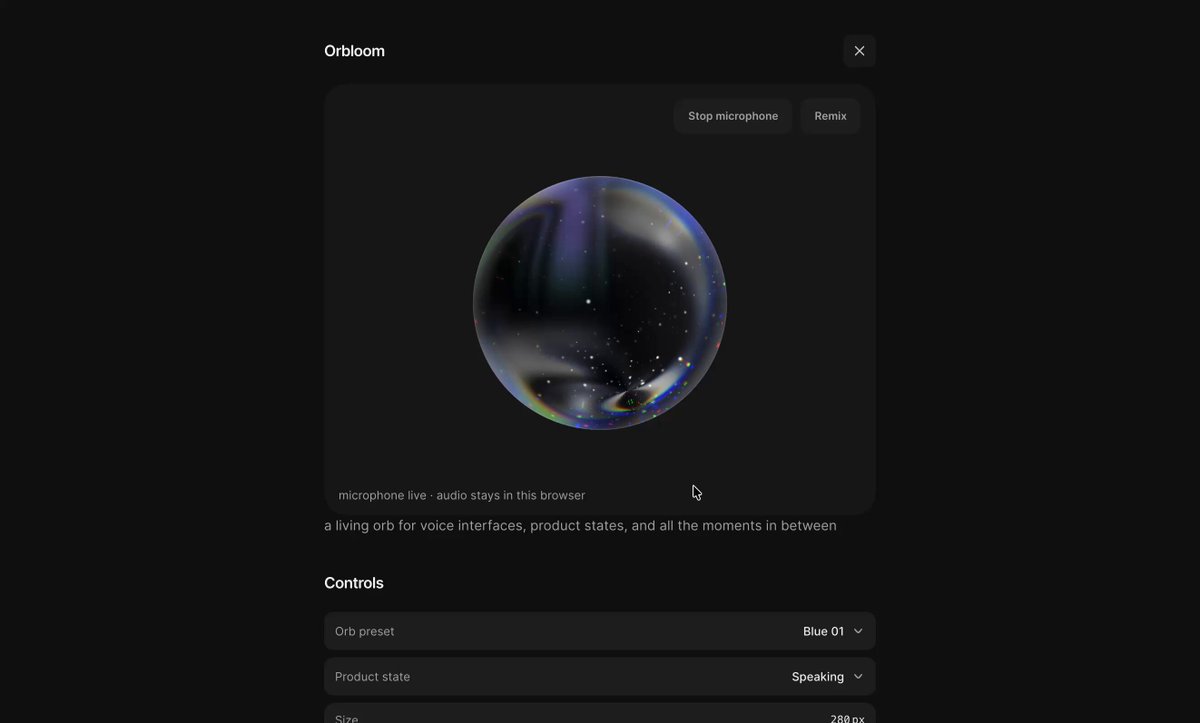
A voice orb component: a sphere filled with a moving starfield and nebula, inside a dark panel with a few controls (preset, product state, mic toggle). Its surface wobbles and brightens with audio input.

DESIGN SYSTEM
- Panel #0E0E0E, 16px radius; orb 200px, dark blue core #0B1026, nebula #4C1D95 and #1D4ED8, stars white.

MOTION
- Idle: nebula rotates slowly (20s per turn), stars twinkle.
- Listening: surface displacement amplitude = mic level * 0.12, smoothed.
- Speaking: rim glow pulses with output level.

SECTIONS
- Orb canvas.
- Controls list (preset select, state select, mic toggle).

IMPLEMENTATION
- Fragment shader on a sphere or a 2D disc with fake depth; AnalyserNode for levels; ship as one component with props for preset and state.
- prefers-reduced-motion: skip the animation and show the end state.

ADAPT TO THE PROJECT
- Reuse the project's existing tokens, components and fonts; map colors to the closest existing tokens.
- Do not copy logos, brand names, characters or artwork from the reference. Use neutral placeholders.

SUCCESS CHECK
- Reacts within 50ms of sound.
- No mic permission prompt until the user asks.
- Pauses rendering when hidden.