REFERENCE
- Gallery page: https://magpui.com/en/i/code-gate-with-tracking-cat-5ffd69
- First frame (image): https://dnioievkvxejjbxgwvko.supabase.co/storage/v1/object/public/media/code-gate-with-tracking-cat-5ffd69/shot.jpg
- Clip (mp4): https://dnioievkvxejjbxgwvko.supabase.co/storage/v1/object/public/media/code-gate-with-tracking-cat-5ffd69/clip.mp4
- Original post: https://www.scrolltide.co/templates/whisker-ops by Scrolltide
Before building, download the first frame and look at it. If ffmpeg is available, download the clip and extract frames (ffmpeg -i clip.mp4 -vf fps=2 frame-%02d.png), then study the motion frame by frame. Match what you see; the text below describes it, the frames are the truth.

ASSETS
This needs real artwork, not shapes drawn in code. Use the files the user gives you (ask where they are). If you have an image generation tool, generate them with these prompts; otherwise leave clearly marked placeholders.
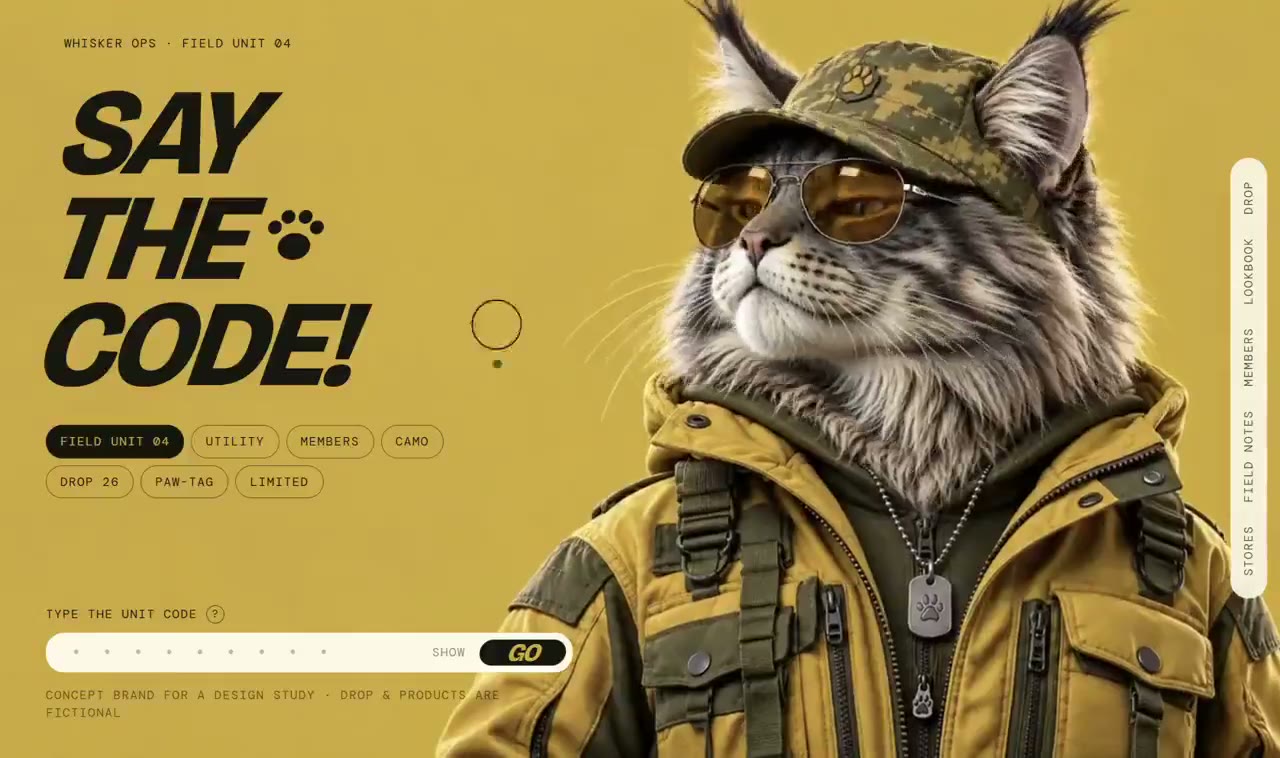
- Original feline checkpoint character sequence: Create an original photoreal long-haired feline checkpoint character, olive utility jacket, field cap and amber aviator glasses, calm confident expression, softly lit detailed fur, frontal three-quarter portrait from waist up, transparent or plain mustard background, 4:5. Produce consistent registered frames with identical camera, torso and lighting while the head moves from slightly raised to neutral to looking down. No logos, lettering or source character replication.

BUILD: Build a single-screen code-gated launch landing page, not a template marketplace. Pair a huge three-line italic headline at left with a photoreal long-haired feline character wearing an olive utility jacket, cap and amber glasses at right. Its head changes pose in response to pointer height. The page should feel like a playful cinematic checkpoint.
DESIGN SYSTEM: Use a full-bleed mustard field around #CBB147, near-black #16180E type, cream #F6F1D1 inputs and olive #696B34 details. At desktop use a 40/60 split, 48px gutters and an oversized character reaching from the top to the bottom edge. Headline: extra-bold condensed italic sans, approximately 108px at 1280px width, tight 0.9 line-height. Small utility labels use uppercase monospaced 10–12px lettering with generous tracking. Below the headline place two compact rows of outlined metadata chips with one dark selected pill. At bottom left place a short label and a cream rounded code field approximately 520px wide and 40px high, ending in a black capsule submit button. Include a narrow cream vertical information rail near the right edge. Avoid card shadows; the character supplies depth. On mobile stack text above the character and keep the input unobscured.
MOTION: Map pointer vertical position to an ordered character image sequence showing chin-up, neutral and looking-down poses. Interpolate the target index using a roughly 120ms response, cubic-bezier(0.22,1,0.36,1), draw only when the index changes, and keep the torso registration stable. Keep the headline and input anchored while the head moves. For implementation feedback, animate focus and button hover over 150ms with cubic-bezier(0.2,0,0,1); use a short 240ms horizontal shake only for a locally simulated invalid code, never implying a real authentication backend.
SECTIONS: One viewport only: tiny upper-left status label; three-line callout with small paw-like decorative marks; two rows of tiny metadata chips; lower-left code entry label, text field and submit button; small footer annotations; oversized right-hand character and narrow vertical utility rail. Provide idle, focused input, submitting, invalid and accepted states without inventing additional page sections.
IMPLEMENTATION: React with a canvas image-sequence renderer for pointer-controlled poses; CSS for typography, layout and controls. Preload a small responsive frame set before enabling tracking, cap device pixel ratio at 2, and load remaining frames progressively. Use requestAnimationFrame only while the pose is changing. CSS transitions or GSAP can handle feedback states. On touch show a neutral poster or an explicitly labeled pose slider. With prefers-reduced-motion show a single neutral frame and remove shakes. Use a real form label, keyboard submission, visible focus rings and an aria-live status message. Treat actual access validation as the existing project's backend responsibility.
ADAPT TO THE PROJECT: Reuse existing tokens, components and fonts; map this palette to the nearest project colors. Do not copy logos, brand names, character imagery or illustrations from the source. Use an original licensed or generated character sequence and placeholder copy.
SUCCESS CHECK:
- The headline and code form remain readable and fixed while the character changes pose.
- Pointer height controls a smoothly registered pose sequence without layout shifts or continuous idle rendering.
- Mobile, keyboard-only and reduced-motion users can complete the same form interaction.