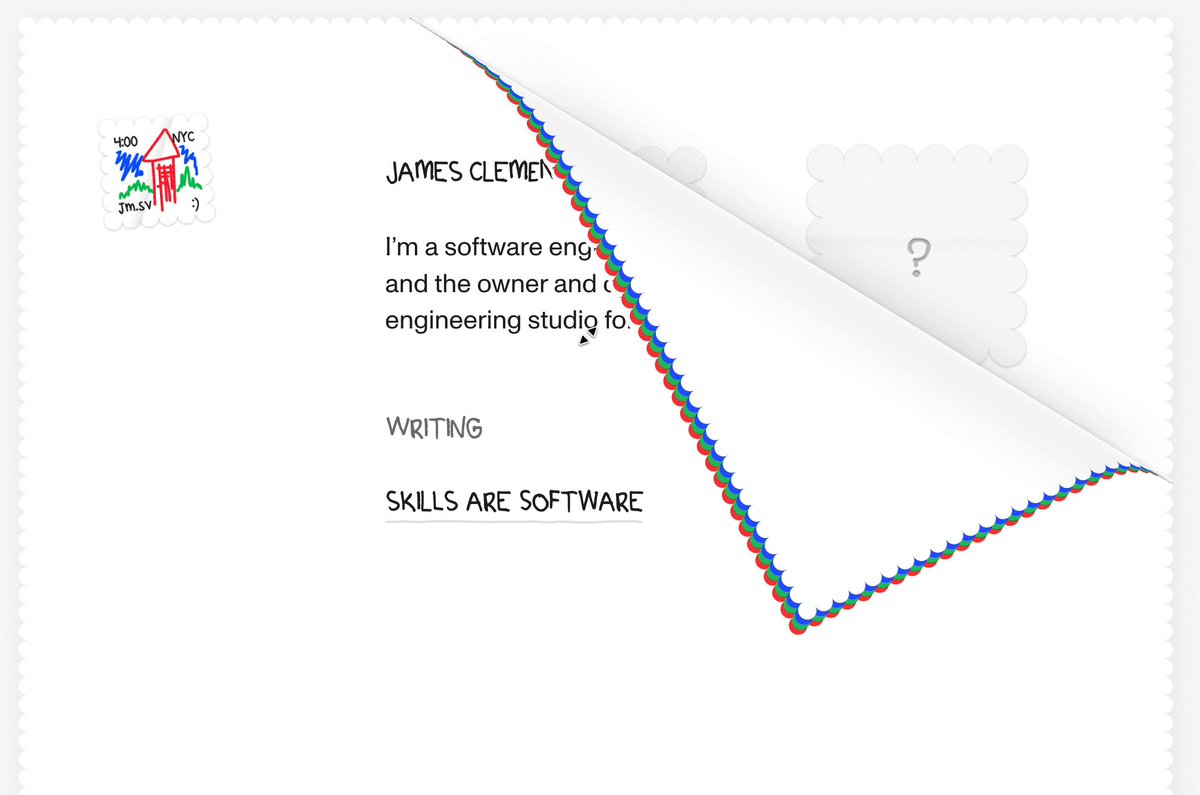
Hit Copy prompt above, open your project in the agent and paste it. The prompt links the original frames, so the agent can look at them before building.
Put the two side by side. If something is off, tell the agent exactly what: timing, size, color or spacing.
REFERENCE
- Gallery page: https://magpui.com/en/i/page-that-peels-like-a-stamp-sheet-7705e5
- First frame (image): https://dnioievkvxejjbxgwvko.supabase.co/storage/v1/object/public/media/page-that-peels-like-a-stamp-sheet-7705e5/shot.jpg
- Clip (mp4): https://dnioievkvxejjbxgwvko.supabase.co/storage/v1/object/public/media/page-that-peels-like-a-stamp-sheet-7705e5/clip.mp4
- Original post: https://x.com/jamesvclements/status/2110462126036775335 by @jamesvclements
Before building, download the first frame and look at it. If ffmpeg is available, download the clip and extract frames (ffmpeg -i clip.mp4 -vf fps=2 frame-%02d.png), then study the motion frame by frame. Match what you see; the text below describes it, the frames are the truth.

BUILD
A minimal personal homepage drawn on a sheet of paper with perforated, stamp-like edges striped in red and blue. Grabbing the bottom corner and dragging peels the sheet back along a diagonal fold, showing its white back and a hidden layer below (placeholder stamps). Releasing past the middle completes the peel; otherwise it springs back.

DESIGN SYSTEM
- Background #F6F6F4; sheet white with a 6px perforated edge (radial-gradient holes) and a red/blue zigzag border.
- Hand-drawn small caps headings 13px, body 12px; tiny sketch logo top-left.
- Back side #FAFAFA with a soft gradient shadow along the fold.

MOTION
- Drag the corner: the fold line follows the pointer; the peeled part reflects across the fold (curl), shadow darkens near the fold.
- Release: spring to fully peeled or back (stiffness 220, damping 24).
- Hover on the corner: it lifts 6px as a hint.

SECTIONS
- Front page content, perforated edge, folding corner, back face, layer underneath.
- States: idle, hint, dragging, peeled, returning.

IMPLEMENTATION
- Clip-path polygons for the front and the folded flap, recalculated from the pointer position (fold line = perpendicular bisector between corner and pointer); Motion for the springs.
- Provide a button 'Turn the page' for keyboard users.
- prefers-reduced-motion: swap the motion for a 150ms opacity change.
- Keyboard: every control focusable with a visible focus ring; same actions with Enter/Space and arrow keys where it makes sense.
- Animate only transform, opacity and filter.

ADAPT TO THE PROJECT
Reuse the project's existing design tokens, components and fonts; map colors to the closest existing tokens. Never copy logos, brand names, photos or illustrations from the original: use placeholders.

SUCCESS CHECK
- Dragging the corner peels the page along a straight fold that follows the pointer.
- Releasing snaps it open or closed.
- The keyboard button does the same peel.