REFERENCE
- Gallery page: https://magpui.com/en/i/exploded-isometric-device-16b80a
- First frame (image): https://dnioievkvxejjbxgwvko.supabase.co/storage/v1/object/public/media/exploded-isometric-device-16b80a/shot.jpg
- Clip (mp4): https://dnioievkvxejjbxgwvko.supabase.co/storage/v1/object/public/media/exploded-isometric-device-16b80a/clip.mp4
- Original post: https://x.com/srushtiddesign/status/2108473831262494790 by @srushtiddesign
Before building, download the first frame and look at it. If ffmpeg is available, download the clip and extract frames (ffmpeg -i clip.mp4 -vf fps=2 frame-%02d.png), then study the motion frame by frame. Match what you see; the text below describes it, the frames are the truth.

BUILD
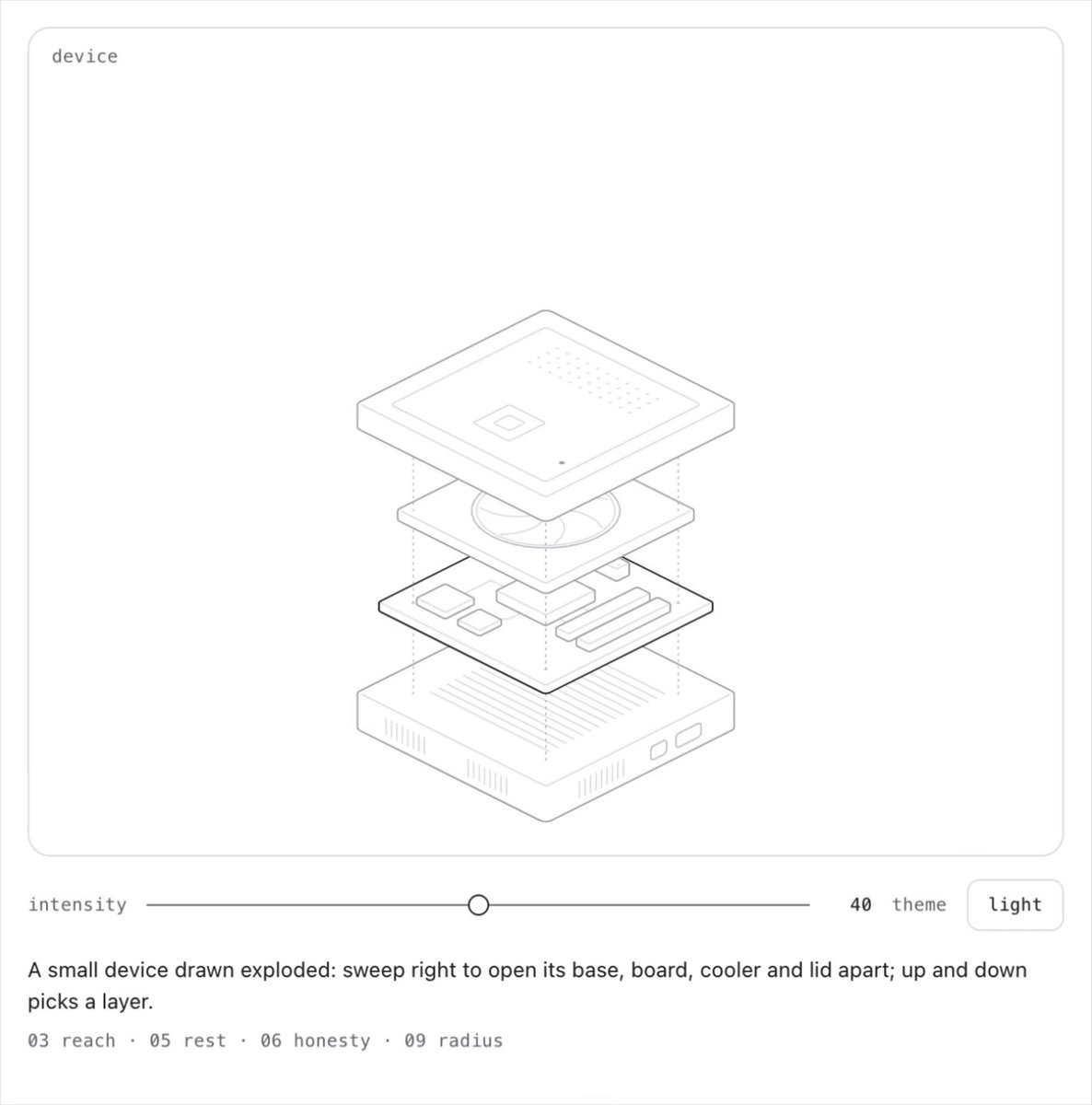
A product explainer: a small device drawn in thin isometric lines. A slider below controls the 'intensity' of an exploded view: as it moves right, base, board, cooler and lid separate vertically. Hovering a layer fills it with a soft color and lifts it a bit more.

DESIGN SYSTEM
- White card, 1px line art #222, layer fills on hover: peach #F7D2A6, mint #CDEBD8, pink #F6C6DA.
- Slider: thin track #DDD, 14px white thumb with border; small mono labels 10px.

MOTION
- Slider value 0-1 maps to each layer's translateY (0 to -40px * index) with a slight ease.
- Hover a layer: fill fades in 150ms, extra -8px lift with spring.
- On release the layers settle with a tiny overshoot.

SECTIONS
- Device layers (SVG groups), slider, caption with specs.
- States: closed, exploded, layer hovered.

IMPLEMENTATION
- Inline SVG with one group per layer, transforms driven by the slider; no 3D library needed.
- prefers-reduced-motion: swap the motion for a 150ms opacity change.
- Keyboard: every control focusable with a visible focus ring; same actions with Enter/Space and arrow keys where it makes sense.
- Animate only transform, opacity and filter.

ADAPT TO THE PROJECT
Reuse the project's existing design tokens, components and fonts; map colors to the closest existing tokens. Never copy logos, brand names, photos or illustrations from the original: use placeholders.

SUCCESS CHECK
- Moving the slider separates the layers smoothly.
- Each layer can be hovered and shows its name.
- The slider is a native range input.