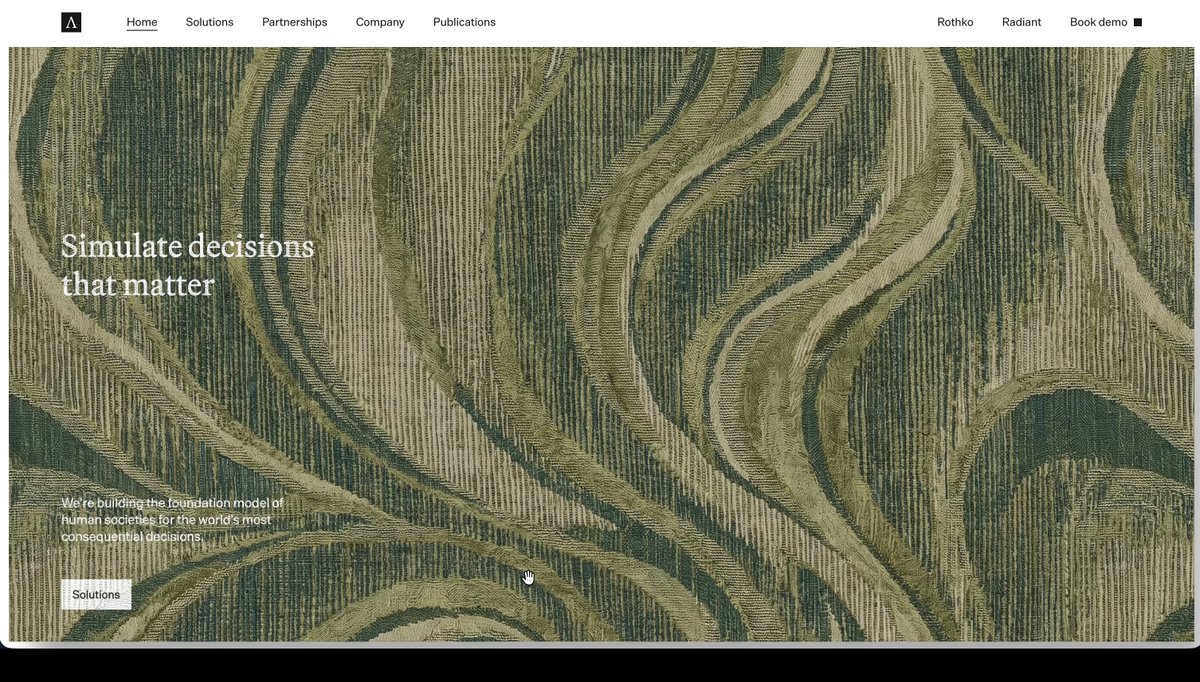
REFERENCE
- Gallery page: https://magpui.com/en/i/hero-section-printed-on-cloth-60c861
- First frame (image): https://dnioievkvxejjbxgwvko.supabase.co/storage/v1/object/public/media/hero-section-printed-on-cloth-60c861/shot.jpg
- Clip (mp4): https://dnioievkvxejjbxgwvko.supabase.co/storage/v1/object/public/media/hero-section-printed-on-cloth-60c861/clip.mp4
- Original post: https://x.com/egorvert/status/2118372794568450289 by @egorvert
Before building, download the first frame and look at it. If ffmpeg is available, download the clip and extract frames (ffmpeg -i clip.mp4 -vf fps=2 frame-%02d.png), then study the motion frame by frame. Match what you see; the text below describes it, the frames are the truth.

ASSETS
This needs real artwork, not shapes drawn in code. Use the files the user gives you (ask where they are). If you have an image generation tool, generate them with these prompts; otherwise leave clearly marked placeholders.
- Woven jacquard rug texture: Seamless tileable top-down photo texture of a heavy woven jacquard rug, flowing organic wave stripes in olive, moss and sage greens with cream highlights, visible thread relief, even soft lighting, no shadows, square 1:1, 4K

BUILD: A full-bleed homepage hero that is a real piece of cloth. The hero area (everything under a slim white top nav) is rendered as a heavy woven rug with a dense jacquard texture of flowing wave stripes in olive and moss greens. The hero's actual HTML content, a two-line serif headline at left, a short paragraph and a small light button at bottom-left, is printed onto that fabric, so the text and button bend, fold and shade with the weave. On load the rug drops in from the top-left corner, flips over and settles flat. The user can grab the cloth anywhere: dragging lifts, pinches and drapes it (folds pile up, a soft shadow forms on the white page beneath), and on release it falls back and relaxes perfectly flat in about one second. When flat, the headline and button behave like normal, clickable, selectable HTML. Feel: tactile, heavy, slightly luxurious, physically believable rather than wobbly jelly.

DESIGN SYSTEM: White page #FFFFFF with a 48px top nav (logo square at left, 4 links in 13px sans, right-aligned secondary links and a small black-square 'Book demo' CTA). Hero cloth fills the viewport width below the nav, about 92vh tall, square corners. Fabric texture: a tileable woven jacquard map (2048px) with wave stripes in #4E5B33, #6F7A45, #9AA06A and highlights #C9C7A0, plus a matching normal map for the thread relief and a roughness around 0.85. Headline: elegant serif, 48-56px, line-height 1.1, color #F4F1E6 at 95%. Body copy 13px sans in #F4F1E6 at 80%, max width 320px. Button: 32px tall, off-white #EDEBE3 fill, 12px dark text, radius 2px. Cloth shadow on the page: rgba(0,0,0,0.25), blurred 40px, only visible when the cloth lifts.

MOTION: Intro: the cloth starts folded back from the top-left corner and unfolds onto the page over 1400ms, gravity-driven, settling with 2-3 small ripples. Grab: on pointerdown pin the nearest cloth particle to the cursor (spring constraint, stiffness about 0.6); the cloth follows with inertia, folds and creases appear naturally; lifted regions get a darker ambient occlusion and the page shadow grows with lift height. Release: unpin, let gravity and a soft 'flatten' force (each particle pulled toward its rest position with strength ramping 0 to 0.15 over 600ms) lay it flat again with a light overshoot. Idle: a barely perceptible 0.5px breathing ripple every 6s so it reads as fabric. Cursor: small white dot that grows to 14px over the grabbable cloth.

SECTIONS: Parts: nav (plain DOM, never simulated); cloth canvas; hidden DOM layer that holds the hero HTML. States: intro (unfolding), idle (flat, DOM fully interactive), grabbed (cloth lifted, DOM pointer events disabled), settling (returning flat), reduced motion (static flat rug, no physics).

IMPLEMENTATION: Three.js with a custom position-based-dynamics cloth: a 96x64 particle grid with structural, shear and bend constraints, 8-12 solver iterations per frame, verlet integration, simple collision against the page plane (z = 0). Render with MeshStandardMaterial using the jacquard map plus a second texture that is the hero's live HTML: use the HTML-in-canvas API (drawElementImage / layoutsubtree on a canvas) where supported so the DOM is painted into a texture each frame, and fall back to rendering the hero once with html-to-image into a CanvasTexture. Composite text over fabric in the fragment shader with multiply for ink and a slight bump so letters sit in the weave. Keep the real DOM hero positioned exactly under the canvas with opacity 0 for accessibility and clicks when the cloth is flat (detect flat when max particle displacement < 0.5px). Pause simulation when offscreen and after 2s of rest; cap devicePixelRatio at 2. prefers-reduced-motion: no intro, no grab, show the flat textured hero as a CSS background with the normal DOM on top. Keyboard users always reach the real headline and button.

ADAPT TO THE PROJECT: Reuse the project's existing nav, fonts, button component and color tokens; map the greens to the closest existing tokens or pick a fabric that suits the brand. Do not copy logos, brand names, copy or the original textile artwork: generate or license your own woven texture and use placeholder text.

SUCCESS CHECK:
- Dragging any point of the hero lifts and folds the cloth with the text and button bending with it, and releasing returns it to a perfectly flat, pixel-aligned state.
- When flat, the headline is selectable and the button is clickable and focusable with the keyboard.
- The scene holds 60fps on a mid-range laptop and stops simulating when at rest or offscreen.