REFERENCE
- Gallery page: https://magpui.com/en/i/glowing-pixel-storage-scanner-b094a0
- First frame (image): https://dnioievkvxejjbxgwvko.supabase.co/storage/v1/object/public/media/glowing-pixel-storage-scanner-b094a0/shot.jpg
- Clip (mp4): https://dnioievkvxejjbxgwvko.supabase.co/storage/v1/object/public/media/glowing-pixel-storage-scanner-b094a0/clip.mp4
- Original post: https://x.com/kshvbgde/status/2120782192385355974 by @kshvbgde
Before building, download the first frame and look at it. If ffmpeg is available, download the clip and extract frames (ffmpeg -i clip.mp4 -vf fps=2 frame-%02d.png), then study the motion frame by frame. Match what you see; the text below describes it, the frames are the truth.

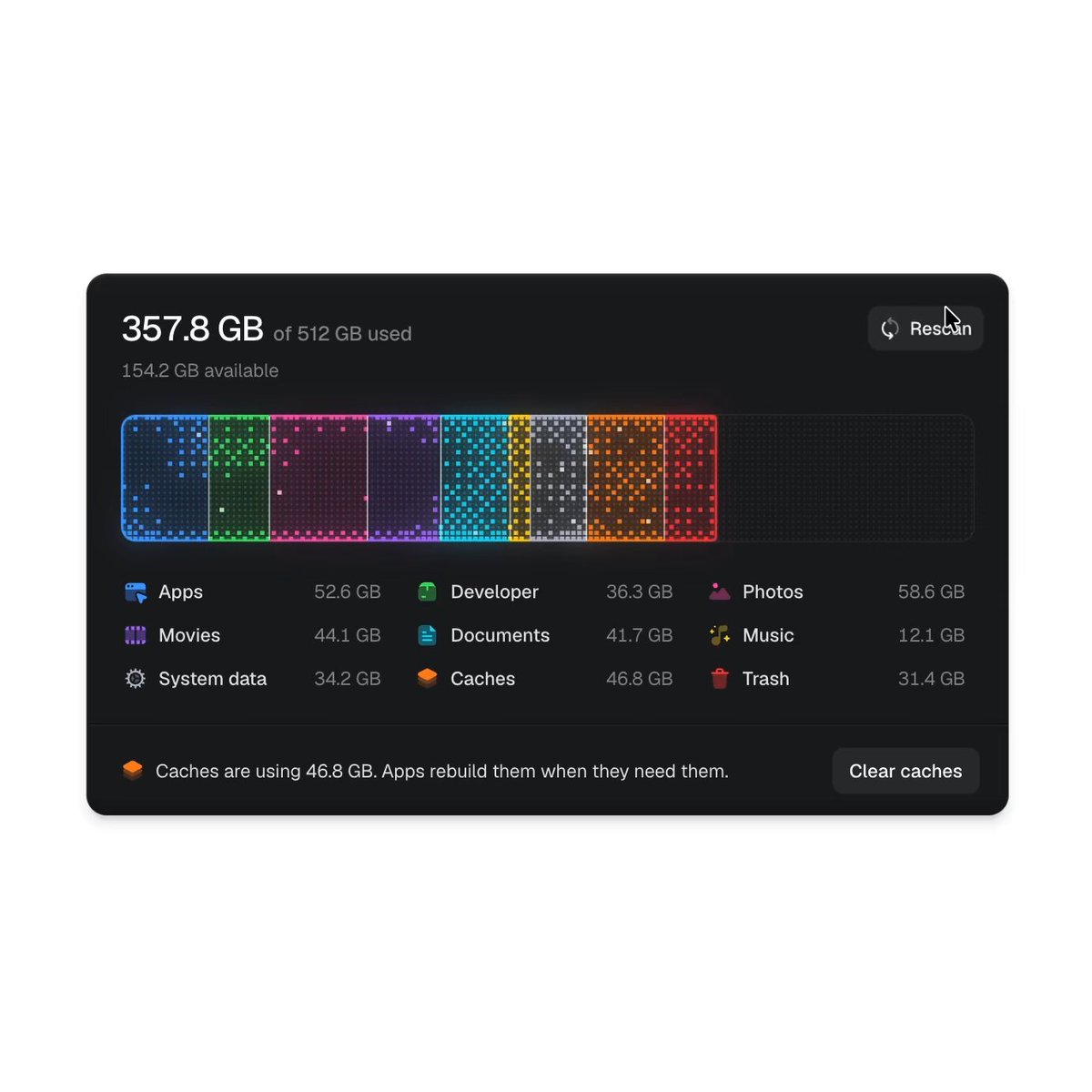
BUILD: A storage overview card for a desktop utility. A big readout ("357.8 GB of 512 GB used", "154.2 GB available") sits above a wide usage bar made of a dot-matrix grid of tiny square LEDs. Pressing Rescan runs a scan: the headline number counts up, a monospace path line shows the folder being read, and the bar fills from the left category by category, each block glowing in its own color. Under the bar, a 3x3 legend lists categories with icons and sizes; hovering a row isolates its segment. A footer shows a tip and a "Clear caches" button. It should feel like a piece of glowing hardware, not a chart.

DESIGN SYSTEM: Card 860x500 at desktop, radius 20px, background #161617, 1px border #232325, soft shadow 0 30px 60px rgba(0,0,0,.35), padding 32px. Headline: neo-grotesk 32px weight 500 #f4f4f5 with the "of 512 GB used" part 16px #8b8b90; sub-line 14px #6f6f74. Bar: height 120px, radius 10px, inner grid of 6px cells with 2px gaps, empty cells #1f1f22. Segment colors: Apps #3b82f6, Developer #22c55e, Photos #ec4899, Movies #8b5cf6, Documents #06b6d4, Music #eab308, System data #a1a1aa, Caches #f97316, Trash #ef4444; each segment has a 1px bright outline in its color, a lower-opacity fill tint (~18%), a scatter of fully lit cells and an outer glow (box-shadow or bloom, 12px blur, 60% alpha). Legend: 3 columns, 15px labels #e4e4e7, sizes right-aligned #8b8b90, 18px colored icons. Footer separated by a 1px #232325 line; button 36px tall, radius 10px, #26262a, text #f4f4f5. Rescan button top-right: ghost pill with a refresh icon.

MOTION:
- Scan (about 4000ms total): segments appear left to right; each fills in 300-500ms proportional to its size, cubic-bezier(0.22, 1, 0.36, 1); the leading edge has a white-hot 2-column highlight that sweeps and fades; the headline counter tweens with the same timing; the path line swaps text every 80ms.
- Lit cells: within each segment random cells twinkle between 40% and 100% brightness, each on its own 800-1600ms cycle.
- Scan end: whole bar flashes +20% brightness for 200ms then settles; the "Clear caches" button fades and slides up 6px in 250ms.
- Hover a legend row: its segment keeps full glow while other segments drop to 25% opacity and lose glow in 180ms ease-out; the row gets a #222225 highlight and the sub-line swaps to a description of that category.
- Rescan: bar drains right to left in 400ms then the scan replays.

SECTIONS: Parts: header (readout, sub-line, Rescan), dot-matrix bar, legend grid, footer tip + action. States: idle, scanning (counter, path line, "Looking for things you can clear"), done, hover-isolated category, clearing.

IMPLEMENTATION: Canvas 2D for the bar (hundreds of cells redraw cheaply each frame; glow via a second blurred layer or shadowBlur on lit cells), DOM for text and legend, Motion or a small tween for counters and hover states. prefers-reduced-motion: skip the sweep and twinkle, show the final bar and fade segments on hover. Legend rows are buttons with visible focus rings and also isolate their segment on focus. Pause the twinkle loop when the card is offscreen.

ADAPT TO THE PROJECT: Reuse the project's fonts, icon set, button component and tokens; map segment colors to the nearest existing palette. Do not copy brand names or icons from the original; use placeholder categories and data.

SUCCESS CHECK:
- Rescan fills the dot-matrix bar left to right with a glowing leading edge while the number counts up.
- Hovering or focusing a legend row dims every other segment and shows that category's description.
- Lit cells twinkle subtly and the bar stays at 60fps on a laptop.