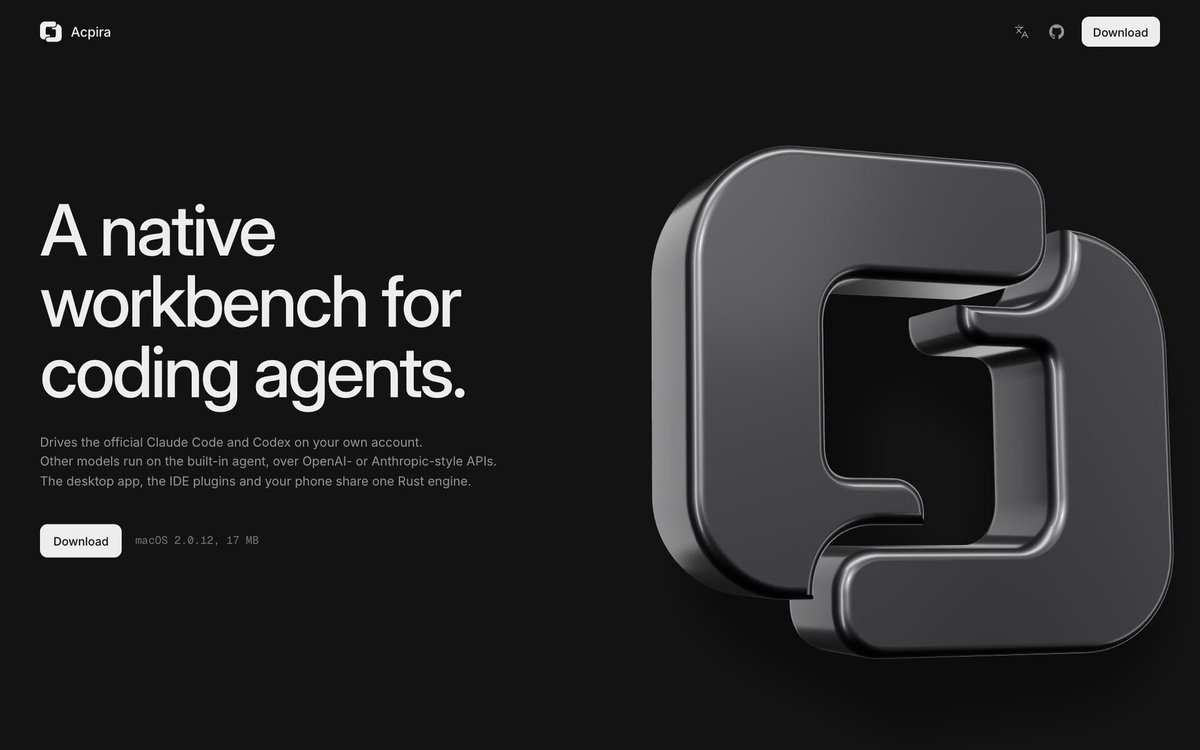
REFERENCE
- Gallery page: https://magpui.com/en/i/chrome-3d-logo-dive-into-app-90a285
- First frame (image): https://dnioievkvxejjbxgwvko.supabase.co/storage/v1/object/public/media/chrome-3d-logo-dive-into-app-90a285/shot.jpg
- Clip (mp4): https://dnioievkvxejjbxgwvko.supabase.co/storage/v1/object/public/media/chrome-3d-logo-dive-into-app-90a285/clip.mp4
- Original post: https://x.com/hoticc/status/2120682879764373908 by @hoticc
Before building, download the first frame and look at it. If ffmpeg is available, download the clip and extract frames (ffmpeg -i clip.mp4 -vf fps=2 frame-%02d.png), then study the motion frame by frame. Match what you see; the text below describes it, the frames are the truth.

BUILD: A dark landing page for a desktop app whose hero ends in a camera dive through a 3D logo. On load, a big extruded chrome logo mark (an interlocking squared C-shape with deep bevels and rounded edges) floats on the right half and rotates slowly while a bold 3-line headline, a short paragraph and a Download button sit on the left. As the user scrolls, the copy fades, the mark grows and turns to face the camera, the camera pushes through its inner opening, and the mark's thick chrome edges sweep past the lens like a tunnel. On the other side, a full-width screenshot of the real app UI (sidebar, session list, empty canvas, prompt bar) settles into place, and the scroll continues into the product story.

DESIGN SYSTEM: Background #0b0b0c. Top nav: 56px, small logo left, two icon links and a white pill button 'Download' right. Headline: neo-grotesk sans, about 56px desktop, line-height 1.05, weight 500, color #f2f2f2; body 14px #8a8a8f, max-width 360px. Primary button: 32px tall, radius 8px, white #f5f5f5 background, #111 text. The mark: polished dark chrome, base #1a1a1c with sharp white highlight streaks and a soft studio environment so the bevels read; rounded bevel radius about 12% of the stroke width. App frame: radius 12px, 1px border #222, window dots top-left.

MOTION:
- Idle: mark rotates on Y about 20deg back and forth over 6000ms, cubic-bezier(0.45, 0, 0.55, 1), with a slight 4px float.
- Scroll 0-30% of a pinned 300vh section: headline and copy opacity 1 to 0 and translateY 0 to -24px; mark scales 1 to 1.6 and rotates to face the camera.
- Scroll 30-70%: camera dolly from z=6 to z=-1 through the mark's opening; the mark's edge passes the lens; slight motion blur or depth of field on the near surface.
- Scroll 60-85%: app screenshot plane fades from 0 to 1 and scales 1.08 to 1 behind the mark, cubic-bezier(0.22, 1, 0.36, 1).
- Scroll 85-100%: unpin; continue into the next section. Scrub everything to scroll with a smoothing of about 0.6s.

SECTIONS: 1) Nav. 2) Pinned hero: copy block left, 3D mark right, canvas behind. 3) Reveal: full app UI frame (sidebar with New session, Search, project groups; main empty area; bottom prompt bar with model chips). 4) Scroll-driven feature story continuing below (placeholder sections).

IMPLEMENTATION: Three.js (or React Three Fiber) for the mark: extrude an SVG path with bevelEnabled, MeshPhysicalMaterial with metalness 1, roughness 0.15 and an HDR studio environment. GSAP ScrollTrigger pins the hero and scrubs one timeline that drives camera z, mark rotation, copy fade and the screenshot plane (render the app UI as a texture or as an HTML layer that fades in as the canvas fades out). prefers-reduced-motion: no pin, show the static hero then the app frame with a simple fade. Keep the Download button focusable with a visible ring. Lazy-load the HDR, cap pixel ratio at 2.

ADAPT TO THE PROJECT: Reuse the project's existing design tokens, fonts, buttons and nav. Map colors to the closest existing tokens. Never copy logos, brand names, photos or app screenshots from the original; use a placeholder mark built from the project's own logo or a simple geometric shape, and a placeholder UI frame.

SUCCESS CHECK:
- The chrome mark idles with a slow turn and clearly catches highlights on its bevels.
- Scrolling flies the camera through the mark's opening, with its edge sweeping past, and lands on the app UI frame.
- Scrolling back reverses the whole sequence smoothly, and reduced motion shows a static version.