REFERENCE
- Gallery page: https://magpui.com/en/i/draggable-spring-and-easing-playground-30bb6e
- First frame (image): https://dnioievkvxejjbxgwvko.supabase.co/storage/v1/object/public/media/draggable-spring-and-easing-playground-30bb6e/shot.jpg
- Clip (mp4): https://dnioievkvxejjbxgwvko.supabase.co/storage/v1/object/public/media/draggable-spring-and-easing-playground-30bb6e/clip.mp4
- Original post: https://x.com/emilkowalski/status/2117240584897548326 by @emilkowalski
Before building, download the first frame and look at it. If ffmpeg is available, download the clip and extract frames (ffmpeg -i clip.mp4 -vf fps=2 frame-%02d.png), then study the motion frame by frame. Match what you see; the text below describes it, the frames are the truth.

BUILD
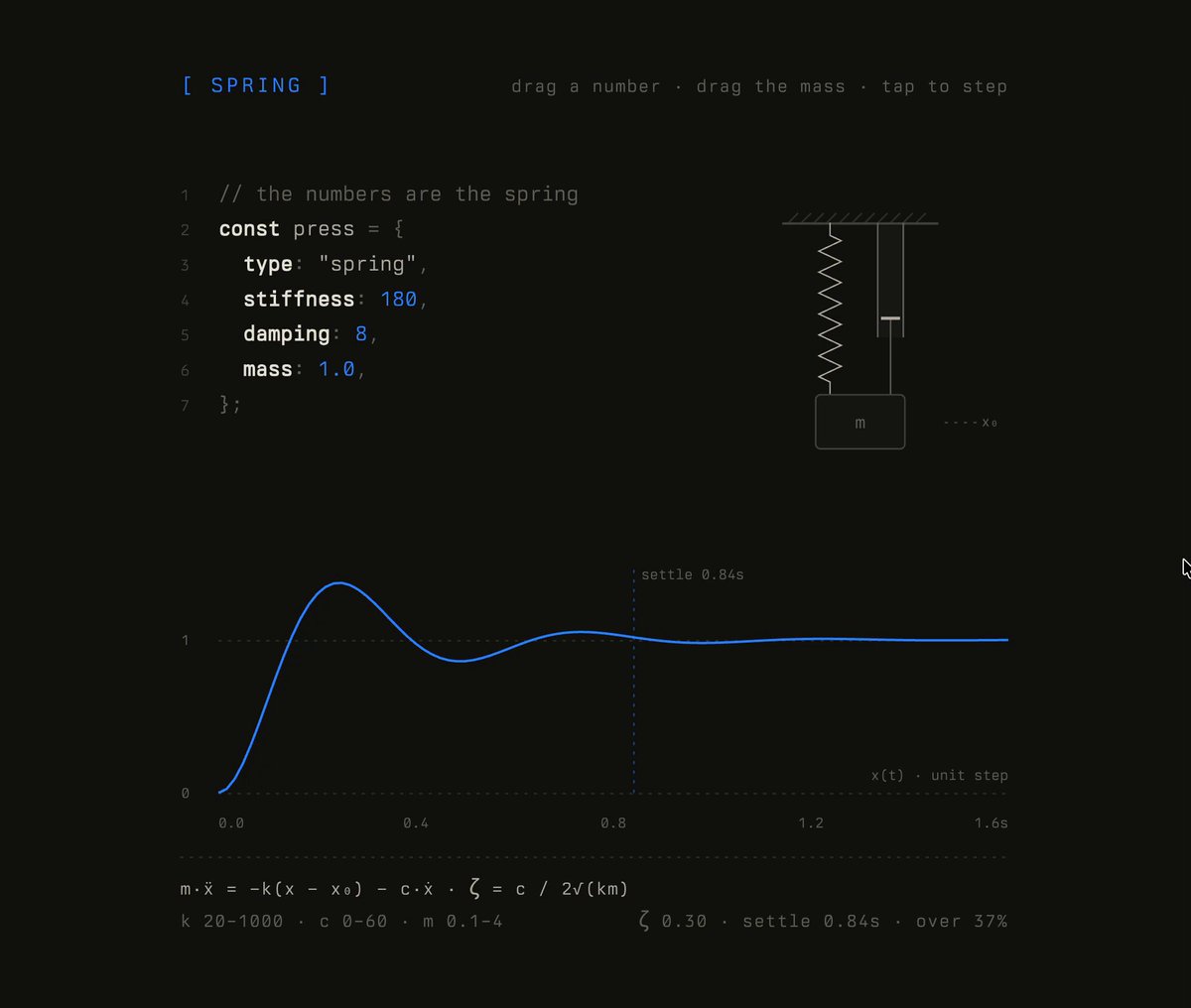
An interactive explainer with two stacked panels, SPRING and EASE, that teach how animation curves work by letting people drag values directly inside a code snippet. In SPRING, a short JS object (stiffness, damping, mass) sits next to a schematic mass hanging from a spring and a damper; dragging a number scrubs it, dragging the mass pulls it down, tapping replays a unit step, and a live plot of position over time redraws while the previous curve stays as a faint ghost. In EASE, a CSS rule with a cubic-bezier() sits above a bezier editor with two draggable handles, a vertical 60 Hz tick ruler that shows frame spacing, and a phone mock whose bottom sheet slides up with the current curve. It should feel like a precise lab instrument: calm, monospace, every change visible instantly.

DESIGN SYSTEM
- Panel: max-width 720px, centered, background #121212 on a #0E0E0E page, no card border; 64px vertical padding, sections separated by a 1px dashed #2A2A2A rule.
- Typography: one monospace family throughout. Section label "[ SPRING ]" 15px, letter-spacing 0.2em, accent blue; hint text top-right 13px, letter-spacing 0.08em, #6B6B6B ("drag a number · drag the mass · tap to step"). Code 16px, line-height 1.9, line numbers 12px #4A4A4A, keys bold #EDEDED, punctuation and comments #7A7A7A, editable numbers in accent #3B82F6 with a dotted underline on hover.
- Diagrams: hairline strokes 1-1.25px #8A8A8A, hatched ceiling, zigzag spring, damper as a piston, mass as a 80x48 rounded box (radius 4px) labeled "m"; active elements turn accent blue.
- Plot: 0 and 1 dotted guide lines, axis labels 11px #6B6B6B, current curve 2.5px accent blue, ghost curve 1.5px #5A5A5A, dotted vertical marker labeled "settle 1.14s".
- Footer row: formula in 14px #D8D8D8 (m·ẍ = −k(x − x₀) − c·ẋ · ζ = c / 2√(km)), ranges and live stats right-aligned in #6B6B6B (ζ 0.27 · settle 1.14s · over 41%).
- Phone mock: 190x360, radius 32px, 1.5px #3A3A3A stroke, dark skeleton list rows, sheet radius 18px with a grab handle and a pill button.

MOTION
- Number scrub: pointerdown on a number + horizontal drag changes it by step per 4px (stiffness 20-1000, damping 0-60, mass 0.1-4); cursor becomes ew-resize; while dragging, a dotted leader line connects the number to the matching part of the diagram, which highlights in blue.
- Spring plot: on every change, keep the old curve as ghost and draw the new one by animating stroke-dashoffset from full length to 0 over the simulated duration (real time, linear), so the line traces at the real speed of the spring; the mass in the diagram moves with the same simulation.
- Drag the mass: pull down up to 60px, release to let the integrated spring run (semi-implicit Euler, 1/120s steps) and plot the response.
- Ease editor: dragging a handle updates the four numbers in the code live; on release (or tap) the phone sheet replays translateY(100%) -> 0 over the given duration with the exact cubic-bezier; the tick ruler re-spaces 24 ticks to show where each 60 Hz frame lands, a blue dot rides the curve and the ruler in sync.
- Stats update with a 150ms number tween, cubic-bezier(.2,.8,.2,1).

SECTIONS
1. SPRING panel: label + hint row; 7-line code block left, spring/damper/mass schematic right; full-width response plot (x 0-1.6s); formula + stats footer.
2. EASE panel: label + hint row; 5-line CSS block; bezier editor (square, dotted frame, P0 bottom-left, P3 top-right, two hollow handles on thin arms), tick ruler, phone mock; bezier formula + frames/delta footer.
States: idle (last curve drawn), scrubbing (leader line + blue highlight), replaying (curve tracing, sheet moving), reduced-motion.

IMPLEMENTATION
- React + SVG for diagrams and plots; a small spring solver (or Motion's spring generator) to compute the curve, the overshoot %, the damping ratio and the settle time (first time it stays within 0.5% of target). Cubic-bezier solved with Newton-Raphson + bisection for x -> t. Use pointer events with setPointerCapture for scrubbing and handle dragging; requestAnimationFrame for tracing.
- Numbers are buttons with role="slider", aria-valuemin/max/now; arrow keys step by 1 (shift x10); handles are focusable and movable with arrows; visible 2px blue focus rings.
- prefers-reduced-motion: draw curves instantly, no tracing, the sheet jumps to its end state.
- Performance: sample curves at 240 points max, recompute only on value change, no layout thrash (transform only on the sheet).

ADAPT TO THE PROJECT
Reuse the project's monospace font, color tokens and dark surfaces; map the blue accent to the closest primary token. Do not copy the original course branding or wording beyond generic labels; use placeholder copy.

SUCCESS CHECK
- Dragging stiffness, damping or mass redraws the response curve with the previous one ghosted and updates ζ, settle time and overshoot.
- Dragging a bezier handle changes the four numbers in the CSS snippet and the phone sheet replays with that exact easing.
- Every editable number and handle works from the keyboard and shows a focus ring.