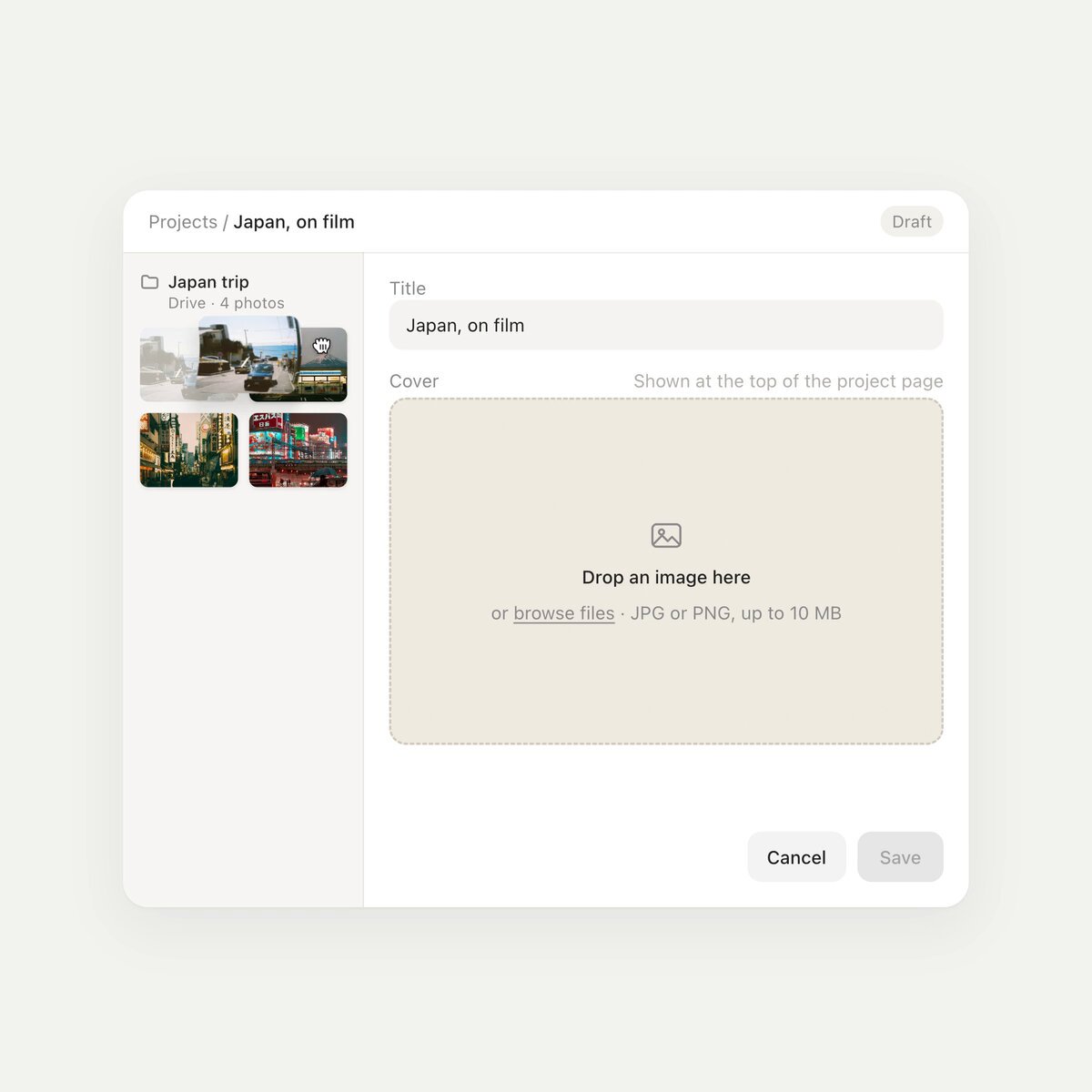
REFERENCE
- Gallery page: https://magpui.com/en/i/cover-upload-develops-like-film-2288ae
- First frame (image): https://dnioievkvxejjbxgwvko.supabase.co/storage/v1/object/public/media/cover-upload-develops-like-film-2288ae/shot.jpg
- Clip (mp4): https://dnioievkvxejjbxgwvko.supabase.co/storage/v1/object/public/media/cover-upload-develops-like-film-2288ae/clip.mp4
- Original post: https://x.com/dev_ya/status/2118030724955852945 by @dev_ya
Before building, download the first frame and look at it. If ffmpeg is available, download the clip and extract frames (ffmpeg -i clip.mp4 -vf fps=2 frame-%02d.png), then study the motion frame by frame. Match what you see; the text below describes it, the frames are the truth.

BUILD: Build only a cover-image upload editor. An empty cream dropzone accepts an image; the preview arrives with a slight curled edge and muted film-like coloring, develops into full color during import, then settles into a larger cover preview when saved. Keep the surrounding editor quiet and functional.
DESIGN SYSTEM: Use a white #FCFCFA editor around 640px wide with a 140px left image rail and a flexible editing column. Use 12px neutral sans labels, a 16px title field, #8A8A83 helper text, thin #E4E4DD borders and 8px corners. The landscape dropzone is approximately 300 by 190px with a #ECECDF fill. Place a slim upload row with thumbnail, filename and percentage below it, with Cancel and Save aligned bottom-right. Use placeholder photographs supplied by the project.
MOTION: On drop show the image from a slightly rolled edge over 420ms, cubic-bezier(0.22,1,0.36,1). During progress reduce sepia and grayscale from 1 toward 0 in sync with actual loading progress, easing each update over 180ms. On save expand the preview into the cover area over 320ms with the same easing and fade the form chrome over 160ms. Do not animate an entire page or add particle effects.
SECTIONS: Empty dropzone with file picker; importing preview and progress row; ready state with enabled Save; saved cover preview; return-to-editor state. Retain the title and chosen file on a recoverable error.
IMPLEMENTATION: Use React and Motion for shared-layout expansion. Use a lightweight Three.js plane mesh only for the brief curled-image entrance, then dispose its resources and fall back to a normal image; color development can use CSS filters. Follow actual import completion rather than a fake timer. Bound WebGL to the preview, cap device pixel ratio at 1.5 and provide a plain-image fallback. Support keyboard file selection, accessible progressbar semantics, visible focus, cancel and error recovery. Under prefers-reduced-motion omit the curl and expansion and swap states immediately. Revoke temporary object URLs on replacement.
ADAPT TO THE PROJECT: Reuse the project's existing design tokens, components and fonts. Map the estimated colors to existing tokens. Never copy logos, brand names, photos or illustrations from the original; use placeholders. All durations and dimensions here are reconstruction targets inferred from the reference, not measured source constants.
SUCCESS CHECK:
- Loading color and progress match real file processing, and Save is disabled until ready.
- The preview changes size without losing the selected image or title.
- Keyboard upload, cancellation and reduced-motion mode work without WebGL.