REFERENCE
- Gallery page: https://magpui.com/en/i/3d-ring-of-spinning-logo-cards-f5b94d
- First frame (image): https://dnioievkvxejjbxgwvko.supabase.co/storage/v1/object/public/media/3d-ring-of-spinning-logo-cards-f5b94d/shot.jpg
- Clip (mp4): https://dnioievkvxejjbxgwvko.supabase.co/storage/v1/object/public/media/3d-ring-of-spinning-logo-cards-f5b94d/clip.mp4
- Original post: https://x.com/builtbykern/status/2118395581676786037 by @builtbykern
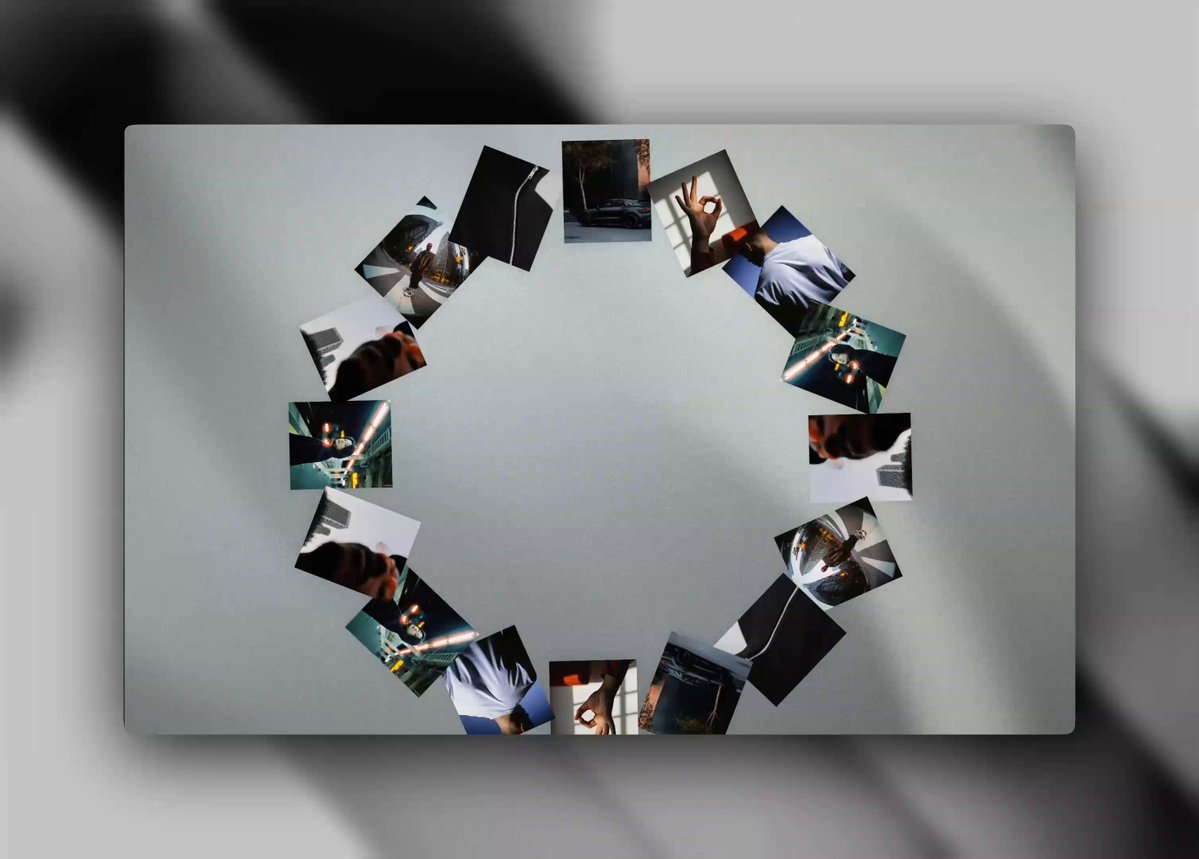
Before building, download the first frame and look at it. If ffmpeg is available, download the clip and extract frames (ffmpeg -i clip.mp4 -vf fps=2 frame-%02d.png), then study the motion frame by frame. Match what you see; the text below describes it, the frames are the truth.

ASSETS
This needs real artwork, not shapes drawn in code. Use the files the user gives you (ask where they are). If you have an image generation tool, generate them with these prompts; otherwise leave clearly marked placeholders.
- logo-card placeholders: Set of 16 square editorial photographs for a 3D logo-card carousel mock: moody night city, hand gesture, portrait crop, abstract fabric — consistent slight film grain, no text or logos, 1:1, soft contrast

BUILD: Build a single interactive logo-wall component: about 14–18 square image cards arranged on a horizontal 3D ring (like a carousel cylinder viewed from above-front). The user drags left/right to spin the ring; each card faces outward, tilts slightly toward the pointer while dragging, and the ring settles with a soft spring when released. One card can briefly enlarge into the empty center of the ring on click, then sink back. Feel tactile and premium, not a flat marquee.

DESIGN SYSTEM: Stage is a light gray board (#e8e8ea to #f3f3f5) with soft diagonal ambient shadows, about 70–80% of viewport width, centered, radius ~24px. Cards: square ~72–88px, radius 10–12px, thin white rim, soft drop shadow (0 8px 24px rgba(0,0,0,0.12)). Images fill the card with object-fit cover. Empty center of the ring is open space (~40% of ring diameter). No chrome UI except an optional tiny caption under the board.

MOTION: (1) Idle: ring slowly auto-rotates ~8–12 deg/s, easing linear, pauses on pointer enter. (2) Drag: pointer X maps to angular velocity; cards tilt ±8–12 deg on X toward the cursor with spring stiffness ~180, damping ~18. (3) Release: angular velocity decays with friction ~0.92/frame until under 0.2 deg/frame, then a short settle spring (overshoot ~4%). (4) Click a card: it scales to ~1.6 and translates to ring center in 420ms cubic-bezier(0.34,1.45,0.64,1), holds 1.2s, then returns in 380ms. (5) prefers-reduced-motion: static ring, no auto-spin, click still focuses the card without flight.

SECTIONS: One component. States: idle (slow spin), dragging (tilt + velocity), settling, focused (center enlarge), reduced-motion.

IMPLEMENTATION: React + Three.js or React Three Fiber for the ring (InstancedMesh or mapped meshes on a torus/orbit), or CSS 3D with perspective if keeping it lighter; pointer events on an invisible hit plane. Use placeholder images (colored gradients or free stock), never the original photos. Cap devicePixelRatio at 2, pause when offscreen. Keyboard: left/right arrows rotate one card step, Enter focuses the front card; visible focus ring on the stage.

ADAPT TO THE PROJECT: Reuse project tokens for radius and shadow; map the board gray to the closest surface token; never copy logos or photos from the original — use the project's own logos or placeholders.

SUCCESS CHECK:
- Dragging spins the ring with card tilt and a smooth settle after release.
- Clicking a card enlarges it into the center then returns it.
- prefers-reduced-motion shows a still ring without auto-spin.