REFERENCE
- Gallery page: https://magpui.com/en/i/weather-widget-with-puffing-clouds-d94474
- First frame (image): https://dnioievkvxejjbxgwvko.supabase.co/storage/v1/object/public/media/weather-widget-with-puffing-clouds-d94474/shot.jpg
- Clip (mp4): https://dnioievkvxejjbxgwvko.supabase.co/storage/v1/object/public/media/weather-widget-with-puffing-clouds-d94474/clip.mp4
- Original post: https://x.com/bedirhandogn/status/2112119016235893096 by @bedirhandogn
Before building, download the first frame and look at it. If ffmpeg is available, download the clip and extract frames (ffmpeg -i clip.mp4 -vf fps=2 frame-%02d.png), then study the motion frame by frame. Match what you see; the text below describes it, the frames are the truth.

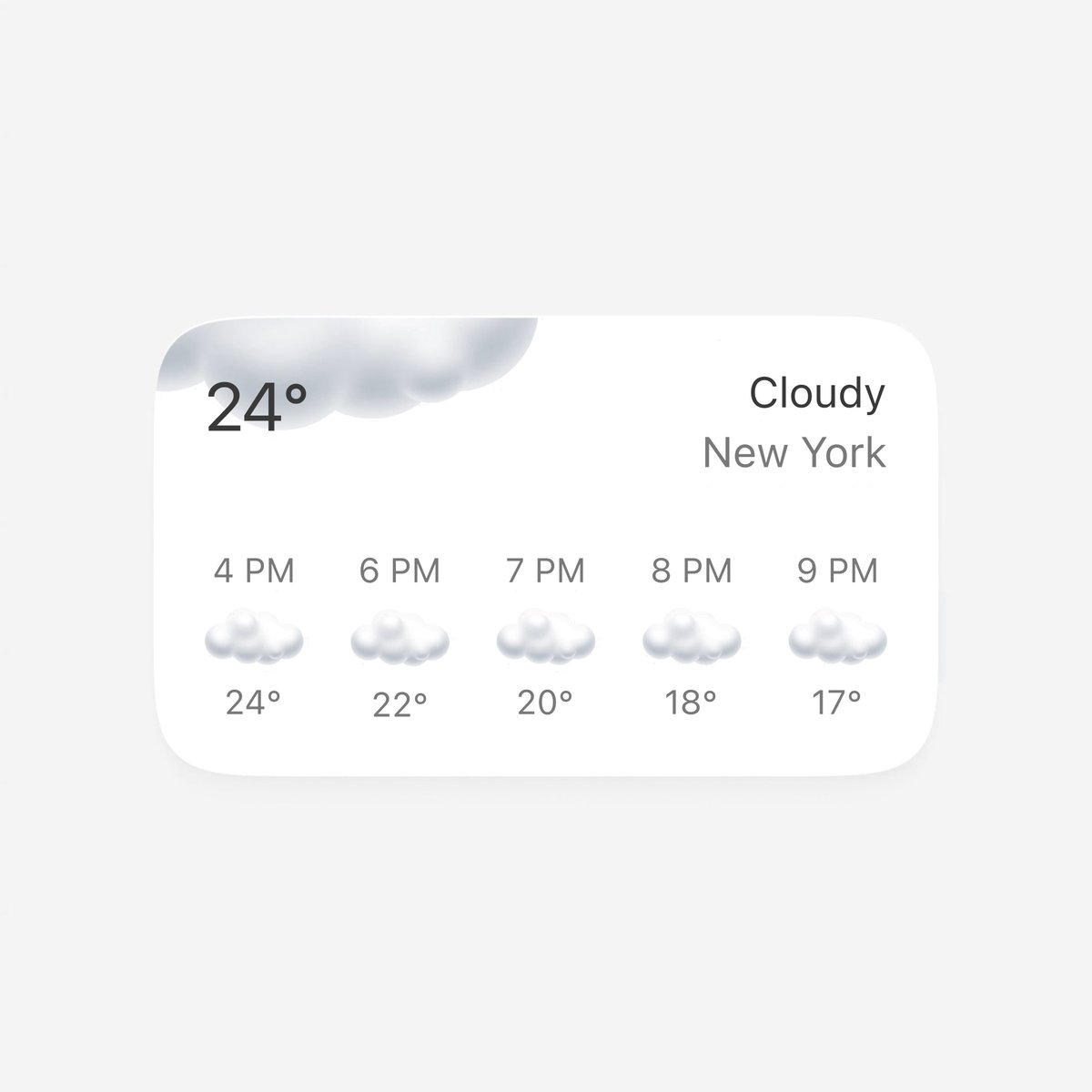
BUILD: A wide weather widget card that animates in on load. A large soft cloud grows out of the top-left corner behind the current temperature, the condition and city fade in on the right, and the hourly forecast row fills from left to right, each hour's small soft cloud icon puffing up into shape before its temperature appears. It should feel quiet, airy and tactile, like a premium home-screen widget.

DESIGN SYSTEM: Card 340x200px, background #FFFFFF, radius 24px, overflow hidden, shadow 0 6px 20px rgba(0,0,0,0.05), on a page of #F4F4F4. Padding 22px. Top row: current temperature '24°' left, 26px regular sans-serif #2B2B2B; condition 'Cloudy' (17px #2B2B2B) and city (17px #6E6E6E) right-aligned, stacked with 4px gap. Corner cloud: a 170x60px soft cloud anchored at the card's top-left, partly clipped by the card edge, light grey gradient #DADADA to #F2F2F2 with soft inner shading, sitting behind the temperature. Hourly row 50px below: 5 equal columns, each with time (13px #6E6E6E, e.g. '4 PM'), a 44x22px soft cloud icon with subtle top-light shading, and temperature (13px #6E6E6E, e.g. '22°'), 10px vertical gaps.

MOTION: On mount: corner cloud scales from 0.2 to 1 with transform-origin top left, blur 8px to 0, opacity 0 to 1, 700ms, cubic-bezier(0.22, 1, 0.36, 1). Temperature text fades from opacity 0.4 and blur 4px to sharp, 400ms. Condition and city fade and slide up 6px, 360ms, delay 200ms, cubic-bezier(0.16, 1, 0.3, 1). Hourly columns enter left to right with 160ms stagger, starting at 300ms: each time label fades in first (240ms), then its cloud icon scales from 0.3 to 1.08 to 1 with blur 6px to 0 (420ms, cubic-bezier(0.34, 1.56, 0.64, 1)), then the temperature fades in 80ms after. While the icon puffs, its blobs morph slightly (made of 3 overlapping circles that grow at offsets of 0, 40 and 80ms) so the cloud looks like it is inflating. Total sequence about 1.4s. On data refresh, only changed columns replay their puff.

SECTIONS: Parts: card shell, corner cloud, current block (temperature, condition, city), hourly row (5 columns: time, icon, temperature). States: loading (skeleton bars in the same positions and sizes, pulsing #EFEFEF), entering (sequence above), idle (corner cloud drifts 2px horizontally on a 6s loop), hover (card lifts with shadow 0 10px 28px rgba(0,0,0,0.08), 200ms), condition change (old icons shrink to 0.8 and fade 160ms, new ones puff in).

IMPLEMENTATION: Motion for React with staggerChildren on the hourly row, or CSS keyframes with --i custom properties for the stagger. Draw clouds as SVG: 3-4 circles merged with a single soft radial gradient and a feGaussianBlur filter for the corner cloud; animate transform and filter: blur only on the small icons, opacity and transform elsewhere. prefers-reduced-motion: render final state with a single 200ms fade, no scale or blur. The card is a static region with an accessible label like 'Weather in City: Cloudy, 24 degrees, next hours 22, 20, 18, 17'; if it is a link, focus ring 2px on the card. Keep the blur filter only during entrance (remove it after the animation ends) so idle cost is zero.

ADAPT TO THE PROJECT: Reuse the project's existing card component, design tokens and fonts; map the greys to the closest tokens. Do not copy logos, brand names or original icons; draw the clouds in SVG and use placeholder city and data.

SUCCESS CHECK:
- On mount the corner cloud blooms from the top-left corner and the five hourly columns enter left to right with a clear stagger, finishing in about 1.5s.
- Each small cloud icon visibly inflates with a slight overshoot rather than just fading in.
- With reduced motion the widget appears with one short fade, and no blur filter remains on any element after entrance.