REFERENCE
- Gallery page: https://magpui.com/en/i/truck-loading-simulation-dashboard-b481aa
- First frame (image): https://dnioievkvxejjbxgwvko.supabase.co/storage/v1/object/public/media/truck-loading-simulation-dashboard-b481aa/shot.jpg
- Clip (mp4): https://dnioievkvxejjbxgwvko.supabase.co/storage/v1/object/public/media/truck-loading-simulation-dashboard-b481aa/clip.mp4
- Original post: https://x.com/konstantinsaifo/status/2112801199099637785 by @konstantinsaifo
Before building, download the first frame and look at it. If ffmpeg is available, download the clip and extract frames (ffmpeg -i clip.mp4 -vf fps=2 frame-%02d.png), then study the motion frame by frame. Match what you see; the text below describes it, the frames are the truth.

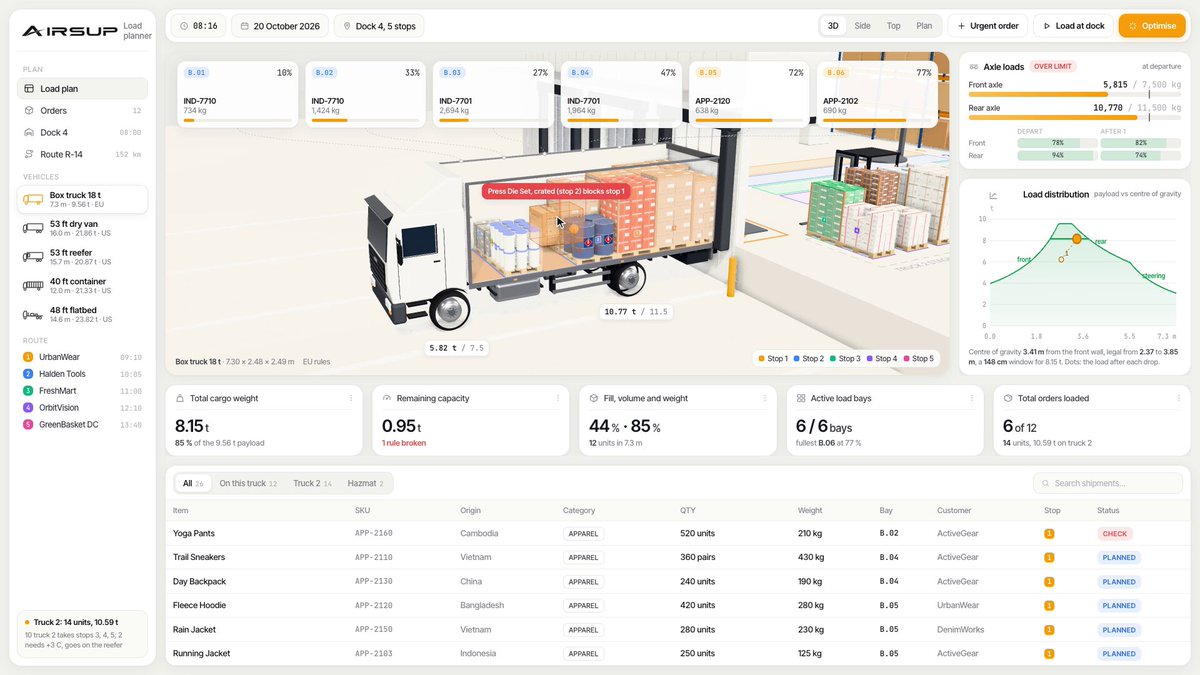
BUILD: Build a logistics dashboard component centered on a 3D truck-loading simulation. Show a white cutaway box truck, orange forklift, warehouse pallets and colored cartons. Pair the scene with compact operational metrics, a right-hand chart and a bottom shipment table. The reference alternates between the full dashboard and close-up views of the loading bay.
DESIGN SYSTEM: At a 1440px desktop width use an approximately 160px left sidebar, 48px top toolbar and a flexible main area. Use a warm off-white #F6F6EF scene background, white cards, #E5E7E4 borders, charcoal #272B2A labels, amber #F5AD26 action accents and muted green #83B8A1 charts. Use a neutral sans serif, 12px labels, 20px metric values and 8px card radii. Place six compact statistic tiles above the scene; keep a narrow summary column to its right and a dense table below. Render boxes in muted coral, mint, blue and kraft tan, with subtle contact shadows and thin pallet outlines.
MOTION: Suggested reconstruction timings, not measured from footage: on play move the forklift between the pallet zone and truck bed along a collision-free route over 3200ms using cubic-bezier(0.45,0,0.55,1). Lift the pallet over 650ms, pause 300ms, then advance and lower over 650ms. Update visible cargo occupancy only after placement. On selecting the viewer, transition the camera from full-truck overview to a rear loading-bay close-up over 1000ms with cubic-bezier(0.22,1,0.36,1); retain the navigation shell. Provide pause and reset controls.
SECTIONS: Persistent sidebar and toolbar; compact KPI cards; central truck scene with transparent or removed near-side cargo wall; neighboring pallets and forklift; right summary indicators and a small green area chart; bottom shipment table with colored status labels. Include overview, close-up, paused and selected-shipment states.
IMPLEMENTATION: Use Three.js for the scene and normal HTML for the dashboard, keeping text sharp and accessible. Model the truck, crates, forklift and pallet racks with grouped box and cylinder geometry. Use instancing for repeated cartons, baked ambient lighting and a single soft directional light. Limit pixel ratio to 1.5 and avoid expensive real-time reflections. Provide keyboard-accessible camera presets, visible focus rings, a pause button and an equivalent text load summary. With prefers-reduced-motion, disable autoplay and switch camera views instantly. On small screens stack metrics and table under the viewer.
ADAPT TO THE PROJECT: Reuse the project's existing design tokens, components and fonts, map colors to the closest existing tokens, and never copy logos, brand names, photos or illustrations from the original; use placeholders.
SUCCESS CHECK:
- Both overview and rear close-up clearly expose the cargo layout without hiding navigation.
- Forklift movement, pallet placement and load indicators remain synchronized.
- Pause, camera presets and shipment details work with keyboard and reduced motion.