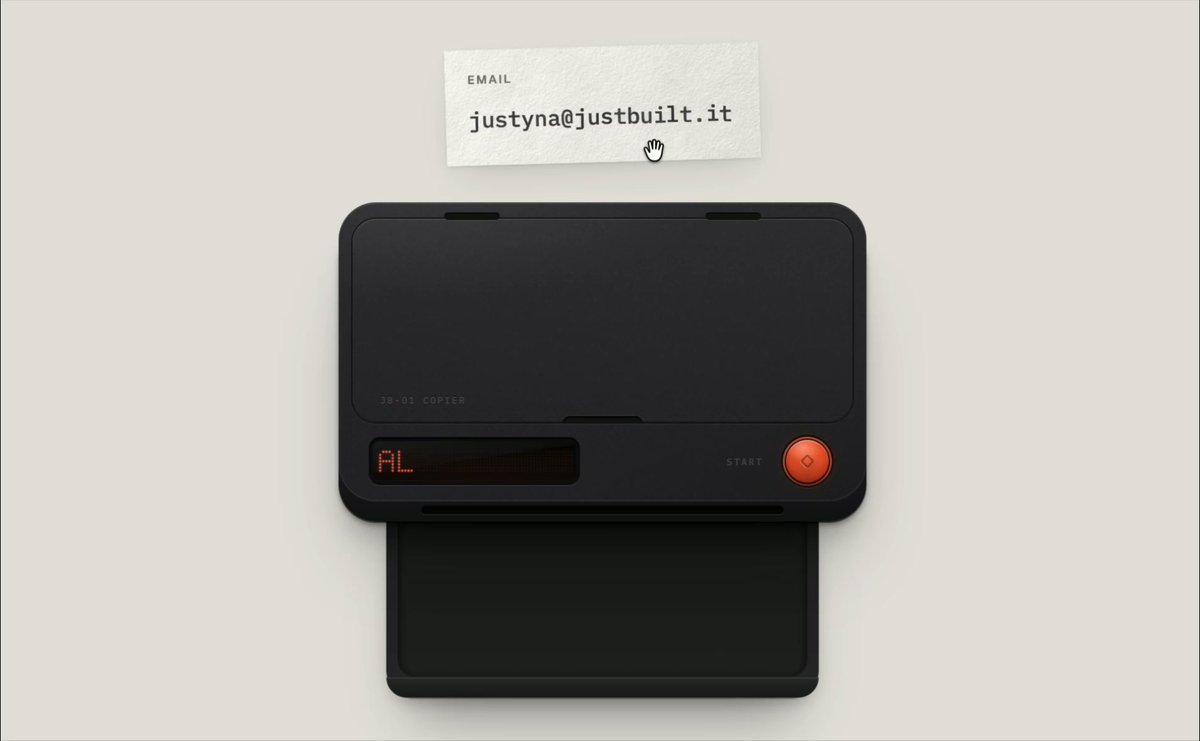
REFERENCE
- Gallery page: https://magpui.com/en/i/toy-photocopier-contact-card-5738dc
- First frame (image): https://dnioievkvxejjbxgwvko.supabase.co/storage/v1/object/public/media/toy-photocopier-contact-card-5738dc/shot.jpg
- Clip (mp4): https://dnioievkvxejjbxgwvko.supabase.co/storage/v1/object/public/media/toy-photocopier-contact-card-5738dc/clip.mp4
- Original post: https://x.com/justyna_framer/status/2114005000619995191 by @justyna_framer
Before building, download the first frame and look at it. If ffmpeg is available, download the clip and extract frames (ffmpeg -i clip.mp4 -vf fps=2 frame-%02d.png), then study the motion frame by frame. Match what you see; the text below describes it, the frames are the truth.

BUILD: Create an isolated toy photocopier contact widget: a paper contact card goes onto the glass, a hinged lid closes and a duplicate emerges into the output tray. Use a placeholder email.
DESIGN SYSTEM: On a warm #e3e0d8 background, center a roughly 280px-wide charcoal machine (#202120) with rounded 16px body, inset black glass bed, subtle bevels and a dark output tray below. Put a small amber-red pixel-style status display at lower left and a round red #e34332 button at lower right. Paper is #f4f1e8 with an approximately 11px monospace address and a small uppercase 7px label. Build shadows and hardware details in CSS/SVG.
MOTION: Proposed reconstruction timings: on activation open the lid around its upper hinge over 400ms, cubic-bezier(0.22,1,0.36,1); place the card on glass over 450ms using translateY and scale; close the lid over 400ms after a 250ms pause; show copying status for 800ms, then slide duplicate paper down about 70px over 650ms, cubic-bezier(0.22,1,0.36,1). On take-copy move the paper toward the side and give success feedback. Timings are estimates, not measured.
SECTIONS: Idle with original card above machine; open lid/drop state; card on glass; copying with lid closed; take-copy state with paper in tray; removed copy and replay.
IMPLEMENTATION: Use Motion for sequenced transforms and CSS perspective for the lid. A semantic button provides a keyboard alternative to dragging; copying must follow explicit activation and report success via aria-live. Preserve visible focus. Disable repeat activation while copying. Reduced motion swaps states without hinge or paper travel. Keep transforms local to the widget.
ADAPT TO THE PROJECT: Reuse existing project tokens, components and fonts; map these estimated colors to the closest tokens. Never copy logos, brand names, photos or illustrations; use placeholders.
SUCCESS CHECK:
- Component remains usable at 320px viewport width.
- Motion matches the described states without layout shifts.
- Reduced-motion and keyboard paths work.