REFERENCE
- Gallery page: https://magpui.com/en/i/press-and-hold-scrubbing-tab-bar-b4863a
- First frame (image): https://dnioievkvxejjbxgwvko.supabase.co/storage/v1/object/public/media/press-and-hold-scrubbing-tab-bar-b4863a/shot.jpg
- Clip (mp4): https://dnioievkvxejjbxgwvko.supabase.co/storage/v1/object/public/media/press-and-hold-scrubbing-tab-bar-b4863a/clip.mp4
- Original post: https://x.com/malikyoloo/status/2112045568168255889 by @malikyoloo
Before building, download the first frame and look at it. If ffmpeg is available, download the clip and extract frames (ffmpeg -i clip.mp4 -vf fps=2 frame-%02d.png), then study the motion frame by frame. Match what you see; the text below describes it, the frames are the truth.

BUILD:
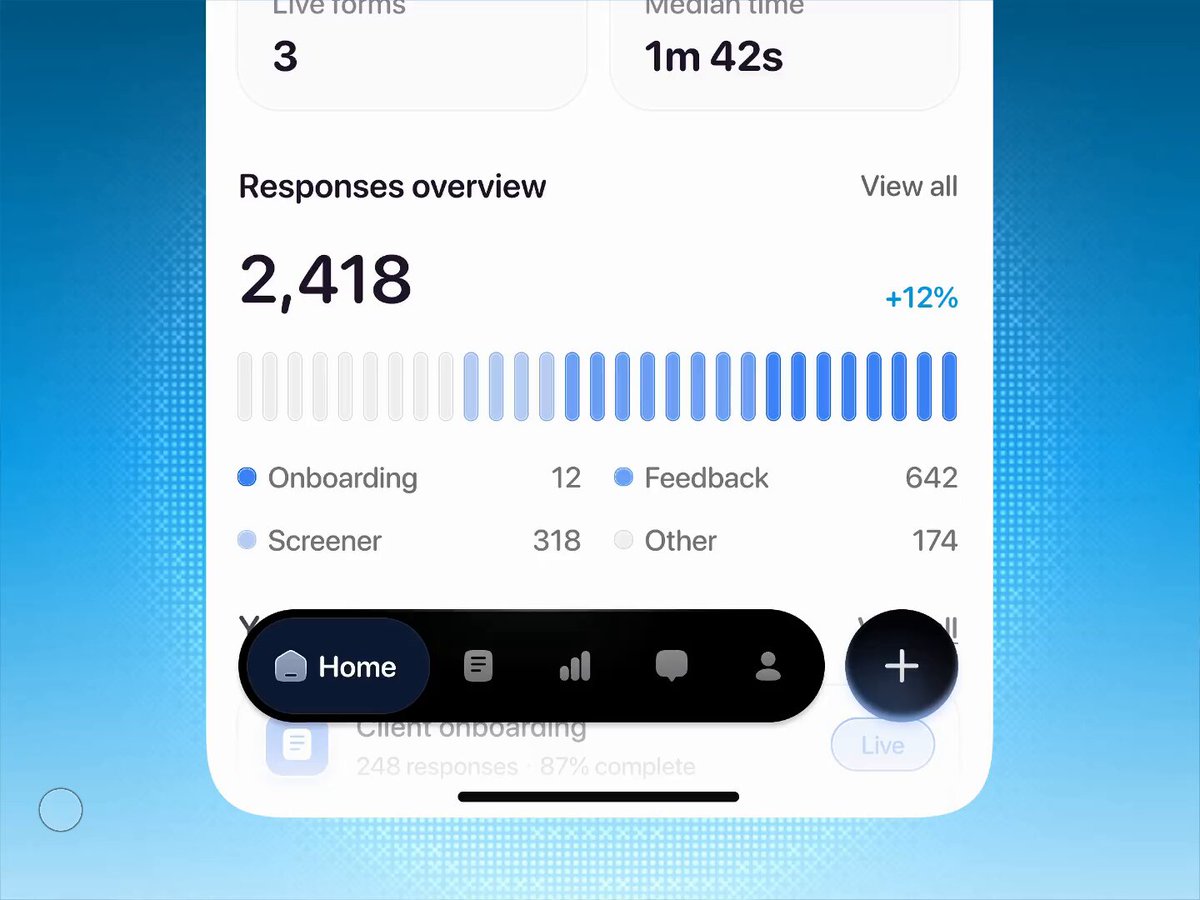
A floating bottom tab bar for a mobile app with a press-and-hold scrub gesture. Normally it is a black pill with 5 icon tabs, where the active tab shows its icon plus label inside a darker navy pill, and a separate round black + button sits to its right. When the user holds a finger on the bar for about 250ms, the bar lifts and grows slightly, the app content behind it blurs, and the user can slide across the tabs: a soft glowing pill follows the finger, each tab it reaches expands to show its label while the others shrink to icons. Lifting the finger selects that tab and everything settles back. It should feel playful, springy and tactile.

DESIGN SYSTEM:
- Bar: height 56px, padding 6px, radius 9999px, background #050608, inner highlight inset 0 1px 0 rgba(255,255,255,0.08), shadow 0 12px 32px rgba(0,0,0,0.25). Sits 16px above the home indicator, about 16px from the left screen edge.
- Tabs: icon 20px, inactive color #8b8f98; active tab is a pill of height 44px, padding 0 16px, radius 9999px, background #1b2433 with a subtle top gradient to #2a3550, icon and label #ffffff, label 15px medium weight, 8px gap.
- Action button: 56px circle, background #050608 with a soft blue glow 0 0 24px rgba(80,140,255,0.35), white + icon 24px, 12px gap from the bar.
- Scrub highlight: a 44px circle or pill with a radial gradient from rgba(120,170,255,0.55) to transparent, blended over the bar.
- Typeface: a clean neo-grotesk sans in the project's UI font.

MOTION:
- Hold detection: pointerdown starts a 250ms timer; moving more than 8px before it fires cancels into a normal tap.
- Lift: bar and action button scale 1 to 1.08, translateY 0 to -6px; content behind gets backdrop blur 0 to 8px and scale 1 to 0.98; 320ms, spring (stiffness 300, damping 24) or cubic-bezier(0.34, 1.56, 0.64, 1).
- Scrub: highlight x follows the finger with a spring (stiffness 500, damping 35). When the finger crosses the centre of a tab, that tab becomes active: width animates to fit icon plus label, label fades and slides in from 6px right with opacity 0 to 1 over 180ms, previous tab collapses over 200ms, cubic-bezier(0.22, 1, 0.36, 1). Optional light haptic on each change.
- Release: highlight fades out over 150ms, bar scales back to 1 and blur to 0 over 280ms, cubic-bezier(0.22, 1, 0.36, 1), and the screen switches to the selected tab.
- Plain tap: active pill slides to the tapped tab with a shared layout animation, 300ms spring.

SECTIONS:
- Parts: blurred content layer, bar container, 5 tab items (icon, label), active pill, scrub highlight, round action button.
- States: idle; pressed (before hold fires, bar scales to 0.98); holding or scrubbing (lifted, blurred background, highlight follows the finger); release (select and settle); plain tap; focus-visible.

IMPLEMENTATION:
- Framer Motion (Motion): layoutId for the active pill, springs for lift and highlight, pointer events with setPointerCapture so the finger can leave a tab without losing tracking. Compute the active index from the pointer x against cached tab rects. Background blur via a fixed overlay with backdrop-filter: blur(), toggled only while holding.
- prefers-reduced-motion: no scale or blur, the highlight jumps between tabs and labels crossfade in 120ms.
- Accessibility: nav with role tablist, each tab a button with aria-selected and an aria-label even when its label is hidden; arrow keys move between tabs, Enter or Space selects; visible 2px focus ring offset 2px. The gesture is an enhancement: normal taps must always work.
- Performance: animate only transform, opacity and width of the active pill; keep backdrop-filter on one element; touch-action: none on the bar only while holding.

ADAPT TO THE PROJECT:
Reuse the project's existing design tokens, components, icon set and fonts, and map colors to the closest existing tokens. Never copy logos, brand names, photos or illustrations from the original: use placeholder icons and labels.

SUCCESS CHECK:
- A quick tap switches tabs with the pill sliding over; a 250ms hold lifts the bar and blurs the content behind it.
- Sliding the finger while holding moves the glowing highlight and expands each tab's label as it passes, and release selects the last tab.
- Keyboard and screen reader users can reach and select every tab, and reduced motion removes scale and blur.