REFERENCE
- Gallery page: https://magpui.com/en/i/postage-stamp-card-with-pixel-glitch-hover-5fcab6
- First frame (image): https://dnioievkvxejjbxgwvko.supabase.co/storage/v1/object/public/media/postage-stamp-card-with-pixel-glitch-hover-5fcab6/shot.jpg
- Clip (mp4): https://dnioievkvxejjbxgwvko.supabase.co/storage/v1/object/public/media/postage-stamp-card-with-pixel-glitch-hover-5fcab6/clip.mp4
- Original post: https://x.com/____pambudi/status/2116166429267603670 by @____pambudi
Before building, download the first frame and look at it. If ffmpeg is available, download the clip and extract frames (ffmpeg -i clip.mp4 -vf fps=2 frame-%02d.png), then study the motion frame by frame. Match what you see; the text below describes it, the frames are the truth.

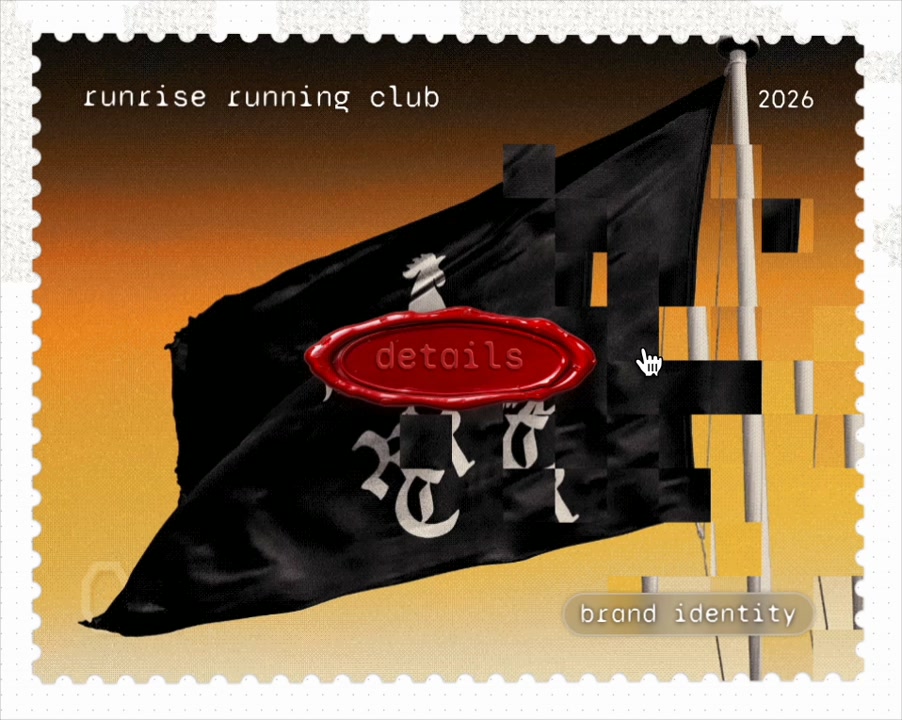
BUILD: A portfolio project card shaped like a postage stamp, with a pixel glitch hover. The card shows a looping video of the project (here a black flag waving against an orange sunset). It has a perforated stamp edge, a lowercase monospace project name top left, the year top right, a small frosted pill tag bottom right with the discipline, and a glossy red wax-seal style pill button "details" that appears on hover. When the cursor moves over the card, the image near the pointer breaks into square pixel blocks: some blocks are displaced, some show a flat color sampled from the image, some go dark, and they flicker for a moment and trail behind the cursor before snapping back. When the cursor stops, the image is clean again. It should feel like a corrupted analog print, crafted, not noisy.

DESIGN SYSTEM: Card about 560x440px on a white page, stamp perforation as a row of 10px semicircle cut-outs around a 10px white border. Inner image fills edge to edge. Name 18px monospace lowercase #FFFFFF at 24px from the top left, year 14px monospace #FFFFFF top right. Tag: 12px monospace #FFFFFF on rgba(255,255,255,0.18) with backdrop blur 8px, radius 8px, padding 4px 10px. Details button: 120x40px pill, gradient #E0161E to #8E0A0F with a white inner highlight and a darker embossed rim, 14px monospace white text, shadow 0 4px 10px rgba(120,0,0,0.4).

MOTION: Pixel grid of 28px cells over the image. On pointer move, cells within about 90px of the cursor become active, with a falloff: each active cell picks one effect (offset its image slice by ±8 to 20px, fill with a color sampled from the frame, or go black at 80% opacity) and lives 180 to 420ms before resetting with a 60ms step (no easing, stepped to feel digital). Fast moves leave a longer trail. Details button: scales from 0.8 to 1 and fades in over 220ms cubic-bezier(0.34,1.56,0.64,1) when the pointer enters, follows the cursor loosely with a 120ms lag. Pointer leave: all cells clear within 200ms and the button fades out.

SECTIONS: Stamp frame; video; name and year; discipline tag; floating details button; glitch layer. States: idle, hover moving, hover still, leaving, focused.

IMPLEMENTATION: A WebGL fragment shader (OGL or Three.js) sampling the video texture with a per-cell data texture for offset, color and life, updated from pointer events; or a 2D canvas drawing the video and copying offset cell slices for a simpler version. Stamp edge with a CSS mask or SVG clip path. Keyboard: the card is a link with a visible focus ring; on focus show the details button and run one short glitch sweep. prefers-reduced-motion: no glitch, only the button fade. Pause the video and the render loop when the card is off screen.

ADAPT TO THE PROJECT: Reuse the project's monospace or text font, link component and color tokens. Do not copy the original video, logo or brand; use a placeholder project clip.

SUCCESS CHECK:
- Moving the cursor breaks the image into flickering square blocks that trail and reset.
- The red details pill appears on hover and loosely follows the cursor.
- Keyboard focus shows the button, reduced motion disables the glitch and the loop pauses off screen.