REFERENCE
- Gallery page: https://magpui.com/en/i/paired-object-preference-quiz-a2f5ca
- First frame (image): https://dnioievkvxejjbxgwvko.supabase.co/storage/v1/object/public/media/paired-object-preference-quiz-a2f5ca/shot.jpg
- Clip (mp4): https://dnioievkvxejjbxgwvko.supabase.co/storage/v1/object/public/media/paired-object-preference-quiz-a2f5ca/clip.mp4
- Original post: https://x.com/krispuckett/status/2120685647115792802 by @krispuckett
Before building, download the first frame and look at it. If ffmpeg is available, download the clip and extract frames (ffmpeg -i clip.mp4 -vf fps=2 frame-%02d.png), then study the motion frame by frame. Match what you see; the text below describes it, the frames are the truth.

ASSETS
This needs real artwork, not shapes drawn in code. Use the files the user gives you (ask where they are). If you have an image generation tool, generate them with these prompts; otherwise leave clearly marked placeholders.
- Object comparison photos: Original studio photographs of two contrasting chairs, one angular red and blue geometric chair and one charcoal rectilinear chair, soft neutral daylight, isolated on plain warm cream background, portrait 3:4, no logos or text.

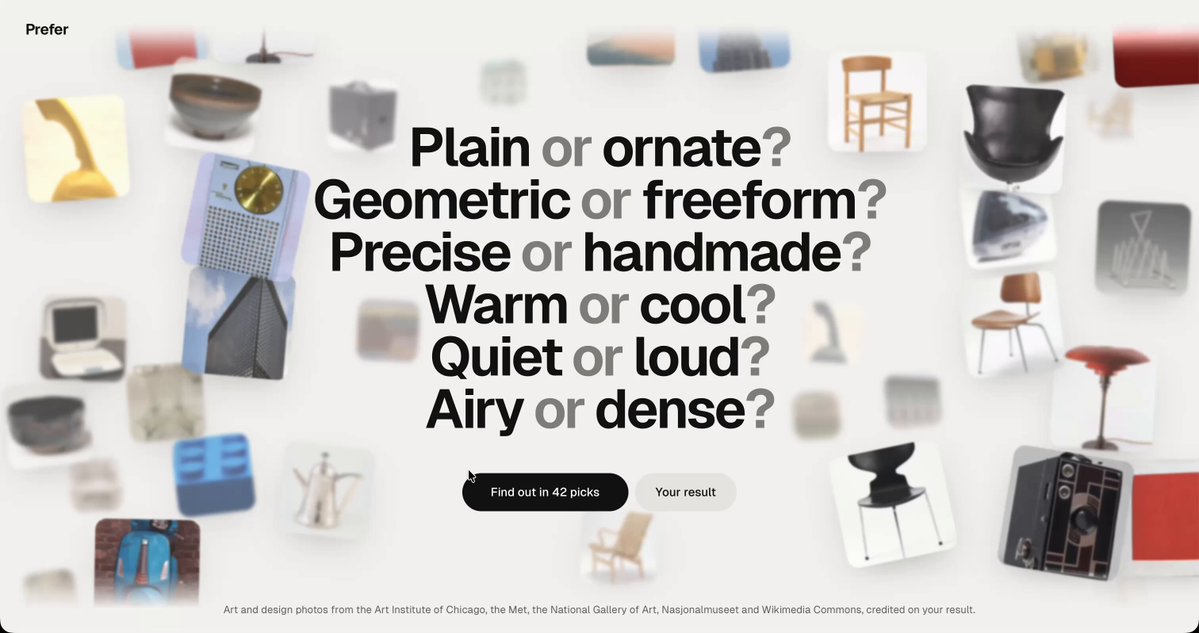
BUILD: Create a sparse visual preference quiz. An introductory collage surrounds six bold comparison questions and a black pill start button; starting reveals a pair of large object photographs and a miniature selected-object trail at the bottom.
DESIGN SYSTEM: Warm cream #F2F1EC surface, near-black #20211E text, bold neo-grotesk intro questions around 40px, small labels 12–14px. Scatter about 20 thumbnail objects around intro edges without covering the center. Quiz state uses two portrait photographs about 260px wide separated by 140px; small top-left label, centered question and top-right progress. Keep generous whitespace, subtle shadows and almost square image corners.
MOTION: Suggested rebuild timings rather than measured source values: start fades intro over 280ms and reveals the pair using opacity and 16px upward travel over 360ms, cubic-bezier(0.22,1,0.36,1). A selection scales and moves toward a 32px bottom thumbnail over 420ms with the same easing; the other image fades over 180ms. Reveal the next pair after 120ms.
SECTIONS: Intro includes scattered object images, comparison questions and start button. Quiz includes heading, progress, two selectable object photographs, Back control and bottom choice trail. States: loading images, idle, keyboard focus, selected, transitioning, completed. Do not invent a detailed results dashboard.
IMPLEMENTATION: React and Motion keyed transitions with shared-layout travel into the choice trail. Use buttons with descriptive object labels, Tab navigation, Enter and Space activation, visible focus rings and an accessible progress label. Preload only the next pair, animate transforms and opacity, cap decorative thumbnails at 24, preserve object image proportions. For prefers-reduced-motion replace travel and scale with instant updates or brief fades.
ADAPT TO THE PROJECT: Reuse existing project tokens, components and fonts, mapping colors to the closest existing tokens. Never copy original logos, brand names, photos or illustrations; use licensed placeholders.
SUCCESS CHECK:
- Starting replaces the collage with two clear choices and progress.
- A selection records one answer and adds a tiny bottom thumbnail without layout jumping.
- Keyboard and reduced-motion users can complete and reverse a choice.