Lancia questi comandi una volta in Claude Code. La skill dà all'agente il mestiere per questo tipo di pezzo. Con altri agenti, segui le istruzioni nella pagina della skill.
npx skills add wheresryan22/anatomy -g
Premi Copia prompt qui sopra, apri il progetto nell'agente e incollalo. Il prompt contiene i link ai fotogrammi originali, così l'agente li guarda prima di costruire.
REFERENCE
- Gallery page: https://magpui.com/en/i/mechanical-watch-you-can-open-67d769
- First frame (image): https://dnioievkvxejjbxgwvko.supabase.co/storage/v1/object/public/media/mechanical-watch-you-can-open-67d769/shot.jpg
- Clip (mp4): https://dnioievkvxejjbxgwvko.supabase.co/storage/v1/object/public/media/mechanical-watch-you-can-open-67d769/clip.mp4
- Original post: https://x.com/0x_fokki/status/2112546905154580675 by @0x_fokki
Before building, download the first frame and look at it. If ffmpeg is available, download the clip and extract frames (ffmpeg -i clip.mp4 -vf fps=2 frame-%02d.png), then study the motion frame by frame. Match what you see; the text below describes it, the frames are the truth.

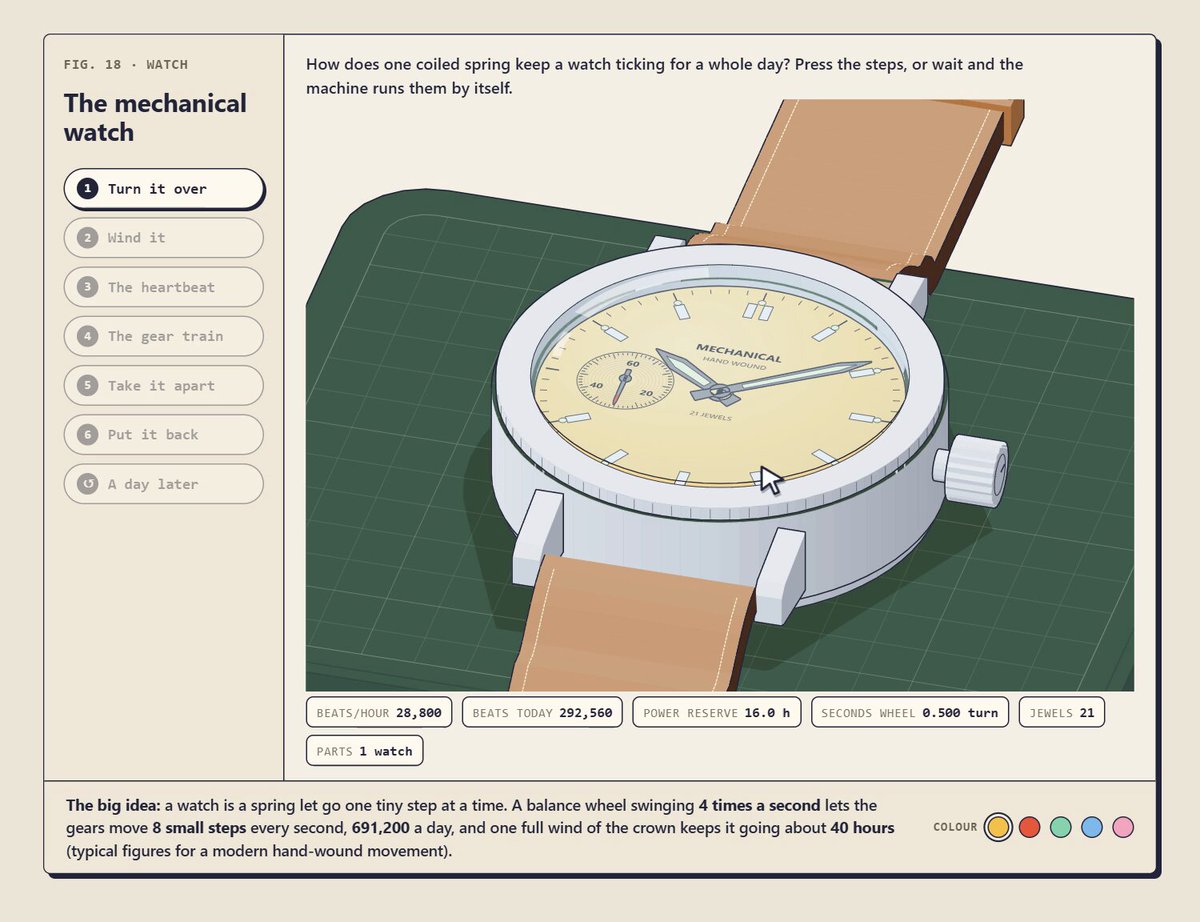
BUILD: Build an interactive mechanical-watch explainer inside the existing project. Center a large illustrated wristwatch in an oblique, almost isometric view on a dark green watchmaker mat. Start with the pale yellow dial visible, then expose the movement and let the user wind the crown and inspect the escapement. It should feel like a printed technical plate brought to life, not a glossy product landing page.

DESIGN SYSTEM: Use a warm cream field approximately #F1EBD9, near-black ink #292A25, a muted cutting mat #294D3E with a faint square grid, silver case surfaces #D0D9DC and #F0F3ED, a tan strap #C5A27C, and mustard active controls #F3CE50. Inside a thin dark rectangular frame, reserve roughly 22% width for the left navigation and 78% for the figure. Give the watch illustration about 60% of the panel height. A narrow explanatory sentence sits above the illustration, a row of small outlined instrument readouts sits below, and a full-width footer carries a short explanatory paragraph and small colored legend dots. Use a compact bold serif heading around 24px, readable serif explanations around 13px and monospaced uppercase labels around 9–11px. Seven small pill-shaped step controls have thin gray outlines, circular number markers, 6px vertical gaps and a yellow active fill. Use 12–20px panel padding, 1px outlines, minimal corner rounding and a restrained 2px offset shadow on the outer frame. Render gears, screws, bridges and the coiled spring as precise layered linework rather than generic stock imagery.

MOTION: Recommended rebuild timings, not measured source timings: on opening the watch, fade the dial and reveal the movement over 650ms using cubic-bezier(0.22,1,0.36,1). On winding, rotate the crown and ratchet in short 120ms increments using cubic-bezier(0.2,0.8,0.2,1), update the wind/reserve readout and briefly display a small 'click click' annotation for 500ms. In the running state, advance the seconds hand in discrete steps and animate an oscillating balance wheel, deriving linked gear rotations from one shared simulation clock; use linear time interpolation, cubic-bezier(0,0,1,1), rather than unrelated decorative loops. The heartbeat step transitions to a close-up of the escapement with a 900ms camera-like SVG viewBox transform using cubic-bezier(0.22,1,0.36,1), keeping the navigation fixed. Show a brief 'tock' annotation near the mechanism. On changing guided steps, update the highlighted pill and explanatory copy with a 150ms fade and no large layout shift.

SECTIONS: One framed component with a numbered figure label and two-line title at upper left; seven guided controls for viewing time, winding, heartbeat, gear train, taking the watch apart, reassembly and slowing down; a short contextual explanation above the stage; the watch with case, strap, crown, dial and exposed movement; compact live readouts for beat rate, movement amplitude, power reserve and winding state; explanatory footer and color key. Required verified visual states are closed dial, open movement, active winding, and escapement close-up. Keep the other controls as coherent guided views using the same geometry, not separate unrelated drawings. Readouts should be driven by the demo state and clearly labeled as illustrative rather than precision physical measurements.

IMPLEMENTATION: Use a responsive layered SVG for the technical drawing, including reusable paths for gear teeth, elliptical case geometry, fine bridge outlines and clipped movement details. Use GSAP timelines to coordinate SVG transforms, winding feedback and close-up framing. Keep one shared animation ticker and stop it when the component is offscreen or the document is hidden. Avoid raster artwork and expensive full-scene filters; precompute repeated gear shapes, animate transforms only where possible, and target a stable 60fps on desktop. Buttons must be native keyboard-operable controls with visible focus, aria-pressed for the selected step, accessible text equivalents for illustrated parts, and a pause control. Under prefers-reduced-motion, disable continuous rotation and camera travel, switch between static annotated diagrams, and preserve explicit winding/state updates. On narrow screens move step controls above the stage, wrap the readouts, and keep explanatory text readable.

ADAPT TO THE PROJECT: Reuse the project's existing design tokens, components and fonts. Map the estimated colors to the closest existing tokens. Never copy logos, brand names, photos or illustrations from the original; draw an original simplified mechanism or use placeholders during development. Preserve the clear diagram hierarchy without importing another site's navigation or identity.

SUCCESS CHECK:
- Opening the watch reveals a consistently aligned movement; winding changes both crown/ratchet feedback and the reserve readout.
- The heartbeat view frames the escapement while the left step selection and explanatory copy remain usable and in sync.
- All steps work with a keyboard, the layout fits a 360px viewport, and reduced-motion mode explains the same mechanism without continuous animation.
Mettili uno accanto all'altro. Se qualcosa non torna, di' all'agente cosa esattamente: tempi, dimensioni, colori o spazi.