REFERENCE
- Gallery page: https://magpui.com/en/i/magnetic-navigation-tags-b9d875
- First frame (image): https://dnioievkvxejjbxgwvko.supabase.co/storage/v1/object/public/media/magnetic-navigation-tags-b9d875/shot.jpg
- Clip (mp4): https://dnioievkvxejjbxgwvko.supabase.co/storage/v1/object/public/media/magnetic-navigation-tags-b9d875/clip.mp4
- Original post: https://x.com/Jakubantalik/status/2112572046505087424 by @Jakubantalik
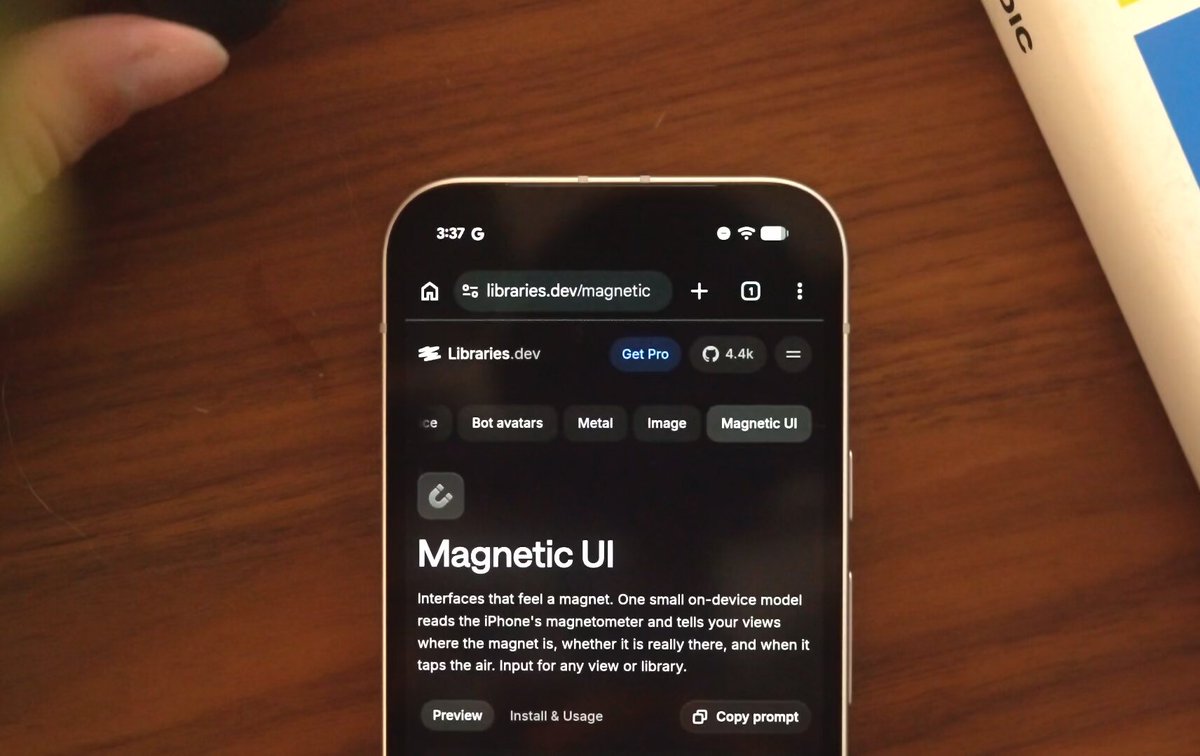
Before building, download the first frame and look at it. If ffmpeg is available, download the clip and extract frames (ffmpeg -i clip.mp4 -vf fps=2 frame-%02d.png), then study the motion frame by frame. Match what you see; the text below describes it, the frames are the truth.

BUILD: Build only a compact magnetic navigation tag row inside an existing dark interface. In the reference, tags shift and tilt while the surrounding heading and body remain stable. Preserve that subtle physical quality rather than making a whole page wobble. A filmed physical magnet provides the interaction context; the frames do not establish the underlying sensor implementation.
DESIGN SYSTEM: Use a near-black #111112 surface, white #F5F5F5 type and muted #A1A1AA secondary text. Arrange four small tags horizontally with 8px gaps and 12px side padding, wrapping on narrow screens. Use the project's sans-serif at 12–14px, medium weight. Inactive tags are quiet text; the selected tag has a charcoal #343638 background, 6px radius and 6px 10px padding. Keep the heading beneath it fixed, around 28px bold, separated by 24px.
MOTION: Proposed reconstruction timings, not measurements: on pointer proximity move individual tags 0–12px and rotate them up to 5 degrees toward a virtual magnetic field. Smooth target updates over 120ms with cubic-bezier(0.22,1,0.36,1). On exit return each tag to its origin over 420ms with cubic-bezier(0.34,1.3,0.64,1), with at most 15ms stagger. Keep all motion localized to the tag row. On selection update the active fill over 150ms with cubic-bezier(0.2,0,0,1).
SECTIONS: Component parts are the row, four interactive tags and one selected-tag surface. States: idle aligned row; proximity displaced and slightly tilted tags; selected charcoal pill; keyboard focus visible ring. Do not recreate the filmed phone, hand, browser chrome or desk.
IMPLEMENTATION: Use Motion transform motion values for low-overhead translation and rotation without changing document flow. Pointer position is the reliable baseline. If the project has real magnetometer access, put it behind an explicit opt-in adapter with feature detection, permission handling and a visible pointer fallback; never imply arbitrary mobile browsers support magnetic readings. Clamp and filter sensor input. With prefers-reduced-motion keep tags aligned and use only the active fill. Keep links semantically navigable and focus order stable; moving hit targets must retain sufficient padding. Update transforms at most once per animation frame and stop updates while hidden.
ADAPT TO THE PROJECT: Reuse existing tokens, components and fonts. Map these estimated colors to the closest existing tokens. Never copy logos, brand names, photos or illustrations from the original; use neutral placeholder labels.
SUCCESS CHECK:
- Only navigation tags translate and tilt; the heading and surrounding layout do not shift.
- Pointer input works without sensors, and denied permissions never block navigation.
- Keyboard focus remains visible and reduced-motion mode keeps the row still.