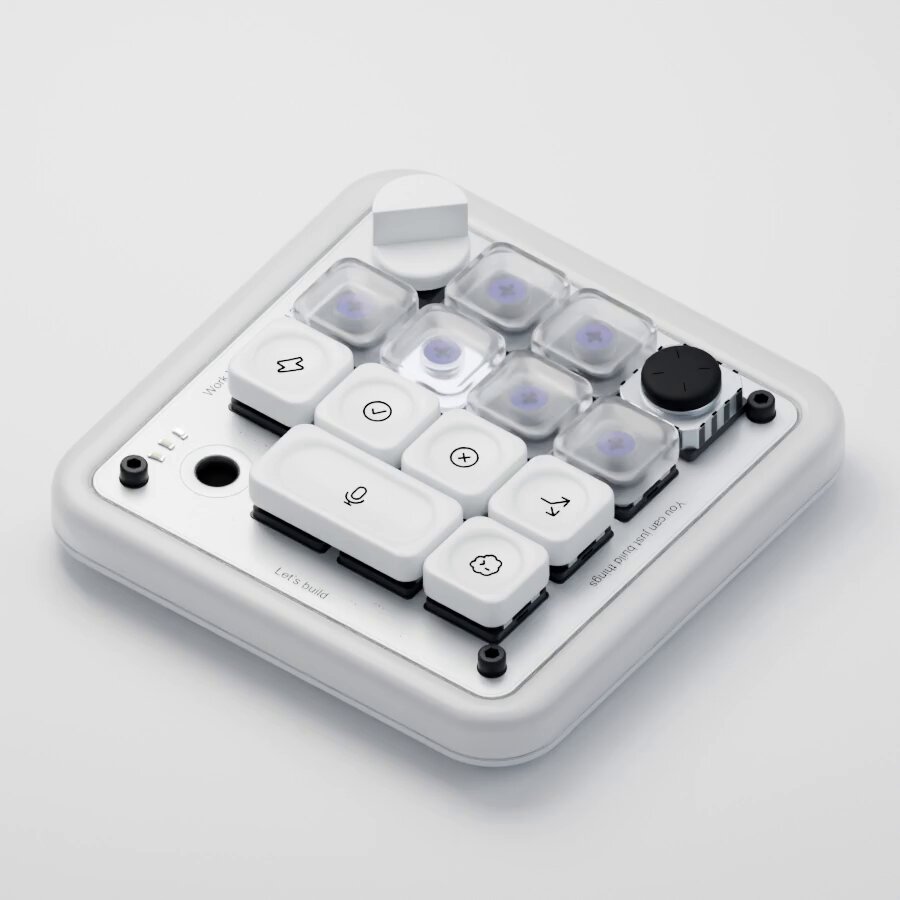
Premi Copia prompt qui sopra, apri il progetto nell'agente e incollalo. Il prompt contiene i link ai fotogrammi originali, così l'agente li guarda prima di costruire.
Mettili uno accanto all'altro. Se qualcosa non torna, di' all'agente cosa esattamente: tempi, dimensioni, colori o spazi.
REFERENCE
- Gallery page: https://magpui.com/en/i/macro-pad-modeled-from-code-d7a02a
- First frame (image): https://dnioievkvxejjbxgwvko.supabase.co/storage/v1/object/public/media/macro-pad-modeled-from-code-d7a02a/shot.jpg
- Clip (mp4): https://dnioievkvxejjbxgwvko.supabase.co/storage/v1/object/public/media/macro-pad-modeled-from-code-d7a02a/clip.mp4
- Original post: https://x.com/skirano/status/2095595932335170031 by @skirano
Before building, download the first frame and look at it. If ffmpeg is available, download the clip and extract frames (ffmpeg -i clip.mp4 -vf fps=2 frame-%02d.png), then study the motion frame by frame. Match what you see; the text below describes it, the frames are the truth.

3D product render, 4:3, white seamless background. A compact custom macro pad with a white aluminum case, a grid of 16 keys mixing frosted translucent keycaps and black keycaps with purple accents, a rotary knob and a small round button. Isometric three-quarter view, crisp studio lighting, soft contact shadow, realistic materials and small screws. For a code build: model it in Three.js from primitives (rounded boxes, cylinders), with an exploded view animation that lifts keycaps off their switches.