REFERENCE
- Gallery page: https://magpui.com/en/i/liquid-bubble-button-pair-4f1c09
- First frame (image): https://dnioievkvxejjbxgwvko.supabase.co/storage/v1/object/public/media/liquid-bubble-button-pair-4f1c09/shot.jpg
- Clip (mp4): https://dnioievkvxejjbxgwvko.supabase.co/storage/v1/object/public/media/liquid-bubble-button-pair-4f1c09/clip.mp4
- Original post: https://x.com/_crisjav/status/2117479742719017227 by @_crisjav
Before building, download the first frame and look at it. If ffmpeg is available, download the clip and extract frames (ffmpeg -i clip.mp4 -vf fps=2 frame-%02d.png), then study the motion frame by frame. Match what you see; the text below describes it, the frames are the truth.

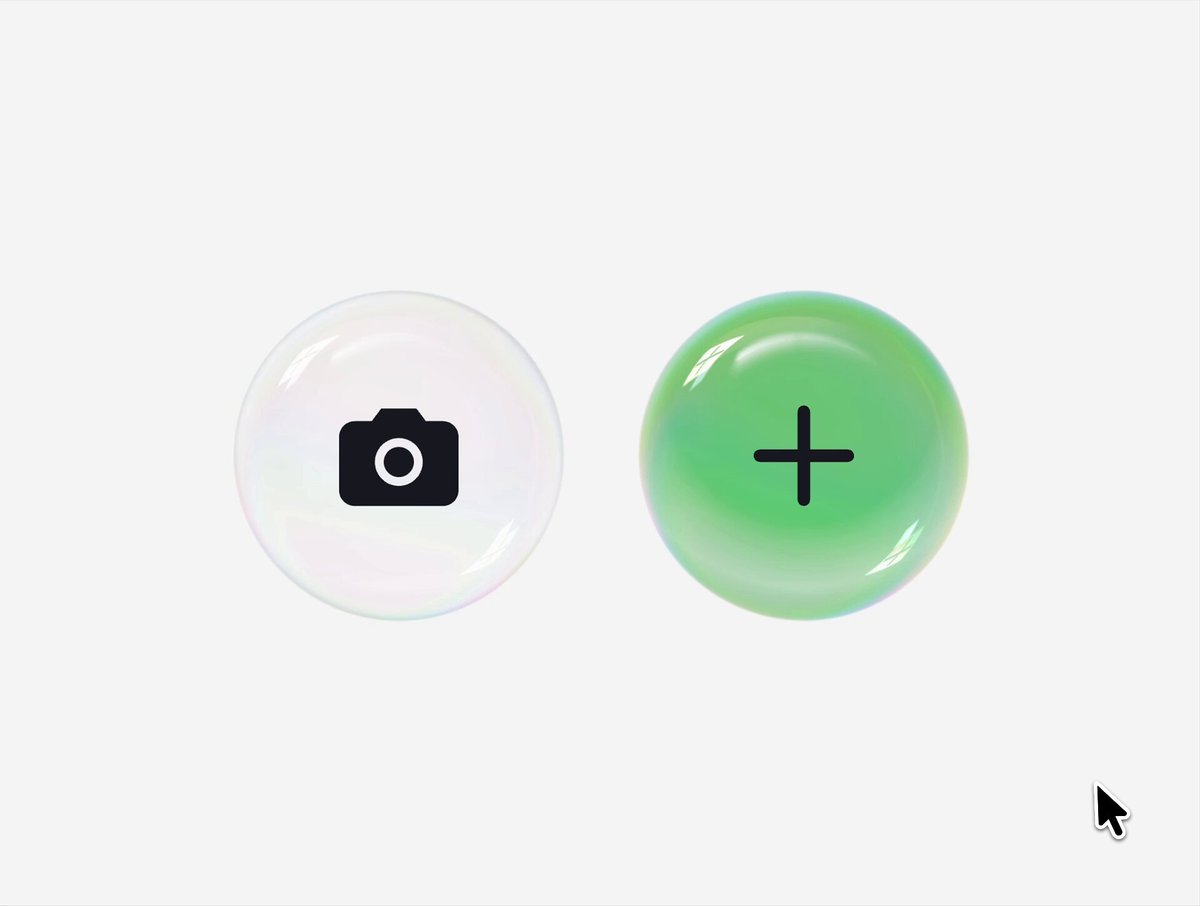
BUILD: A pair of round bubble buttons sitting side by side: a translucent, frosted white orb with a camera icon and a glossy green orb with a plus icon. Hovering one makes it swell and its edge stretches toward its neighbor until the two surfaces fuse with a thick liquid neck (a metaball or goo effect), the icon of the swollen bubble dims slightly; when the pointer leaves or moves to the other button, the neck thins, snaps and both bubbles wobble back to their round shape. It should feel like two soap or gel bubbles touching.

DESIGN SYSTEM: Background light gray #F2F2F2. Two orbs 92px in diameter, centers 116px apart (about 24px gap). Camera orb: fill #F4F4F4 to #E6E6E6 radial, 1px rim rgba(255,255,255,0.9) with a faint cool edge tint #DDE7EA, inner highlight at top left (white ellipse 40% opacity, blurred 6px), soft drop shadow 0 10px 24px rgba(0,0,0,0.08). Plus orb: radial green #7EE08A center to #43C15A edge, glossy top-left highlight, slightly darker lower rim #36A84C, same shadow tinted green rgba(67,193,90,0.25). Icons: solid black #111 camera glyph 24px and a 28px plus with 3px strokes, centered. Hovered orb grows to about 120px; the goo bridge takes the color of the hovered orb and blends into the other through a short gradient.

MOTION: Hover in: hovered orb scale 1 to 1.3 with a spring (stiffness 300, damping 14, slight overshoot), its center shifts about 8px toward the neighbor; the neighbor drifts 4px toward it; the goo threshold makes the shapes fuse once their edges are under about 10px apart, forming a concave neck. Hovered icon opacity 1 to 0.45 over 180ms. Hover out: scale back with a softer spring (stiffness 260, damping 12) so the bubbles jiggle 1-2 times; the neck stretches and breaks at about 14px separation, each side snapping back into a round shape over about 300ms. Moving directly from one orb to the other transfers the swell, with the bridge staying connected during the handoff. Press: scale 0.94 for 90ms.

SECTIONS: Parts: left orb (camera), right orb (plus), goo bridge, highlights and rims, icons. States: idle, hover left, hover right, handoff, pressed, focus-visible (3px ring #111 at 30% opacity outside the orb).

IMPLEMENTATION: Keep two real <button> elements for accessibility and draw the liquid layer behind them: either an SVG goo filter (feGaussianBlur stdDeviation about 10 plus feColorMatrix alpha 0 0 0 20 -9) on a group of two circles animated with Motion springs, with the glossy highlights and icons rendered on top outside the filter; or a small canvas or WebGL metaball shader for smoother color blending. Each button needs an aria-label ('Take photo', 'Add'). prefers-reduced-motion: no fusing, a plain 1.05 scale and highlight on hover. Keep the filter region tight around the pair to stay cheap; animate only transforms of the circles.

ADAPT TO THE PROJECT: Reuse the project's existing design tokens, icon set and fonts; map the colors above to the closest existing tokens. Never copy logos, brand names or app icons from the original: use neutral placeholder icons.

SUCCESS CHECK:
- Hovering either orb makes it swell and fuse with its neighbor through a liquid neck that snaps apart on leave.
- Moving between the two orbs hands the swell over without the shapes jumping.
- Both buttons are focusable with visible focus, labeled, and the effect respects prefers-reduced-motion.