REFERENCE
- Gallery page: https://magpui.com/en/i/keyboard-launch-site-in-real-time-3d-02db6a
- First frame (image): https://dnioievkvxejjbxgwvko.supabase.co/storage/v1/object/public/media/keyboard-launch-site-in-real-time-3d-02db6a/shot.jpg
- Clip (mp4): https://dnioievkvxejjbxgwvko.supabase.co/storage/v1/object/public/media/keyboard-launch-site-in-real-time-3d-02db6a/clip.mp4
- Original post: https://x.com/nikunjdesign/status/2117466805316772244 by @nikunjdesign
Before building, download the first frame and look at it. If ffmpeg is available, download the clip and extract frames (ffmpeg -i clip.mp4 -vf fps=2 frame-%02d.png), then study the motion frame by frame. Match what you see; the text below describes it, the frames are the truth.

BUILD
A scroll-driven product page for a compact mechanical keyboard with two rotary knobs and a small screen, rendered live in WebGL. It starts with a tiny glowing loader, then keycaps fall from above and snap onto the board, and each scroll chapter shows the product from a new angle: an exploded view of its layers, a macro of the knobs acting as a timer, one key taken apart, and a calm closing with specs. It should feel like a premium hardware launch: quiet light-gray studio, crisp white plastic, one hot orange accent.

DESIGN SYSTEM
- Full-bleed canvas over a seamless studio background #DCDDD8 to #E9E9E5 (soft radial light from top-left), with a thin top nav: small wordmark left, 4 text links at 11px #4A4A4A, a search pill and a dark pill CTA (#1D1D1D, white 11px text, radius 999px) on the right.
- Headlines: high-contrast serif, 44-52px, line-height 1.05, centered above the product; first line #1E1E1E, second line in italic orange #E2552B (e.g. a two-line punchy statement). Sub line 12px #6B6B6B, max width 420px.
- Side annotations on the exploded view: 10px uppercase labels with 1px #9A9A9A leader lines; right-side caption in serif 18px ("Aluminium, layer by layer.").
- Product: white keycaps #F4F3EF, orange accent keys #E2552B, dark case edge #2A2A2A, mint transparent plate #8FD9C4 at 70% opacity, black knobs with knurled edge.
- Facts section: 3 columns of 12px specs under an "The facts" serif heading on #E4E4E0, with two product thumbnails in white cards (radius 6px, 1px #D0D0CC border).

MOTION
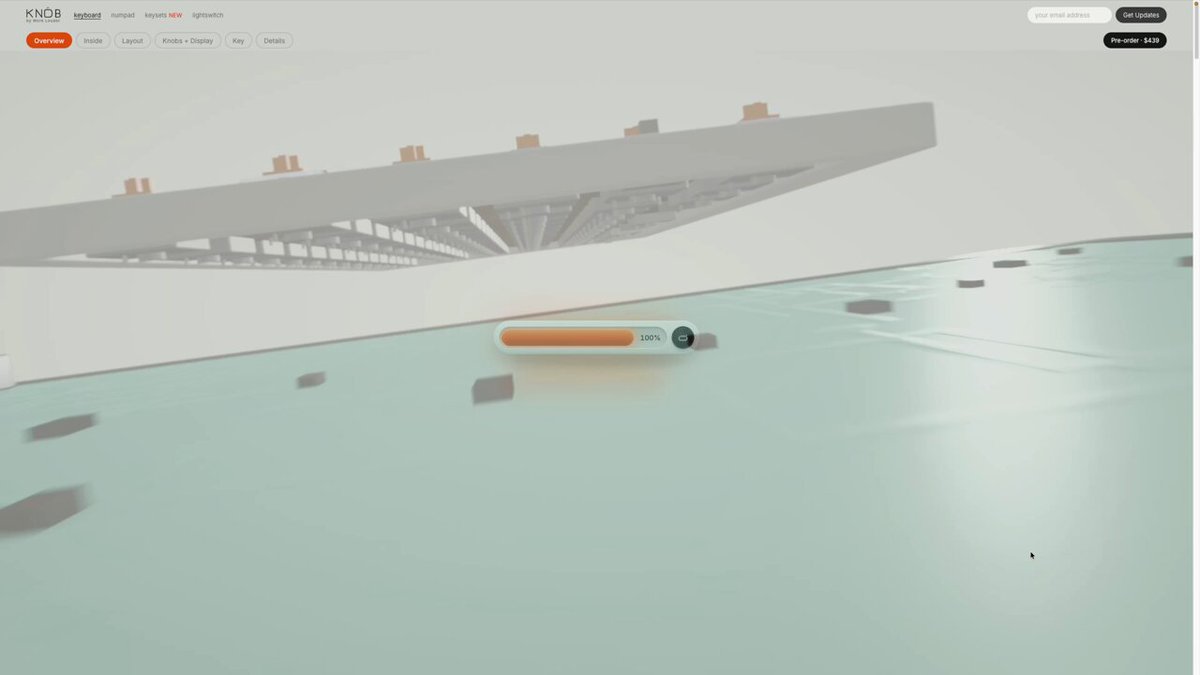
- Loader: a 160x18px white pill with an inner orange fill bar growing 0 -> 100% over 1600ms, cubic-bezier(.4,0,.2,1), with an orange glow (box-shadow 0 0 24px #E2552B80) and a small black dot button at its right end.
- Intro: camera starts low and close; about 70 keycaps fall onto the plate with gravity and a tiny bounce (each 500ms, stagger 12ms, random order), orange caps last; a slight camera pull-back 1400ms cubic-bezier(.22,1,.36,1).
- Chapter 2: the board settles at a 3/4 angle with the headline fading in and rising 16px over 500ms.
- Chapter 3, exploded view: scroll-scrubbed separation of 7 layers along Y (keycaps, switches, plate, PCB, foam, case top, case bottom), each offset by 40-60px world units, with labels drawing their leader lines as each layer arrives.
- Chapter 4, knob macro: camera dolly to the knobs and screen; rotating the knob (drag or scroll) advances a countdown on the screen with an orange fill gauge.
- Chapter 5: one key lifts and comes apart (cap, stem, spring, housing) with a 300ms stagger, then reassembles.
- Closing: wide shot with a launch headline and dark CTA pill, then the facts grid.

SECTIONS
1. Loader on blank studio.
2. Keycap rain intro.
3. Hero statement with the full keyboard.
4. Compact size chapter with side caption.
5. Exploded layers chapter with annotations.
6. Knob and screen timer macro.
7. Single key teardown.
8. Launch headline with CTA.
9. Facts grid and footer.

IMPLEMENTATION
- three.js or React Three Fiber with one GLB keyboard model split into named layer meshes; GSAP ScrollTrigger scrubs a master timeline for camera and layer offsets; keycap rain with a lightweight physics pass (or precomputed bounce curves) and InstancedMesh for caps.
- Lighting: soft studio environment map plus one directional key light with contact shadows; MeshPhysicalMaterial with transmission for the mint plate.
- Text and labels in HTML over the canvas, positioned from projected 3D anchor points.
- Performance: Draco/Meshopt compression, instancing, cap devicePixelRatio at 1.75, pause the render loop off-screen.
- prefers-reduced-motion: skip the rain and scrubbing, show each chapter as a still angle with simple crossfades; knob control also works with arrow keys and has a visible focus ring.

ADAPT TO THE PROJECT
Reuse the project's existing design tokens, components and fonts; map the colors above to the closest existing tokens. Never copy the original brand name, logo or product model: build or use a placeholder keyboard model and placeholder copy.

SUCCESS CHECK
- After the loader completes, keycaps visibly fall and settle onto the board before the hero headline appears.
- Scrolling through the exploded chapter separates at least 6 labeled layers and scrolling back reassembles them.
- Turning the knob (drag or arrow keys) changes the timer value on the on-device screen.