REFERENCE
- Gallery page: https://magpui.com/en/i/image-compressor-that-crumples-photos-6ce9ec
- First frame (image): https://dnioievkvxejjbxgwvko.supabase.co/storage/v1/object/public/media/image-compressor-that-crumples-photos-6ce9ec/shot.jpg
- Clip (mp4): https://dnioievkvxejjbxgwvko.supabase.co/storage/v1/object/public/media/image-compressor-that-crumples-photos-6ce9ec/clip.mp4
- Original post: https://x.com/gabriell_lab/status/2111073963719684163 by @gabriell_lab
Before building, download the first frame and look at it. If ffmpeg is available, download the clip and extract frames (ffmpeg -i clip.mp4 -vf fps=2 frame-%02d.png), then study the motion frame by frame. Match what you see; the text below describes it, the frames are the truth.

ASSETS
This needs real artwork, not shapes drawn in code. Use the files the user gives you (ask where they are). If you have an image generation tool, generate them with these prompts; otherwise leave clearly marked placeholders.
- retro compressor machine: Product render of a compact retro desktop machine, warm beige plastic body with a slightly darker top panel, a small dark rectangular display, a large glossy cobalt blue knob and a small red-orange round button, a wide horizontal slot along the bottom front edge, soft studio lighting from above, subtle soft shadow, front three-quarter view slightly from above, clean and minimal like 1980s Japanese electronics, transparent or plain white background, 16:9

BUILD:
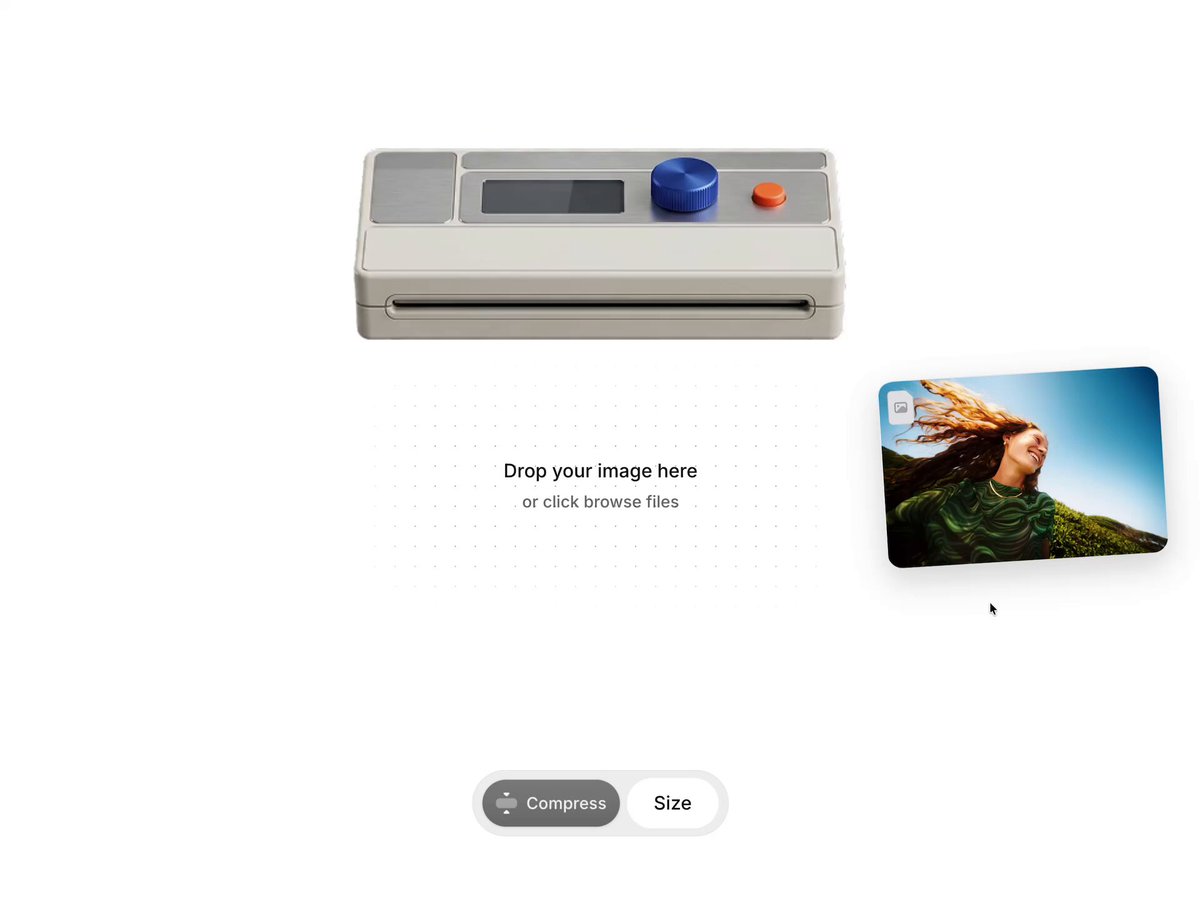
An image compression widget where the metaphor is literal. A beige retro desktop machine (small screen, big blue knob, red button, wide slot at the bottom) sits on a white canvas. Below it, an empty drop area says "Drop your image here / or click browse files". When the user drops or picks an image, a card of the photo glides up into the slot, then prints out of the slot as a photo with a white border. Pressing Compress makes the printed photo wrinkle and crumple inward, getting physically smaller and more creased while a size readout counts down (for example 58KB to 21KB). Playful, tactile, product-grade polish.

DESIGN SYSTEM:
- Canvas: #FFFFFF, widget centered, width 360px.
- Machine: rendered image asset, 340px wide, on top; slot line at its bottom edge is where the print emerges (the print is clipped by the slot so it appears to come out of it).
- Drop area: 300x200px under the machine, no border at rest; text 13px medium #111 and 11px #8A8A8A, centered. Drag-over state: 1px dashed #D0D0D0 border, radius 16px, background #FAFAFA.
- Dragged/selected photo card: 120x80px, radius 8px, tilted -6deg, shadow 0 16px 32px rgba(0,0,0,0.18), small file badge top-left.
- Printed photo: 160px wide, 10px white border, a faint diagonal stripe texture on the paper (repeating-linear-gradient(135deg, #F4F4F4 0 6px, #FFFFFF 6px 12px)), shadow 0 8px 24px rgba(0,0,0,0.10).
- Control pill under everything: height 32px, radius 999px, background #F2F2F2 with 1px #E6E6E6 border and soft shadow; left segment "Compress" button with an icon (12px medium, white text on #6E6E6E idle, #111 when ready), right segment shows "Size" or the current size in 12px medium #111.

MOTION:
- Drop: the photo card flies from the pointer to just under the slot: translate + rotate -6deg -> 0deg over 450ms cubic-bezier(0.34,1.56,0.64,1); shadow shrinks as it gets closer.
- Feed: card moves up into the slot (translateY -100%, clipped) over 350ms cubic-bezier(0.55,0,1,0.45); the machine shakes 1px for 200ms.
- Print: the photo slides down out of the slot over 900ms cubic-bezier(0.22,1,0.36,1), with a subtle 2px horizontal jitter at 30ms steps; the size label shows the original size ("58KB") with a 200ms fade.
- Compress (button press): the button presses (scale 0.96, 120ms). A thin orange #FF6A2B light pulses along the slot (opacity 0 -> 1 -> 0, 600ms, repeat while working). The print crumples over 1400ms cubic-bezier(0.65,0,0.35,1): its outline shrinks to about 75% width and 85% height, edges become irregular and wrinkle shading increases. The size counter tweens from 58KB to the real compressed size in the same 1400ms, rounding to integers.
- Done: counter does a small scale 1 -> 1.08 -> 1 pop over 240ms; the crumpled print sways gently (rotate +-1.5deg, 2400ms ease-in-out, infinite while hovered).

SECTIONS:
- Parts: machine image, slot clip area, drop zone with hidden file input, flying photo card, printed photo (crumple surface), control pill (Compress button + size readout).
- States: empty, drag-over, dropped (card flying), feeding, printed (original size), compressing, compressed (new size), error (unsupported file: card shakes and returns, readout says "Images only").

IMPLEMENTATION:
- Crumple: render the print as a WebGL plane with a dense grid (64x64) in OGL or three.js. In the vertex shader, displace vertices with fractal noise scaled by a uCrumple uniform (0 -> 1) and pull them toward the center to shrink the outline; compute normals from the displacement and light them with one directional light so creases read. Animate uCrumple with GSAP alongside the counter.
- Everything else (drop, feed, print, counter) with GSAP timelines on DOM elements: transforms and opacity only.
- Real compression: use the browser canvas (toBlob with image/webp or image/jpeg and a quality value) or an existing compression util, and drive the counter with the real before/after byte sizes.
- Accessibility: the drop zone is a labelled button that opens the file input; Enter/Space work; the size readout is aria-live=polite; Compress is a real button disabled until an image is loaded.
- prefers-reduced-motion: no fly or crumple; show the print and the final size with 200ms fades, and render the compressed print as a flat image with a static wrinkle texture.
- Performance: one WebGL canvas only, created on first drop; cap devicePixelRatio at 2; pause the render loop when idle.

ADAPT TO THE PROJECT:
Reuse the project's existing design tokens, components and fonts, its button and pill styles, and map grays, blue and orange to the closest existing color tokens. Never copy logos, brand names, photos or illustrations from the original: use the generated machine asset and a placeholder photo.

SUCCESS CHECK:
- Dropping an image makes the card fly into the slot and come back out as a bordered print showing its real file size.
- Pressing Compress crumples the print with visible creases while the counter tweens to the real compressed size.
- The whole flow works by keyboard and screen readers hear the new size; with reduced motion it is a simple fade.