REFERENCE
- Gallery page: https://magpui.com/en/i/floating-collage-welcome-modal-df141d
- First frame (image): https://dnioievkvxejjbxgwvko.supabase.co/storage/v1/object/public/media/floating-collage-welcome-modal-df141d/shot.jpg
- Clip (mp4): https://dnioievkvxejjbxgwvko.supabase.co/storage/v1/object/public/media/floating-collage-welcome-modal-df141d/clip.mp4
- Original post: https://x.com/dsgn_aleksei/status/2112558512362418250 by @dsgn_aleksei
Before building, download the first frame and look at it. If ffmpeg is available, download the clip and extract frames (ffmpeg -i clip.mp4 -vf fps=2 frame-%02d.png), then study the motion frame by frame. Match what you see; the text below describes it, the frames are the truth.

ASSETS
This needs real artwork, not shapes drawn in code. Use the files the user gives you (ask where they are). If you have an image generation tool, generate them with these prompts; otherwise leave clearly marked placeholders.
- Abstract artwork thumbnails: A contact sheet of eight unrelated small editorial art thumbnails: a landscape, folded fabric, abstract colorful shapes, botanical detail and textured sculpture. Mix photographic and graphic treatments, restrained soft lighting, no words, no logos, each isolated on a plain background with clean rectangular edges. 4:3 sheet, separable tiles for a floating creative-workspace collage.

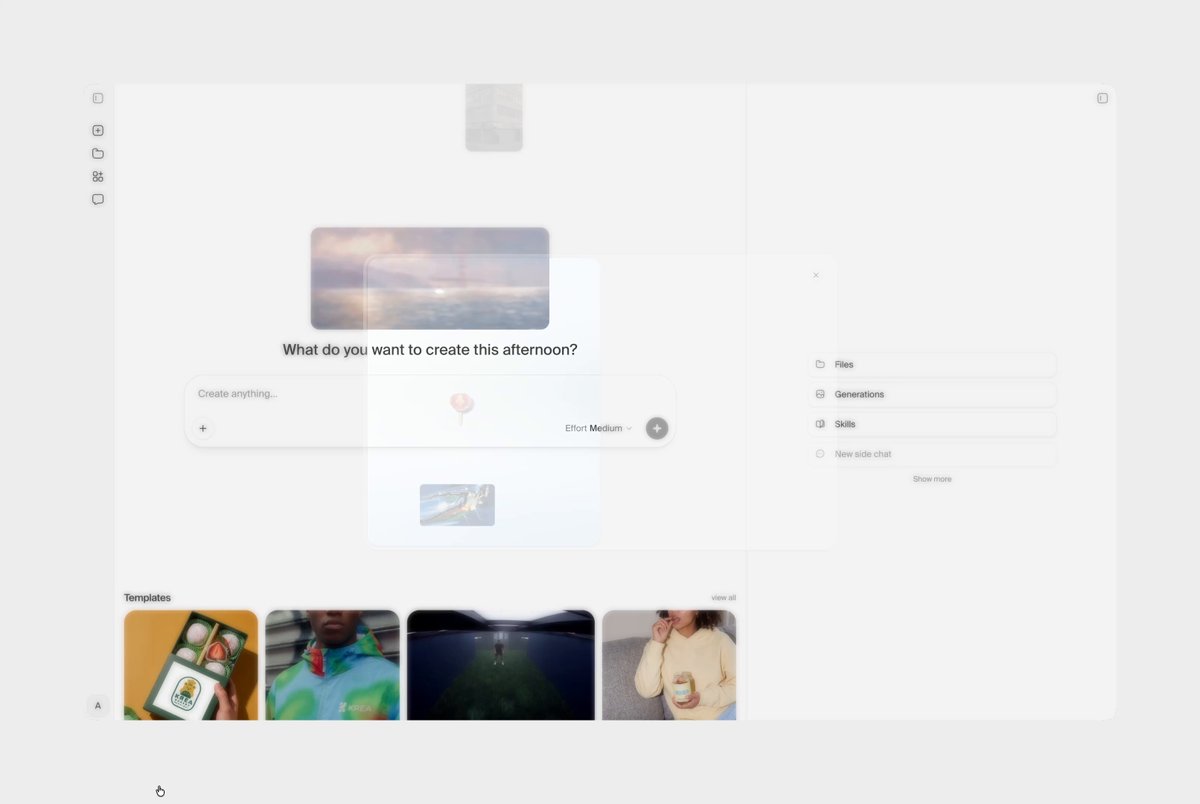
BUILD: Build only a centered welcome modal for a creative workspace. Use a pale-blue animated preview on the left and a calm white welcome message on the right. Small artwork cards drift through and beyond the preview, while the copy and primary action remain still and easy to read. The underlying workspace is washed out by a light overlay.

DESIGN SYSTEM: At desktop size target a 600px-wide, 370px-tall dialog split into equal columns, with a 12px outer radius. Use a white #FFFFFF surface, a very soft shadow and a left-panel gradient from #F2F8F7 to #C7E8F3. Keep the right panel padded by 26px. Use the project's neutral sans-serif: 17px semibold heading, 12px supporting copy, 11px utility labels. Center the welcome copy vertically in the right column; place a small secondary control at the bottom left and a compact black #151515 primary button at the bottom right. Add a small close control in the top-right corner. In the left panel place a slim white prompt-like strip with a dark circular action at its right edge. Surround it with differently sized image tiles, roughly 24-90px wide, with 3-6px corner radii. Keep the collage asymmetrical and allow selected tiles to extend beyond the modal silhouette.

MOTION: The sampled frames show the collage changing position around an otherwise stationary modal. For the rebuild, use these tuning targets rather than claiming exact source timing: fade the overlay in over 220ms and bring the dialog from opacity 0 and scale .98 to 1 over 300ms, cubic-bezier(.22,1,.36,1). Drift individual collage tiles vertically by 40-100px with small horizontal offsets over 5000-9000ms, stagger starts by 150-450ms, cubic-bezier(.45,0,.55,1), alternating direction. Fade tiles at the edges rather than making them pop. Keep the welcome text, close button and primary CTA static. Button hover darkens over 120ms, cubic-bezier(.2,0,0,1).

SECTIONS: Component parts only: washed-out workspace backdrop; two-column dialog; left gradient preview with floating image collage and a white prompt strip; right welcome heading and short explanatory copy; close control; secondary and primary footer actions. Show focus and pressed states for buttons. The visible sequence remains on the welcome view; do not invent extra onboarding steps or tool-connection screens.

IMPLEMENTATION: Use semantic dialog markup and Motion for independent tile transform/opacity loops and modal entrance. Render artwork from replaceable local placeholders, not copied source images. Keep the animated tile count below 16; animate transforms and opacity only and stop animation while the dialog is closed or offscreen. Use a separate pointer-events-none decorative layer for overflow tiles, behind the right-hand copy. Trap focus, support Escape, label the dialog, restore focus on close and show a clear keyboard focus ring. With prefers-reduced-motion use a static collage and an immediate dialog appearance. Below 640px use a single-column dialog with a 160px-high preview and keep all controls within the viewport.

ADAPT TO THE PROJECT: Reuse the project's existing tokens, dialog primitives, buttons and fonts; map these approximate colors to the nearest existing tokens. Never copy logos, brand names, photos or illustrations from the original; use replaceable placeholders.

SUCCESS CHECK:
- Floating tiles visibly change position without shifting the modal text or covering the primary action.
- The dialog works at 360px and 1280px viewport widths with no horizontal page overflow.
- Keyboard focus stays inside the modal, Escape closes it, and reduced-motion produces a readable static composition.