REFERENCE
- Gallery page: https://magpui.com/en/i/file-dashboard-with-layered-folders-ee6f5d
- First frame (image): https://dnioievkvxejjbxgwvko.supabase.co/storage/v1/object/public/media/file-dashboard-with-layered-folders-ee6f5d/shot.jpg
- Clip (mp4): https://dnioievkvxejjbxgwvko.supabase.co/storage/v1/object/public/media/file-dashboard-with-layered-folders-ee6f5d/clip.mp4
- Original post: https://x.com/seanaiux/status/2115162868039442861 by @seanaiux
Before building, download the first frame and look at it. If ffmpeg is available, download the clip and extract frames (ffmpeg -i clip.mp4 -vf fps=2 frame-%02d.png), then study the motion frame by frame. Match what you see; the text below describes it, the frames are the truth.

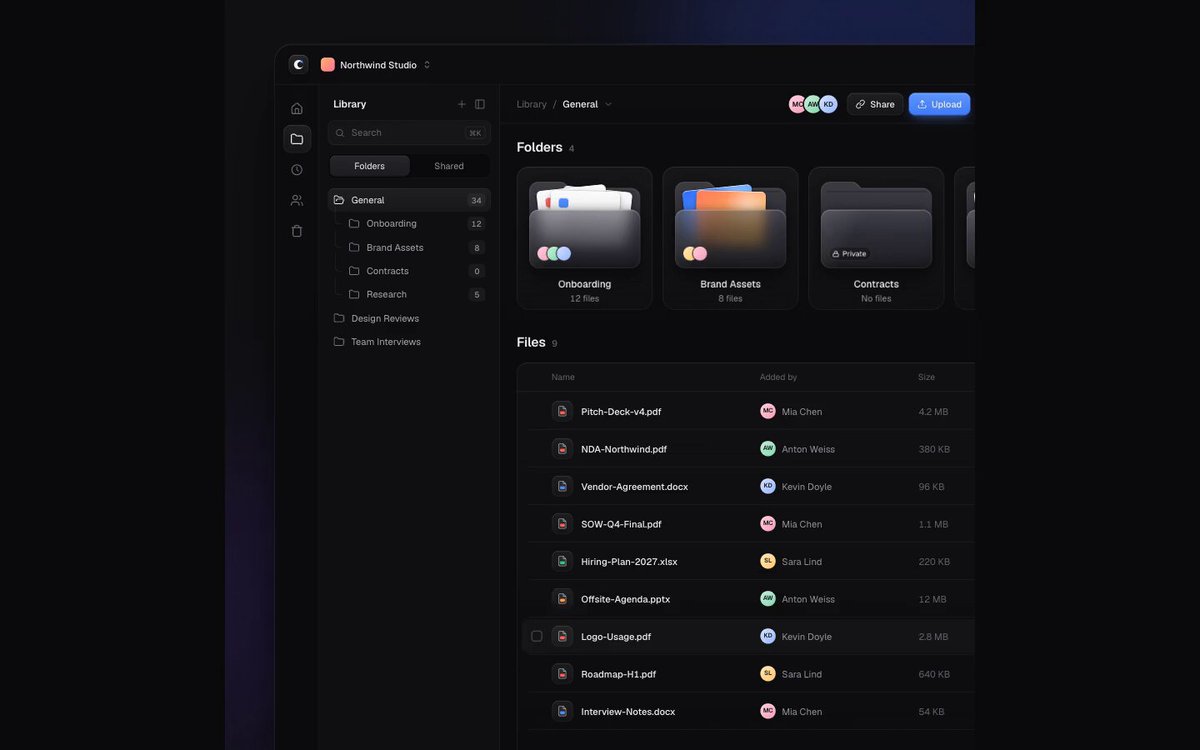
BUILD: Build a compact dark file-manager dashboard with a narrow icon rail, folder sidebar, three layered folder preview cards and a dense file table. Make folder contents feel tangible without losing the precision of a productivity UI.
DESIGN SYSTEM: Use a near-black #101113 background, raised #191B20 panels, fine #2A2D33 borders, muted #888D98 labels, white #ECEEF4 primary text and #5679FF selection accents. Use a neutral sans-serif, 12px table labels, 14px navigation and 18px section headings. Use an approximately 48px icon rail and 180px sidebar; let the content fill the remaining width. Folder cards have 12px radii, soft shadows and overlapping document tabs protruding above their front surface. Use 16-24px section gaps and 36px table rows.
MOTION: Suggested recreation timing: on folder hover raise the stacked preview sheets 6px over 220ms with cubic-bezier(0.22,1,0.36,1), staggering sheets by 25ms. On file selection fade the blue row tint and checkbox in over 140ms with cubic-bezier(0.2,0,0,1). Show the floating bottom action bar with an 8px upward translation and opacity over 180ms using cubic-bezier(0.22,1,0.36,1). Keep these implementation timings adjustable rather than treating them as measured source timings.
SECTIONS: Left icon rail; folder navigation with active blue row; top toolbar with overlapping collaborator avatars and blue primary action; Folders heading and three preview cards; Files heading and table with file names, small type icons, owner avatars and dates. Include idle, hovered folder, focused control, selected file and multi-selection states. The selection state exposes a compact bottom action toolbar.
IMPLEMENTATION: Use React with Motion for coordinated card layers and the contextual toolbar. Keep document previews as CSS rectangles and generic icons. Use semantic navigation and a real table, labelled checkboxes, visible keyboard focus, and Escape to clear selection. On narrow screens collapse navigation and allow horizontal table scrolling. Respect prefers-reduced-motion by removing translations and staggers. Animate only opacity and transforms; avoid expensive full-screen effects.
ADAPT TO THE PROJECT: Reuse existing design tokens, components and fonts; map the palette to the closest existing tokens. Never copy original logos, brand names, photos or illustrations; use generic labels and placeholder avatars.
SUCCESS CHECK:
- Three folder cards visibly contain layered document previews.
- Keyboard selection and pointer selection expose the same contextual actions.
- The dense dark table remains legible and reduced-motion mode removes decorative movement.