REFERENCE
- Gallery page: https://magpui.com/en/i/faq-with-chat-bubble-answers-2cd53d
- First frame (image): https://dnioievkvxejjbxgwvko.supabase.co/storage/v1/object/public/media/faq-with-chat-bubble-answers-2cd53d/shot.jpg
- Clip (mp4): https://dnioievkvxejjbxgwvko.supabase.co/storage/v1/object/public/media/faq-with-chat-bubble-answers-2cd53d/clip.mp4
- Original post: https://www.rareui.com/components/faq by Rare UI
Before building, download the first frame and look at it. If ffmpeg is available, download the clip and extract frames (ffmpeg -i clip.mp4 -vf fps=2 frame-%02d.png), then study the motion frame by frame. Match what you see; the text below describes it, the frames are the truth.

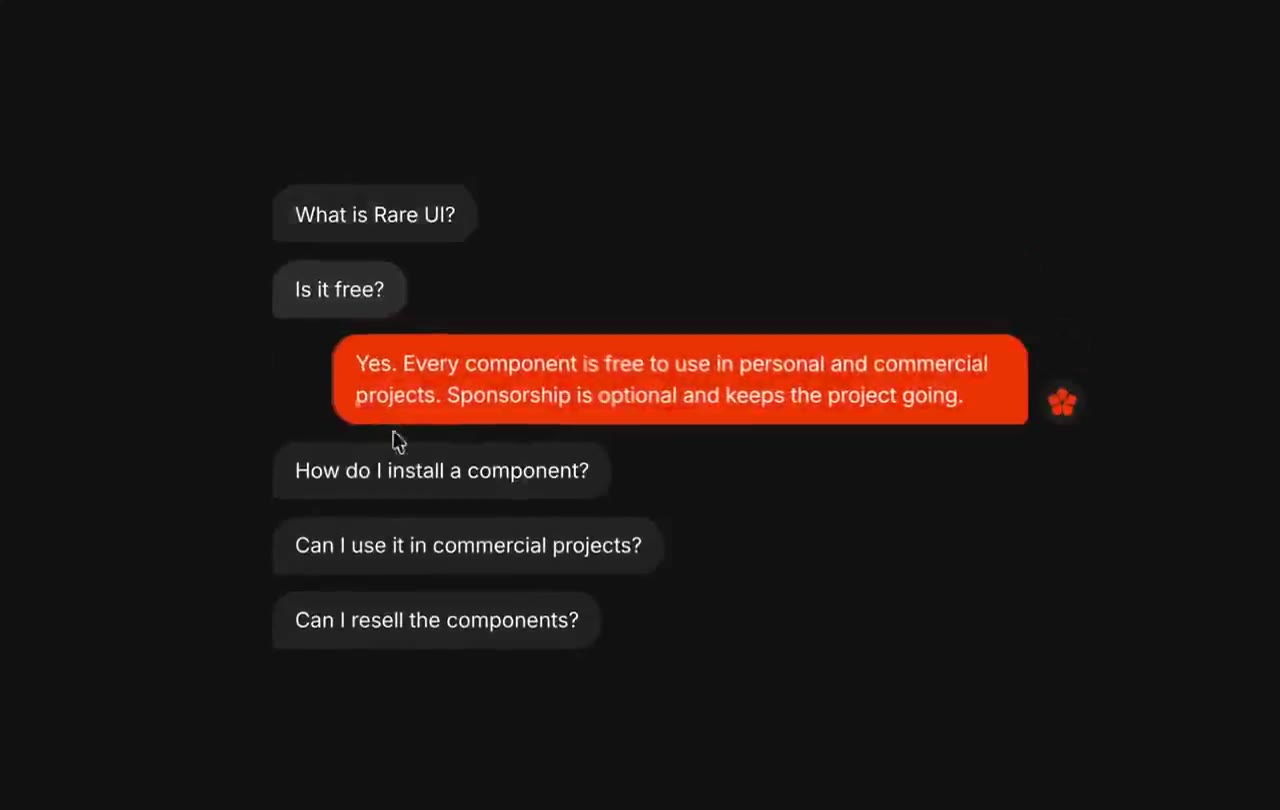
BUILD: Build a compact conversational FAQ component, not a full page. Five small dark question chips form a left-aligned vertical stack. Opening one inserts a vivid orange answer bubble below it, slightly indented, with a small orange star-like mark outside its right edge. Only one answer is visible at a time.
DESIGN SYSTEM: Use a near-black #101010 surface, charcoal #242424 question chips, off-white #EEEEEE text and orange-red #F13B0B answers. Suggested component width 440px, question text 13px and answer text 13px with 18px line height, neutral sans serif. Chips size to content with 8px horizontal and 6px vertical padding, 7px corners and 6px gaps. Answer width up to 360px, 12px padding, 10px corners, 32px left indentation; place a 14px decorative star 10px beyond its right edge near the bottom.
MOTION: On question activation, smoothly insert or remove its answer and move subsequent chips into their new vertical positions. Suggested reconstruction timing: height and layout 280ms, opacity 160ms, translateY from 6px to 0 over 220ms, cubic-bezier(0.22,1,0.36,1). No looping animation.
SECTIONS: Five question buttons; closed state shows only the chip. Active state places the answer beneath that chip with the orange accent mark. Switching questions collapses the prior answer and expands the new one without detaching the surrounding stack. Hover lightens the chip slightly; pressed state reduces scale to 0.98.
IMPLEMENTATION: Use React and Motion layout animations with AnimatePresence for answer entrances and exits. Keep data separate from rendering and use stable question keys. Use aria-expanded, aria-controls and labeled answer regions; support Enter/Space and visible keyboard focus. Under prefers-reduced-motion, switch states instantly. Animate only this short stack and avoid large blur filters.
ADAPT TO THE PROJECT: Reuse existing design tokens, components and fonts; map the estimated colors to the closest project tokens. Never copy logos, brand names, photos or illustrations from the original; use neutral placeholder FAQ copy and a simple geometric accent.
SUCCESS CHECK:
- Only one answer is expanded and it stays directly beneath its question.
- The orange bubble is indented while question chips keep a shared left edge.
- Keyboard activation, narrow-screen wrapping and reduced-motion behavior work without overflow.