REFERENCE
- Gallery page: https://magpui.com/en/i/document-folding-into-a-spatial-canvas-d065ec
- First frame (image): https://dnioievkvxejjbxgwvko.supabase.co/storage/v1/object/public/media/document-folding-into-a-spatial-canvas-d065ec/shot.jpg
- Clip (mp4): https://dnioievkvxejjbxgwvko.supabase.co/storage/v1/object/public/media/document-folding-into-a-spatial-canvas-d065ec/clip.mp4
- Original post: https://x.com/movindesign_/status/2106761488434094118 by @movindesign_
Before building, download the first frame and look at it. If ffmpeg is available, download the clip and extract frames (ffmpeg -i clip.mp4 -vf fps=2 frame-%02d.png), then study the motion frame by frame. Match what you see; the text below describes it, the frames are the truth.

BUILD
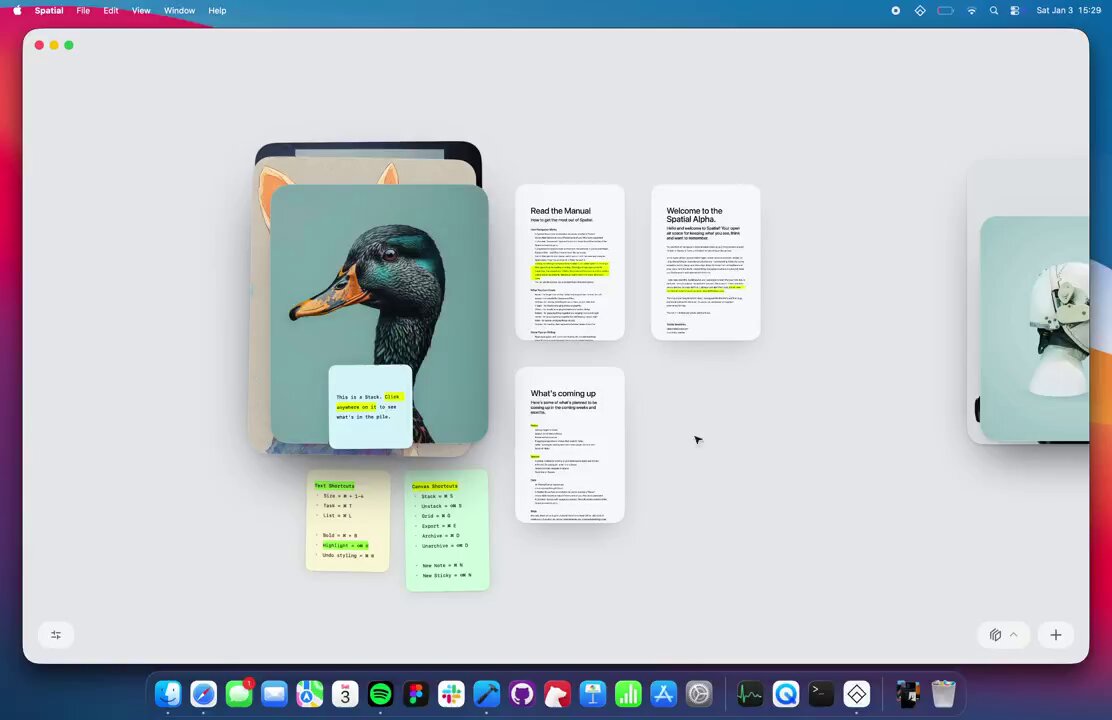
A view transition where a single long document collapses into a spatial canvas: each block of the document (image, paragraph, highlight, sticky note) flies to its own position as a floating card, with soft depth and parallax. Toggling back reassembles the document.

DESIGN SYSTEM
- Canvas #ECECEC, cards #FFFFFF with 10px radius and a soft shadow 0 12px 32px rgba(0,0,0,.12).
- Document column 640px, serif-free sans 16px body, 28px title.
- Highlights in #E8FF6B, sticky notes #F4F9C8.

MOTION
- Collapse: each block animates from its document rect to its canvas rect (FLIP), 700ms, cubic-bezier(0.22, 1, 0.36, 1), staggered 30ms from top to bottom.
- During the flight cards scale 0.92 and gain shadow, then settle to scale 1.
- Canvas pans with drag and inertia; cards at different depths move at 0.9x/1x/1.1x for parallax.

SECTIONS
- Document view: title, paragraphs, images, inline highlights.
- Canvas view: the same blocks as cards, images larger, notes as small tilted stickies.
- A toggle button bottom right.

IMPLEMENTATION
- Use the FLIP technique: measure both layouts, animate transforms only (Framer Motion layoutId works well).
- Keep the canvas a single transformed layer; virtualize cards off screen.
- prefers-reduced-motion: skip the animation and show the end state.

ADAPT TO THE PROJECT
- Reuse the project's existing tokens, components and fonts; map colors to the closest existing tokens.
- Do not copy logos, brand names, characters or artwork from the reference. Use neutral placeholders.

SUCCESS CHECK
- Every block lands in a stable position every time.
- Only transform and opacity animate (no layout thrash).
- Toggling back restores the exact document scroll position.