REFERENCE
- Gallery page: https://magpui.com/en/i/distance-ring-with-synced-counter-4e0dee
- First frame (image): https://dnioievkvxejjbxgwvko.supabase.co/storage/v1/object/public/media/distance-ring-with-synced-counter-4e0dee/shot.jpg
- Clip (mp4): https://dnioievkvxejjbxgwvko.supabase.co/storage/v1/object/public/media/distance-ring-with-synced-counter-4e0dee/clip.mp4
- Original post: https://60fps.design/shots/runmo-distance-wheel-fill-interaction by Runmo
Before building, download the first frame and look at it. If ffmpeg is available, download the clip and extract frames (ffmpeg -i clip.mp4 -vf fps=2 frame-%02d.png), then study the motion frame by frame. Match what you see; the text below describes it, the frames are the truth.

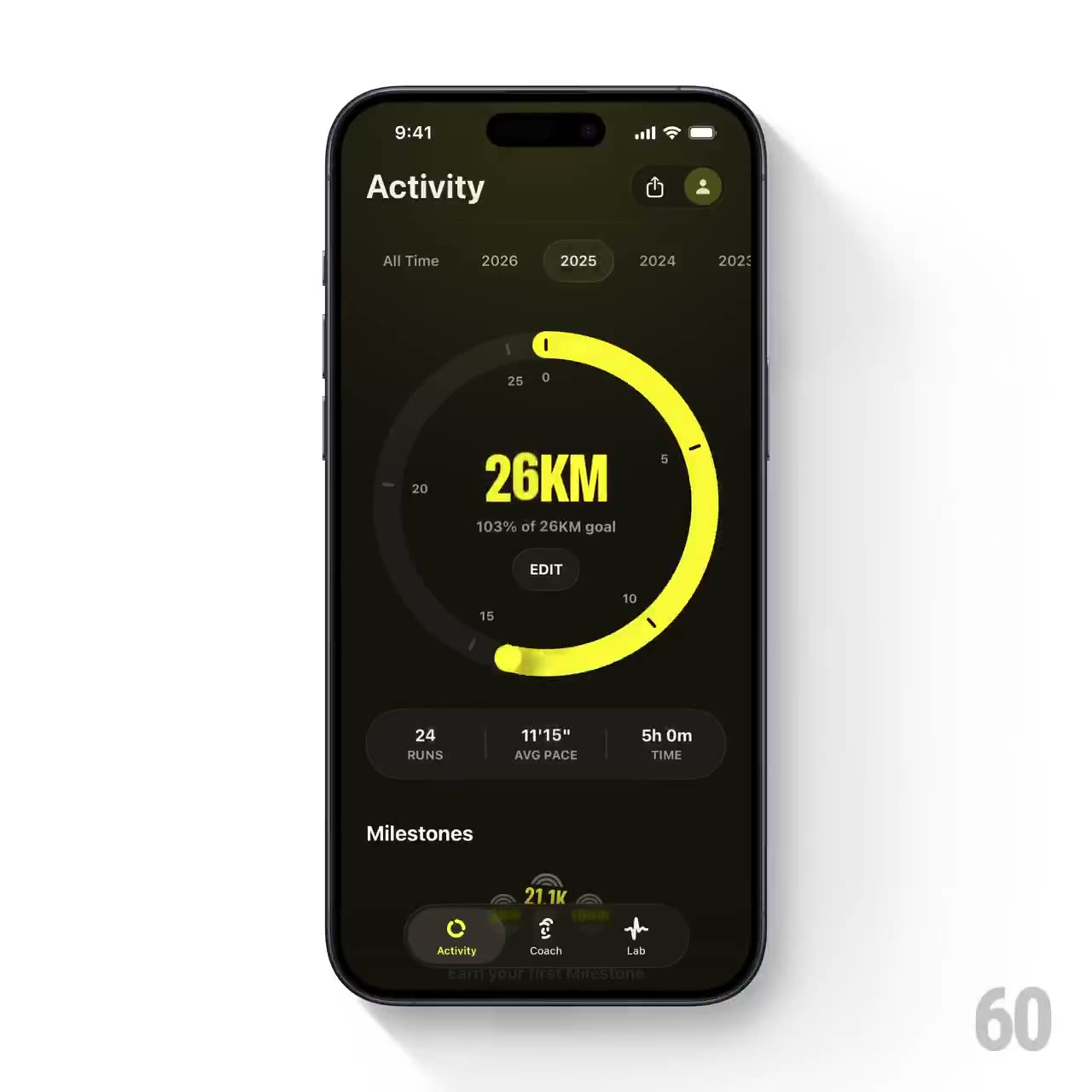
BUILD: Build a compact distance-progress widget with year tabs, a bright circular progress ring and a large synchronized kilometer counter. Rebuild only this widget, not the surrounding mobile app or device frame.
DESIGN SYSTEM: Around 340px wide, dark olive-black #17180E surface, muted #292B1B circular track and vivid yellow #EAF51B progress stroke. A 250px diameter ring with 16px stroke, rounded caps, inner tick marks and small numerical markers. Center a 38px heavy condensed sans distance value with KM suffix; add a 10px muted goal caption and small Edit button underneath. Year navigation uses 11px labels and a subtle active pill. A three-column summary sits below.
MOTION: On initial entry animate ring stroke-dashoffset from empty to progress and count distance from zero over approximately 850ms with cubic-bezier(0.22,1,0.36,1). On selecting a year retarget both values from their current states over 650ms; crossfade the goal and summary over 180ms. Keep ring, labels and counter centered without bouncing or rotation. Durations are suggested rebuild settings.
SECTIONS: Year tabs with All time option; circular chart with numerical ticks; distance and goal text; Edit action; static three-column summary. Include selected, transitioning and focus states.
IMPLEMENTATION: Use an SVG circle with normalized pathLength and Motion to synchronize progress and numeric interpolation; cap a completed ring at 100 percent while permitting a larger numeric total. Preserve a stable tabular-number text box. Use accessible tab semantics, arrow-key navigation, focus rings and a concise final-value announcement; do not announce every animated increment. Reduced motion updates values immediately.
ADAPT TO THE PROJECT: Reuse existing design tokens, components and fonts. Map these colors to nearby project tokens. Never copy logos, brand names, photos or illustrations; use neutral placeholder content.
SUCCESS CHECK:
- Motion remains smooth without layout jumps at mobile widths.
- All controls work with keyboard and visible focus.
- Reduced-motion mode preserves readable data without continuous animation.