REFERENCE
- Gallery page: https://magpui.com/en/i/3d-pop-up-book-carousel-16a77f
- First frame (image): https://dnioievkvxejjbxgwvko.supabase.co/storage/v1/object/public/media/3d-pop-up-book-carousel-16a77f/shot.jpg
- Clip (mp4): https://dnioievkvxejjbxgwvko.supabase.co/storage/v1/object/public/media/3d-pop-up-book-carousel-16a77f/clip.mp4
- Original post: https://x.com/techartist_/status/2116407421065482362 by @techartist_
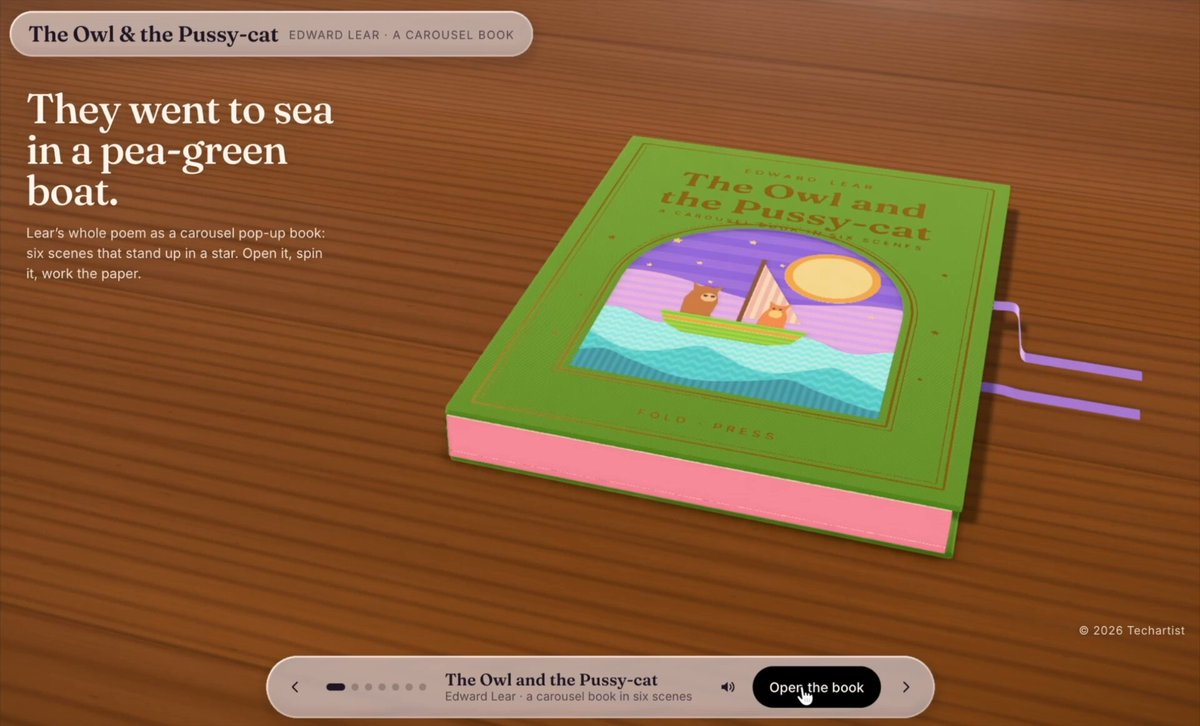
Before building, download the first frame and look at it. If ffmpeg is available, download the clip and extract frames (ffmpeg -i clip.mp4 -vf fps=2 frame-%02d.png), then study the motion frame by frame. Match what you see; the text below describes it, the frames are the truth.

ASSETS
This needs real artwork, not shapes drawn in code. Use the files the user gives you (ask where they are). If you have an image generation tool, generate them with these prompts; otherwise leave clearly marked placeholders.
- Pop-up scene layers: Layered paper-cut diorama pieces for a children's pop-up book scene: backdrop with a pastel sky, a striped lighthouse, a wavy sea, two small cartoon animal characters, each as a separate cut-out with a thin darker edge, flat colors in purple, teal, coral and yellow, soft paper texture, transparent background, 4:3 aspect ratio
- Wood table texture: Seamless warm dark wood-grain tabletop texture, top-down, soft studio lighting, subtle vignette, 16:9

BUILD
A 3D pop-up storybook carousel. A closed book with a green cover opens on load; each page spread then shows a layered paper-cut diorama (a backdrop, a midground and a foreground, all standing upright like a pop-up book) with a short stanza of text on the facing page. The user steps through scenes with a bottom control bar and the book pivots, the spread folds and the next scene rises into place. It should feel tactile, warm and handmade.

DESIGN SYSTEM
- Stage: dark warm wood-grain table texture, background gradient #3A2418 to #1E120B, soft vignette; the book sits centered with a slight top-down 3/4 perspective (perspective 1400px).
- Pages: cream paper #F6E7CF with subtle grain; scene layers are flat illustrated cut-outs in purple #7C4DFF, magenta #C84BD6, teal #2BC4B4, coral #FF7A59, yellow #FFD54F, with 2-3px darker edges and a soft drop shadow between layers to fake paper thickness.
- Typography: a literary serif for stanza text (16-18px, line-height 1.5, ink #3B2A20), a small caps sans for the chapter label and counter (11-12px, letter-spacing .08em).
- Caption card: frosted glass, rgba(255,255,255,.55) with 16px backdrop blur, 14px radius, 1px white 40% border, shadow 0 12px 30px rgba(0,0,0,.25).
- Control bar: pill, 56px high, rgba(255,255,255,.7) blur, with prev/next arrows, a dot or segment progress, the scene title, a dark pill primary button and a sound toggle icon button. Top bar: title left, small pill counter right.

MOTION
- Book open: cover rotates around the left spine from 0 to -165deg on rotateY, 1200ms, cubic-bezier(.65,0,.35,1).
- Scene change: current layers drop back (translateZ -80px to 0, opacity to 0) over 450ms; the next layers rise from translateY 40px / rotateX 35deg to upright, staggered back to front by 90ms, 700ms each, cubic-bezier(.22,1,.36,1), with a slight overshoot on the foreground layer.
- Page fold: the right page flips over its spine, 900ms, cubic-bezier(.45,0,.2,1), with a shading gradient moving across it.
- Parallax: on pointer move, each layer shifts by depth x 6-14px and the whole book tilts up to 4deg, smoothed with lerp 0.08.
- Caption card: fades and slides up 12px, 350ms, 200ms after the scene lands.
- Ambient: foreground characters bob (translateY 0 to -4px, 3.2s ease-in-out, infinite, offset per element).

SECTIONS
- Top bar: book title, chapter label, counter.
- Stage: the 3D book with the cover state and the open spread (left page text, right page diorama).
- Floating caption card with the current stanza, with a magnify icon at its left that enlarges the text on click.
- Bottom control bar: previous, progress dots, scene title, primary button (Open / Next / Finish), sound toggle.
- States: closed, opening, idle on a scene, transitioning, last scene (button turns into Restart).

IMPLEMENTATION
- Three.js with React Three Fiber (or CSS 3D transforms for a lighter version): each scene is a stack of textured planes at different z depths with a shared shadow material; pages are bent planes animated with GSAP or Motion timelines.
- Keep illustrations as SVG or PNG with alpha, maximum 2048px, lazy-load the next scene while the current one is idle.
- prefers-reduced-motion: no fold or parallax, cross-fade between scenes in 250ms.
- Keyboard: left/right arrows change scene, Enter or Space triggers the primary button, visible focus rings (2px, #FFD54F) on every control; the caption text stays real DOM text for screen readers, with aria-live polite on scene change.
- Performance: cap pixel ratio at 2, pause rendering when the tab is hidden, target 60fps on a mid laptop.

ADAPT TO THE PROJECT
Reuse the project's existing design tokens, components and fonts; map the colors to the closest existing tokens. Never copy logos, brand names, photos, characters, the poem text or the illustrations from the original; use placeholder cut-out shapes and your own sample text.

SUCCESS CHECK
- The scene layers show clear depth and parallax, and stepping through scenes feels like pop-up pages rising, with no layer popping or z-fighting.
- Controls, arrow keys and the caption text all work and stay legible over every scene.
- With reduced motion enabled the carousel still works through simple cross-fades.