REFERENCE
- Gallery page: https://magpui.com/en/i/3d-option-wheel-picker-efb53d
- First frame (image): https://dnioievkvxejjbxgwvko.supabase.co/storage/v1/object/public/media/3d-option-wheel-picker-efb53d/shot.jpg
- Clip (mp4): https://dnioievkvxejjbxgwvko.supabase.co/storage/v1/object/public/media/3d-option-wheel-picker-efb53d/clip.mp4
- Original post: https://x.com/cabralorenzo/status/2116111013502472331 by @cabralorenzo
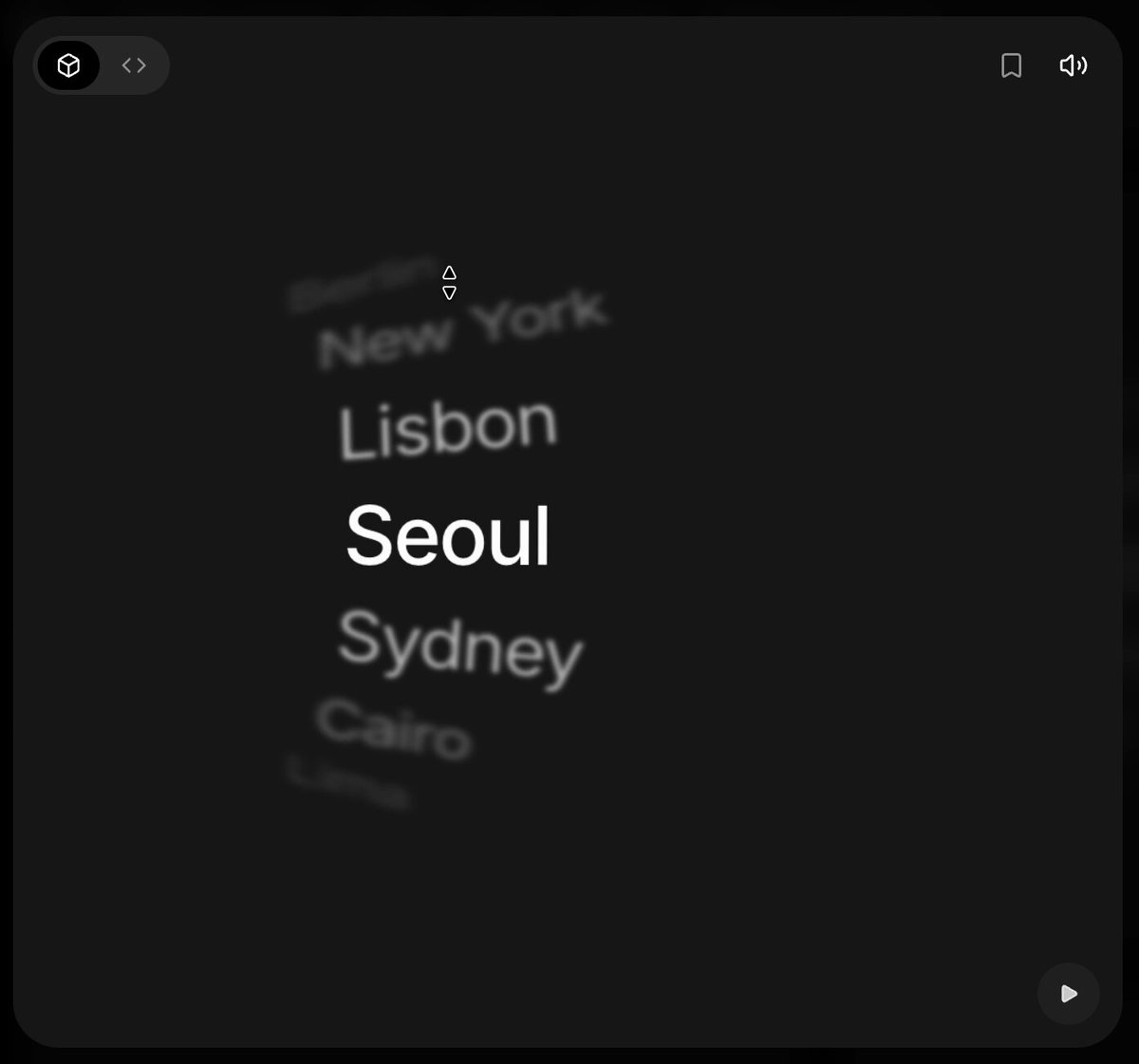
Before building, download the first frame and look at it. If ffmpeg is available, download the clip and extract frames (ffmpeg -i clip.mp4 -vf fps=2 frame-%02d.png), then study the motion frame by frame. Match what you see; the text below describes it, the frames are the truth.

BUILD
A single interactive option wheel: a vertical list of options (example: city names) wrapped around an invisible 3D cylinder that is slightly tilted, like a drum seen from a little to the side. The selected option sits in the center, large, white and sharp; neighbours rotate back on the drum, get smaller, dimmer and progressively blurred, and the farthest rows fade into the dark. Drag, scroll or use arrow keys to spin it; on release it glides and snaps to the nearest option. It should feel tactile and calm, like a physical dial.

DESIGN SYSTEM
- Stage: square card about 320x320px, background #1A1A1A, radius 20px, subtle inner border rgba(255,255,255,.04).
- Typography: a clean neo-grotesk sans, selected item 28px weight 500, others 22px, left-aligned in a column offset about 30% from the left edge.
- Colors: selected #FFFFFF; first neighbours #BDBDBD; second #7A7A7A; outer rows #4A4A4A fading to transparent.
- Drum: item pitch 34px, about 18 degrees per item, 9-11 rows rendered, perspective 600px, whole wheel rotated about rotateY(-14deg) rotateZ(-4deg) so rows tilt and the edges skew.
- Depth: blur 0px at center, 1px first ring, 2.5px second, 4px+ outer; opacity 1, .8, .5, .2.

MOTION
- Drag or wheel input maps directly to drum rotation (1px pointer = 0.5deg), no lag while held.
- Release: inertial glide with friction, then snap to nearest item, about 380ms, cubic-bezier(.22,1,.36,1).
- Selection change: the new center item scales 0.86 to 1 and brightens over 220ms, cubic-bezier(.2,.8,.2,1); blur and opacity of every row are derived from its angle every frame, so they update continuously.
- Arrow keys: one item per press, 260ms, same easing; Page Up/Down jump 5 items.
- Optional: soft tick haptic sound per item (muted by default, toggle in the corner).

SECTIONS
Parts: stage card, drum container, item rows, optional center highlight band (invisible), optional small toolbar icons top corners. States: idle, dragging (cursor grabbing), gliding, snapped, focus-visible, disabled item (skipped by snap).

IMPLEMENTATION
Use transform-style: preserve-3d with each row placed by rotateX(angle) translateZ(radius); compute angle from a single rotation value updated with requestAnimationFrame and a spring (Motion's useSpring or a small custom spring). Expose as an accessible listbox (role listbox, aria-activedescendant) with keyboard support; wheel events are passive where possible. Limit filter blur to visible rows only, use will-change: transform on the drum, and fall back to no blur on low-power devices. prefers-reduced-motion: no inertia, instant snap with a 120ms opacity crossfade.

ADAPT TO THE PROJECT
Reuse the project's existing font, color tokens and radius scale; map the grays to the closest neutrals. Use placeholder options (cities, times, sizes). Do not copy any logos, brand names or images from the original.

SUCCESS CHECK
- Dragging or scrolling spins the drum smoothly and it always snaps to exactly one centered option.
- Rows away from center visibly curve, shrink, dim and blur in proportion to their distance.
- The picker works with arrow keys, announces the selected option to screen readers and respects reduced motion.