REFERENCE
- Gallery page: https://magpui.com/en/i/weekly-scheduler-for-agent-runs-c9bb7d
- First frame (image): https://dnioievkvxejjbxgwvko.supabase.co/storage/v1/object/public/media/weekly-scheduler-for-agent-runs-c9bb7d/shot.jpg
- Clip (mp4): https://dnioievkvxejjbxgwvko.supabase.co/storage/v1/object/public/media/weekly-scheduler-for-agent-runs-c9bb7d/clip.mp4
- Original post: https://x.com/flohoeller/status/2116460582761107641 by @flohoeller
Before building, download the first frame and look at it. If ffmpeg is available, download the clip and extract frames (ffmpeg -i clip.mp4 -vf fps=2 frame-%02d.png), then study the motion frame by frame. Match what you see; the text below describes it, the frames are the truth.

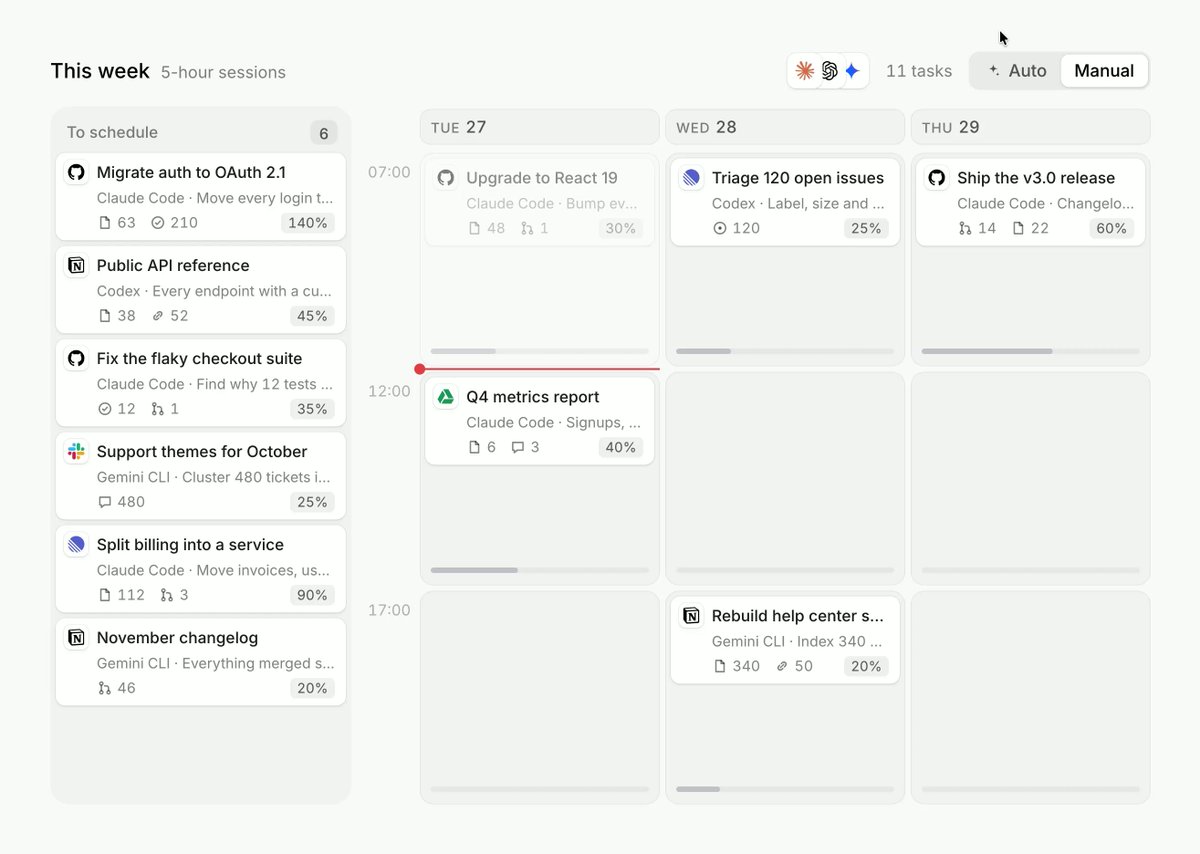
BUILD: A weekly scheduling board for AI agent tasks that must fit inside usage-limit sessions (for example 5-hour windows). A left column 'To schedule' holds task cards; the board shows a few day columns split into session slots by time. An Auto / Manual segmented toggle at top right: Auto flies every unscheduled card into the best free slot, Manual lets you drag cards from the list into a day and between days. A red horizontal line marks the current time. It should feel tidy and satisfying, like a good calendar, with a matching dark theme.

DESIGN SYSTEM: Board on #EDEDED (dark #121212) inside a #F7F7F7 container with radius 12px. Header: 'This week' 14px/600 #111111, '5-hour sessions' 11px #9A9A9A, at right three 14px agent avatars, a '11 tasks' count 11px #8A8A8A and a segmented control (24px tall, track #E4E4E4 radius 6px, active segment white with shadow 0 1px 2px rgba(0,0,0,0.08), labels 11px/500). Left column 160px, header 'To schedule' with a count badge. Day columns 140px each with a header 'TUE 27' 10px/600 uppercase #8A8A8A, columns separated by 8px, background #E6E6E6 with session bands every slot, time labels '07:00' '12:00' '17:00' in 10px #A0A0A0 at left. Task card: white #FFFFFF (dark #1D1D1D), radius 6px, 1px border #E6E6E6, padding 6px 8px, height about 44px; row 1: 12px agent icon, title 11px/600 #111111 truncated; row 2: 10px subtitle #9A9A9A ('Coder - Every endpoint...'); row 3: tiny meta icons with counts and a usage-share pill at right (10px, bg #F1F1F1, e.g. '40%'). Now-line: 1px #E5484D across the board with a 6px dot at the left edge. Slot capacity: each session slot shows a thin bottom bar filling with the sum of its cards' usage share, warning color #E5A23A past 90%.

MOTION: Auto toggle: each unscheduled card lifts (scale 1.02, shadow 0 6px 16px rgba(0,0,0,0.12)) and flies to its slot with a shared-layout transition, 420ms cubic-bezier(0.22,1,0.36,1), staggered 60ms in list order; the source list collapses its gaps with a 240ms layout animation. Manual drag: card follows the pointer with a 3 degree tilt and a drop placeholder (dashed 1px #C8C8C8, radius 6px) that opens in the hovered slot over 160ms; on drop it settles with a spring (stiffness 500, damping 32). Slot capacity bars animate width over 240ms. Cursor tooltips 'Over' or 'Full' appear above a full slot in 120ms. Theme switch crossfades over 240ms.

SECTIONS: Parts: header with toggle, To schedule list, day columns with session slots, time axis, now-line, task cards, capacity bars, empty state ('Everything scheduled' centered 11px #9A9A9A). Card states: idle, hover (border #D0D0D0), dragging, placed, over capacity (left border 2px #E5A23A).

IMPLEMENTATION: React with Motion layout animations (layoutId per card) for the Auto fly, and dnd-kit (or pointer events) for manual drag with keyboard sensors. A small greedy scheduler fills sessions in day order without exceeding 100% of a session's usage. Keyboard: Tab to a card, Space to pick up, arrows to move between slots, Space to drop, Escape to cancel; announce moves via aria-live. prefers-reduced-motion: cards jump to their slots with a 120ms fade, no tilt or flight. Keep layout animations to transform and opacity only.

ADAPT TO THE PROJECT: Reuse the project's existing design tokens, components and fonts; map the colors above to the closest existing tokens. Never copy logos, brand names or provider icons from the original: use neutral placeholder icons and sample task names.

SUCCESS CHECK:
- Switching to Auto moves every card from To schedule into day slots with no slot over 100% usage.
- In Manual mode a card can be dragged (and moved with the keyboard) from one day to another and the capacity bars update.
- The red now-line sits at the current time and the empty state shows when the list is empty.