REFERENCE
- Gallery page: https://magpui.com/en/i/textured-blue-adjustment-sliders-f4f78e
- First frame (image): https://dnioievkvxejjbxgwvko.supabase.co/storage/v1/object/public/media/textured-blue-adjustment-sliders-f4f78e/shot.jpg
- Clip (mp4): https://dnioievkvxejjbxgwvko.supabase.co/storage/v1/object/public/media/textured-blue-adjustment-sliders-f4f78e/clip.mp4
- Original post: https://x.com/zzzzshawn/status/2114546010647380448 by @zzzzshawn
Before building, download the first frame and look at it. If ffmpeg is available, download the clip and extract frames (ffmpeg -i clip.mp4 -vf fps=2 frame-%02d.png), then study the motion frame by frame. Match what you see; the text below describes it, the frames are the truth.

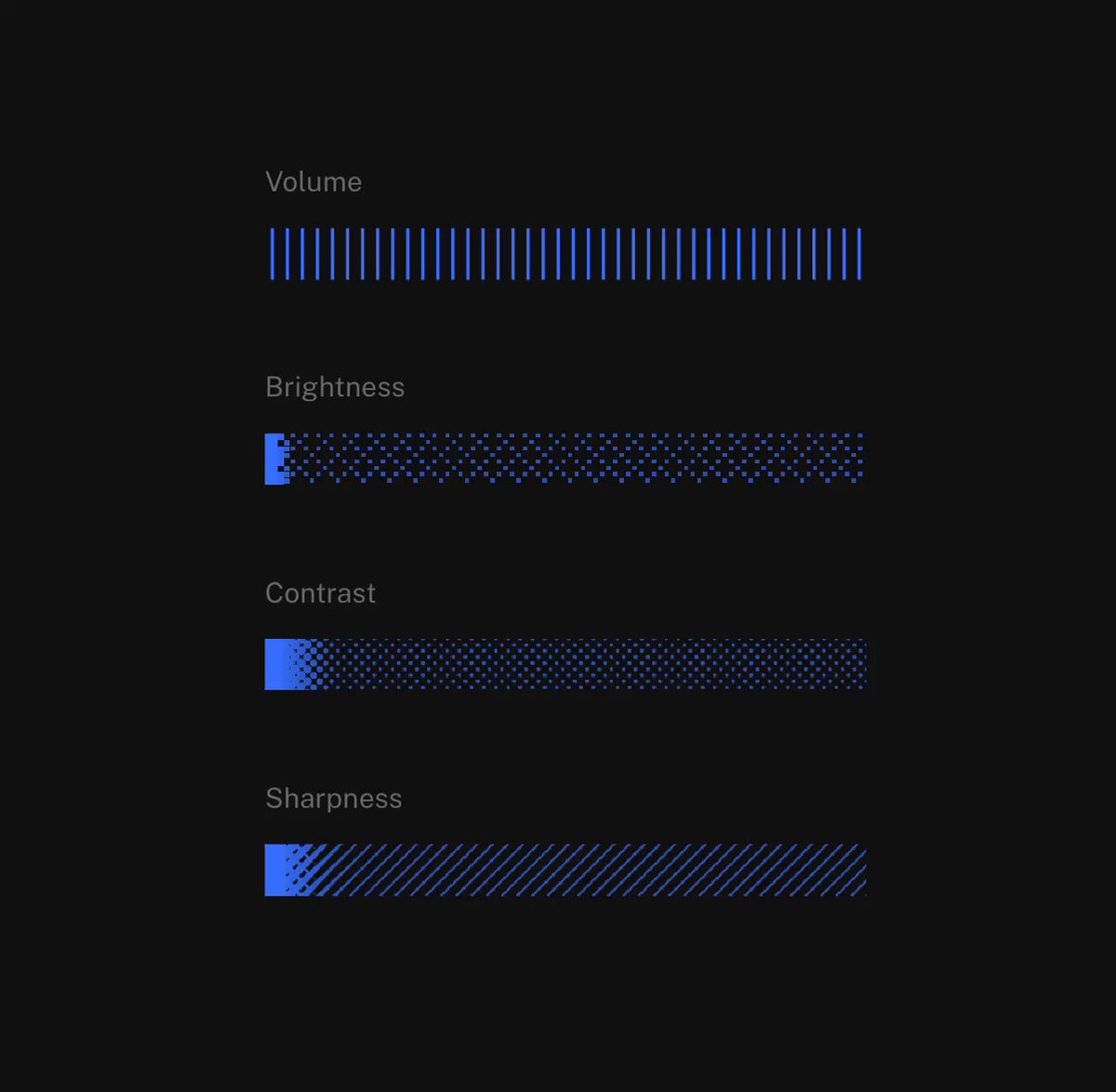
BUILD: Build a compact panel of four textured horizontal sliders for volume, brightness, contrast and sharpness. Keep the interaction direct and tactile, without a separate round thumb.
DESIGN SYSTEM: Near-black #101110 background, muted gray #777777 labels in a small 12px sans-serif, vivid blue #3865FF fill. Stack four 280px-wide, 24px-high tracks with 64px vertical pitch. Use nearly square corners. Volume uses thin vertical blue ticks on the unfilled track; brightness uses a dense dotted texture; contrast fades from blue into a dark dotted field; sharpness uses fine diagonal hatching. No decorative panel chrome.
MOTION: Pointer drag changes each fill width immediately, tracking horizontal position continuously. On pointer release settle any eased visual interpolation within 100ms, cubic-bezier(0.2,0,0,1). Preserve the stationary pattern behind the moving fill boundary. Hover reveals the grab cursor, while active drag keeps the selected control captured. These timings are implementation targets rather than measured source timings.
SECTIONS: Four labeled controls, each with unfilled textured track, blue value region, idle, hover, keyboard-focus and dragging states. Start volume near one third, brightness near four fifths and the remaining controls near minimum.
IMPLEMENTATION: Use accessible native range inputs with custom CSS layered gradients and masks for textures. Render a solid blue fill over the patterned track; use a feathered mask on contrast. Avoid canvas and per-frame React rerenders. Support arrow keys, Home and End, expose label and value to assistive technology, and draw a visible focus ring. Clamp values from 0 to 100. Under prefers-reduced-motion disable settling interpolation. Keep texture layers static and touch targets at least 44px high.
ADAPT TO THE PROJECT: Reuse existing design tokens, components and fonts; map colors to the nearest existing tokens. Never copy logos, brand names, photos or illustrations from the original; use placeholders.
SUCCESS CHECK:
- Each slider retains its own distinct texture at every value.
- Drag, touch and keyboard all update values without jumps.
- The compact dark panel remains legible and fits narrow screens.