REFERENCE
- Gallery page: https://magpui.com/en/i/sidebar-with-animated-layout-checks-f4685e
- First frame (image): https://dnioievkvxejjbxgwvko.supabase.co/storage/v1/object/public/media/sidebar-with-animated-layout-checks-f4685e/shot.jpg
- Clip (mp4): https://dnioievkvxejjbxgwvko.supabase.co/storage/v1/object/public/media/sidebar-with-animated-layout-checks-f4685e/clip.mp4
- Original post: https://x.com/MichaelFilipiuk/status/2113239967006855524 by @MichaelFilipiuk
Before building, download the first frame and look at it. If ffmpeg is available, download the clip and extract frames (ffmpeg -i clip.mp4 -vf fps=2 frame-%02d.png), then study the motion frame by frame. Match what you see; the text below describes it, the frames are the truth.

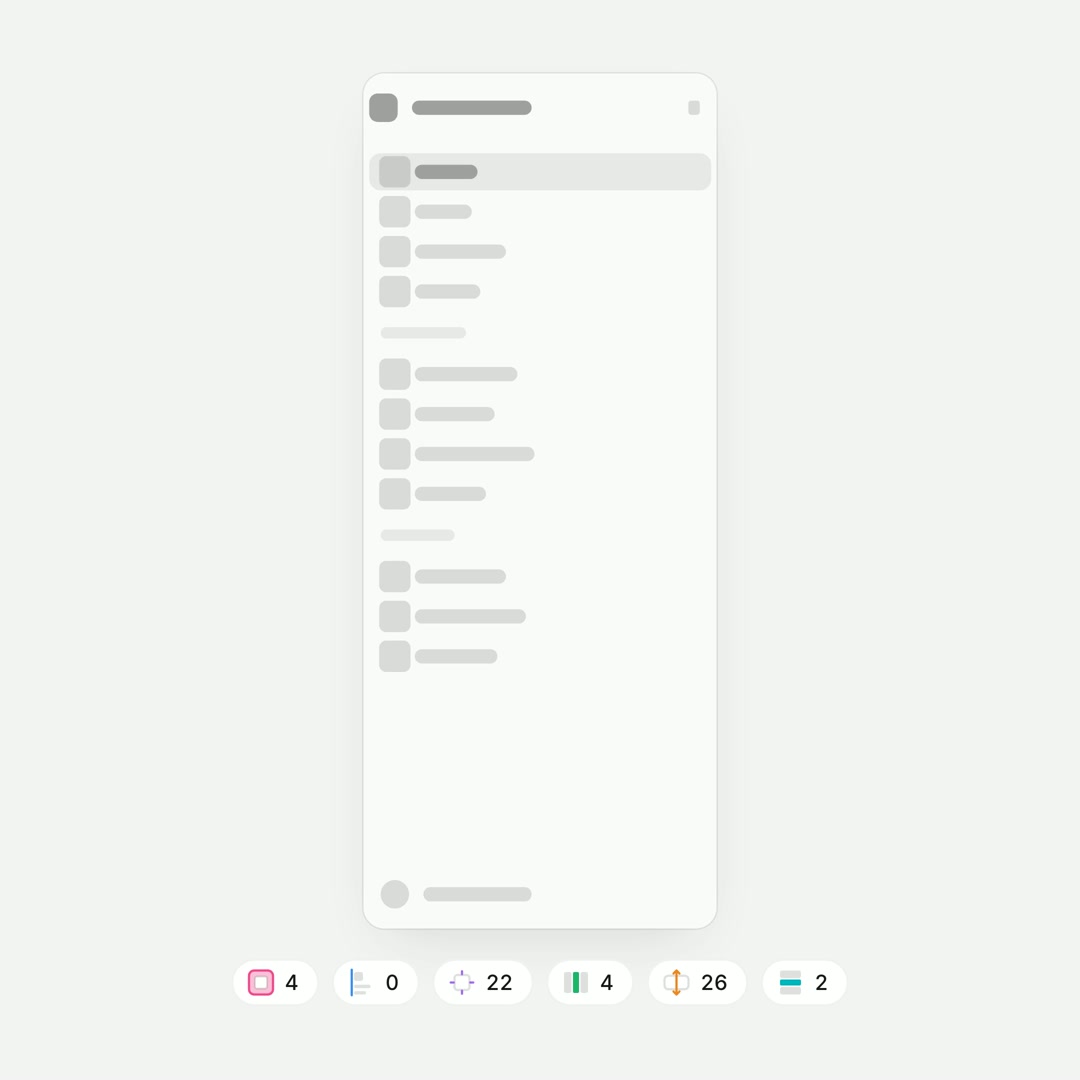
BUILD: Build a compact sidebar inspection demo: a pale wireframe navigation panel above six diagnostic counters. Each check overlays a different class of layout issue before the sidebar resolves into a tidy state. Build only this component.
DESIGN SYSTEM: Target a 240px-wide, 560px-tall white panel on #F3F6F3, with 12px corners, #DFE4E0 border and subtle shadow. Represent labels as gray bars and icons as 14px rounded squares. Include an identity row, grouped navigation, selected row and bottom account row. Place six small counters underneath in 11px sans-serif. Use pale pink #E9B3C6, blue #91BEDD, lavender #D0C6DF, orange #EFCCA1 and cyan #9EDFE1 for overlays.
MOTION: On selecting a badge, fade the previous overlay out in 150ms and the next in over 250ms with cubic-bezier(0.22,1,0.36,1). States show a pink panel outline, blue alignment guides, lavender icon boxes, orange padding blocks and cyan horizontal gap bands. Stagger rows by 35ms. Transition counter values and active outlines in 200ms. An optional replay advances checks every 1200ms, ending with overlays removed and rows aligned over 400ms. These are implementation targets, not measured timings.
SECTIONS: Wireframe sidebar; colored diagnostic overlays; six counter badges; idle, active check and resolved states; replay control.
IMPLEMENTATION: Use React and Motion for opacity and transform transitions; CSS or SVG for guides. Store issue rectangles relative to the panel. Avoid per-frame layout reads. Provide keyboard-operable diagnostic buttons, visible focus rings and text equivalents for colors. For prefers-reduced-motion disable autoplay and switch states instantly.
ADAPT TO THE PROJECT: Reuse the project's existing design tokens, components and fonts, mapping colors to the closest existing tokens. Never copy logos, brand names, photos or illustrations from the original; use placeholders.
SUCCESS CHECK:
- Each badge selects only its diagnostic layer.
- The resolved state has aligned rows with no overlays.
- Keyboard navigation and reduced motion work.