REFERENCE
- Gallery page: https://magpui.com/en/i/scrubbable-keyframes-with-code-decode-02bd9c
- First frame (image): https://dnioievkvxejjbxgwvko.supabase.co/storage/v1/object/public/media/scrubbable-keyframes-with-code-decode-02bd9c/shot.jpg
- Clip (mp4): https://dnioievkvxejjbxgwvko.supabase.co/storage/v1/object/public/media/scrubbable-keyframes-with-code-decode-02bd9c/clip.mp4
- Original post: https://x.com/emilkowalski/status/2112146246299259017 by @emilkowalski
Before building, download the first frame and look at it. If ffmpeg is available, download the clip and extract frames (ffmpeg -i clip.mp4 -vf fps=2 frame-%02d.png), then study the motion frame by frame. Match what you see; the text below describes it, the frames are the truth.

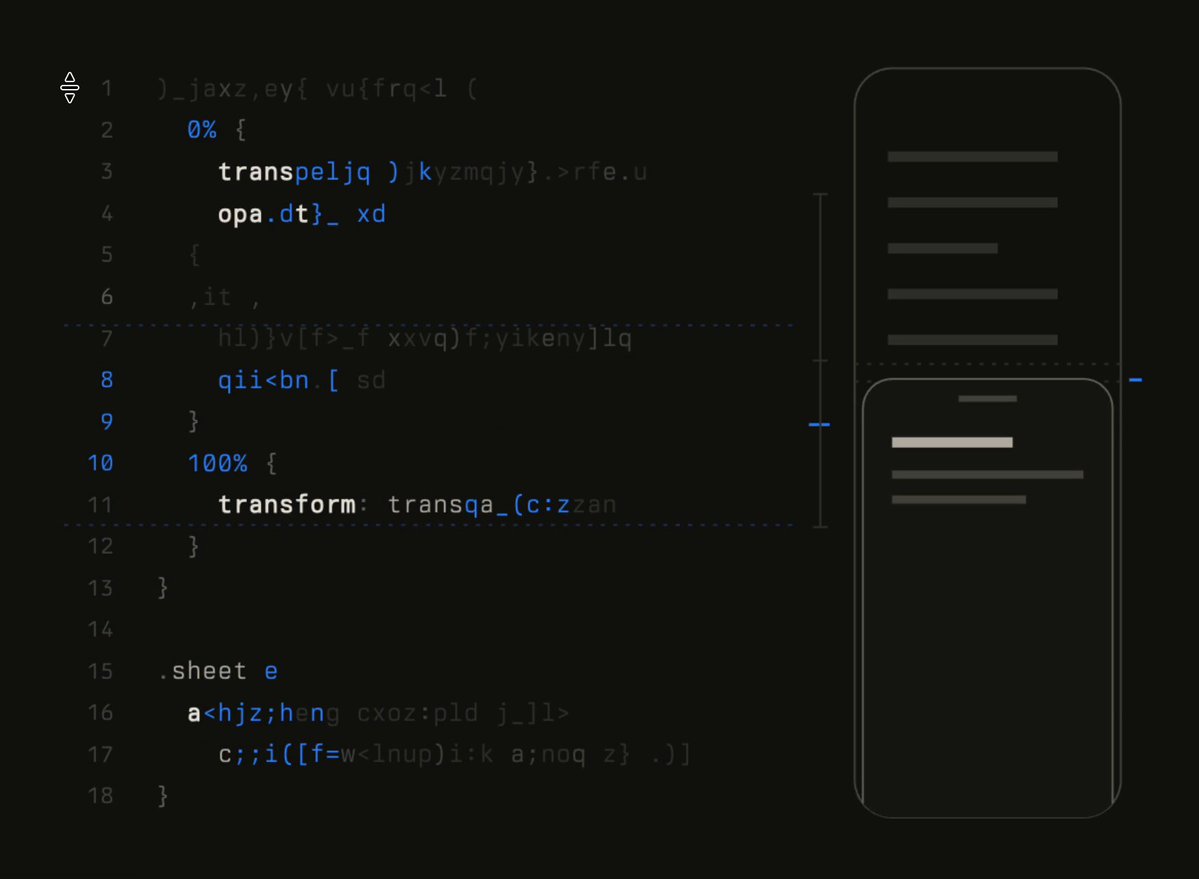
BUILD: An interactive explainer that ties CSS keyframes to their visual result. On the left an 18-line code block shows a 'sheet-in' @keyframes rule (0% translateY(100%) opacity 0, 60% translateY(-4%) opacity 1, 100% translateY(0)) and a .sheet rule using it (500ms, cubic-bezier(0.32, 0.72, 0, 1)). On the right a phone outline previews a bottom sheet. Dragging up and down anywhere over the code scrubs the animation: the vertical pointer position maps to animation progress, the sheet in the phone moves to that frame, and only the code lines near the pointer are readable while the rest stays scrambled as random characters, decoding as the pointer reaches them. It should feel precise and calm, like a design engineer's lab notebook.

DESIGN SYSTEM: Full-bleed background #121212. Two-column layout, about 960px wide: code column 62%, phone column 38%, 32px gap. Code: monospace 12-13px, line height 1.4, line numbers in #4A4A4A right-aligned in a 28px gutter, keywords and selectors in #FFFFFF semibold, properties #E6E6E6, values and numbers in blue #4C8DFF, scrambled characters in #3A3A3A. A faint dashed horizontal rule (#2A2A2A) separates the keyframes block from the .sheet block. Phone: 150x300px outline, 1px #3A3A3A stroke, radius 20px, transparent fill; inside, a background list of 6 grey bars (#3A3A3A, 4px tall, 10px gap) and the sheet: same width as the phone minus 6px, radius 14px top, 1px #555 border, background #1A1A1A, a 16px grab handle bar #6A6A6A, a white title bar and two grey text bars. A thin vertical scale to the left of the phone (1px #2E2E2E) with a short blue #4C8DFF tick marking the current progress, and a matching tick at the sheet's top edge. Cursor is row-resize (ns-resize).

MOTION: Scrub: progress p = clamp((pointerY - top) / height, 0, 1); compute the keyframe value at p using the same keyframes and timing function, and render the sheet's translateY and opacity directly (no easing lag, or a 60ms lerp for smoothness). Decode: each code line gets a reveal radius of about 3 lines around the pointer; characters inside the radius resolve to real text one by one, outside it they re-scramble, cycling random glyphs every 40ms; resolve takes 160ms per line with a 12ms stagger per character from left to right. Lines that hold the keyframe stop currently active (0%, 60%, 100%) turn brighter (#FFFFFF) when p is inside their segment. On pointer leave: the code fully scrambles over 300ms except the @keyframes header line, and the sheet plays the real animation from 0 to 1 once (500ms, cubic-bezier(0.32, 0.72, 0, 1)).

SECTIONS: Parts: code panel (gutter, scrambled layer, decoded layer), progress scale with tick, phone preview (list skeleton, bottom sheet). States: idle (code scrambled, sheet at rest, loops the real animation every 3s), scrubbing (decode window follows pointer, sheet follows progress), keyboard scrubbing (Up/Down arrows step progress by 0.05, Home/End jump to 0/1), done/leave (plays full animation).

IMPLEMENTATION: Plain React with requestAnimationFrame; no animation library needed for the scrub because values are computed from p. Evaluate the cubic-bezier with a small solver (or use the WAAPI trick: create element.animate(keyframes, {duration: 500, easing, fill: 'both'}), pause it, and set currentTime = p * 500 so the browser does the math exactly). Scramble text per line in spans; keep the real text in an aria-hidden=false visually hidden copy so screen readers and copy-paste get the real code. Make the panel a focusable slider (role=slider, aria-valuenow = progress percent) with visible focus ring 2px #4C8DFF. prefers-reduced-motion: show all code decoded, no scramble cycling, and keep the scrub only on explicit drag. Performance: only re-render lines inside the reveal radius each frame, throttle glyph cycling to 25fps.

ADAPT TO THE PROJECT: Reuse the project's existing code-block styles, monospace font, design tokens and colors; map the near-black, greys and blue to the closest tokens. Do not copy logos, brand names or original content; use placeholder UI bars in the phone.

SUCCESS CHECK:
- Moving the pointer from top to bottom moves the sheet from fully hidden to its resting position, overshooting about 4% around 60% progress.
- Only the 5-7 lines around the pointer are readable at any time, and they decode and re-scramble smoothly as the pointer moves.
- Arrow keys scrub with focus visible, and copying the code block yields the real, unscrambled CSS.