REFERENCE
- Gallery page: https://magpui.com/en/i/region-status-on-a-dotted-globe-7baf85
- First frame (image): https://dnioievkvxejjbxgwvko.supabase.co/storage/v1/object/public/media/region-status-on-a-dotted-globe-7baf85/shot.jpg
- Clip (mp4): https://dnioievkvxejjbxgwvko.supabase.co/storage/v1/object/public/media/region-status-on-a-dotted-globe-7baf85/clip.mp4
- Original post: https://x.com/KhalidDevLog/status/2111451565915517385 by @KhalidDevLog
Before building, download the first frame and look at it. If ffmpeg is available, download the clip and extract frames (ffmpeg -i clip.mp4 -vf fps=2 frame-%02d.png), then study the motion frame by frame. Match what you see; the text below describes it, the frames are the truth.

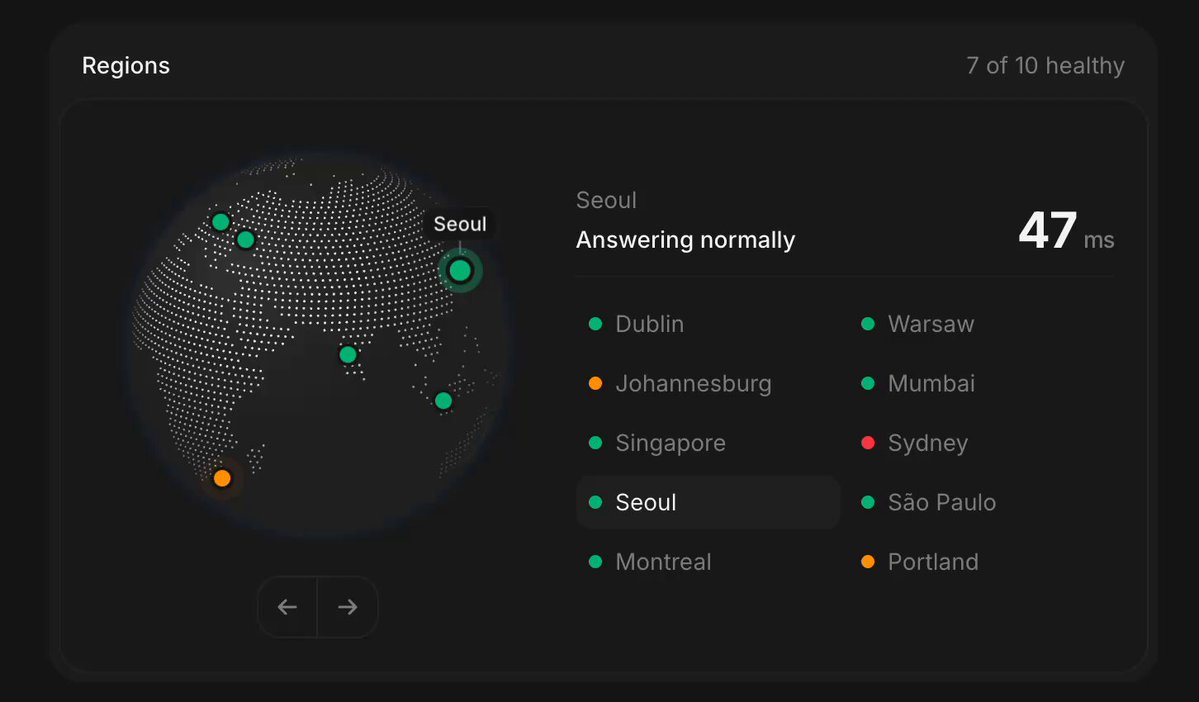
BUILD: Build a compact region-health component pairing an interactive dotted globe with a selectable city list. The globe gives spatial context without overwhelming the service metrics. Build only this widget.
DESIGN SYSTEM: Use a near-black #141414 card about 680 by 400px with a subtle #292929 border, 18px radius and 20px padding. Top row has a small region label and muted healthy-count summary. Below, place a 250px globe on the left and status/list area on the right. Use a neutral sans-serif at 12-14px; a 28px semibold latency number with a smaller ms suffix. Render continents as dense gray dots, oceans near-black, and markers in emerald #16bd86, amber #e7a122 or red #ed3058. Use two columns of five city rows and a subtle filled active row. Add two small arrow controls beneath the globe.
MOTION: On city selection, rotate the globe to face its coordinate using shortest-path quaternion interpolation over approximately 700ms, cubic-bezier(0.22,1,0.36,1). Keep markers attached to the sphere and hide those behind it. The selected marker has a brighter outer ring and a small nearby city label. Fade the label and metric change over 160ms with cubic-bezier(0.2,0,0,1). Arrow controls step through orientations; pointer drag rotates the globe. These timings are implementation targets.
SECTIONS: Header with health count; dotted globe with colored region markers and navigation arrows; selected-city summary with normal/unavailable message and latency or em dash; two-column city selector. Idle shows all visible markers; active selection adds a halo, city label and row highlight; unavailable state uses red and no latency.
IMPLEMENTATION: Use Three.js Points for the land dots, a single sphere and batched marker geometry. Use coordinate-to-vector mapping and quaternion interpolation rather than per-dot React updates. Overlay labels in HTML and use real buttons for cities and arrows. Include visible focus rings, arrow-key navigation and accessible textual status. Cap pixel ratio at 2, pause drawing when offscreen, and dispose GPU resources on unmount. Under prefers-reduced-motion, jump directly to the chosen orientation. On narrow screens stack globe above the list.
ADAPT TO THE PROJECT: Reuse existing tokens, components and fonts, mapping the colors to the closest existing tokens. Never copy logos, brand names, photos or illustrations from the original; use placeholder city data.
SUCCESS CHECK:
- Selecting any city brings its marker to the front and updates latency and health consistently.
- Markers remain attached during dragging and hidden on the back hemisphere.
- All regions are usable by keyboard and reduced-motion mode skips animated rotation.