REFERENCE
- Gallery page: https://magpui.com/en/i/pixel-construction-crew-loading-bar-b15ac0
- First frame (image): https://dnioievkvxejjbxgwvko.supabase.co/storage/v1/object/public/media/pixel-construction-crew-loading-bar-b15ac0/shot.jpg
- Clip (mp4): https://dnioievkvxejjbxgwvko.supabase.co/storage/v1/object/public/media/pixel-construction-crew-loading-bar-b15ac0/clip.mp4
- Original post: https://x.com/noclipepe/status/2119881447687569842 by @noclipepe
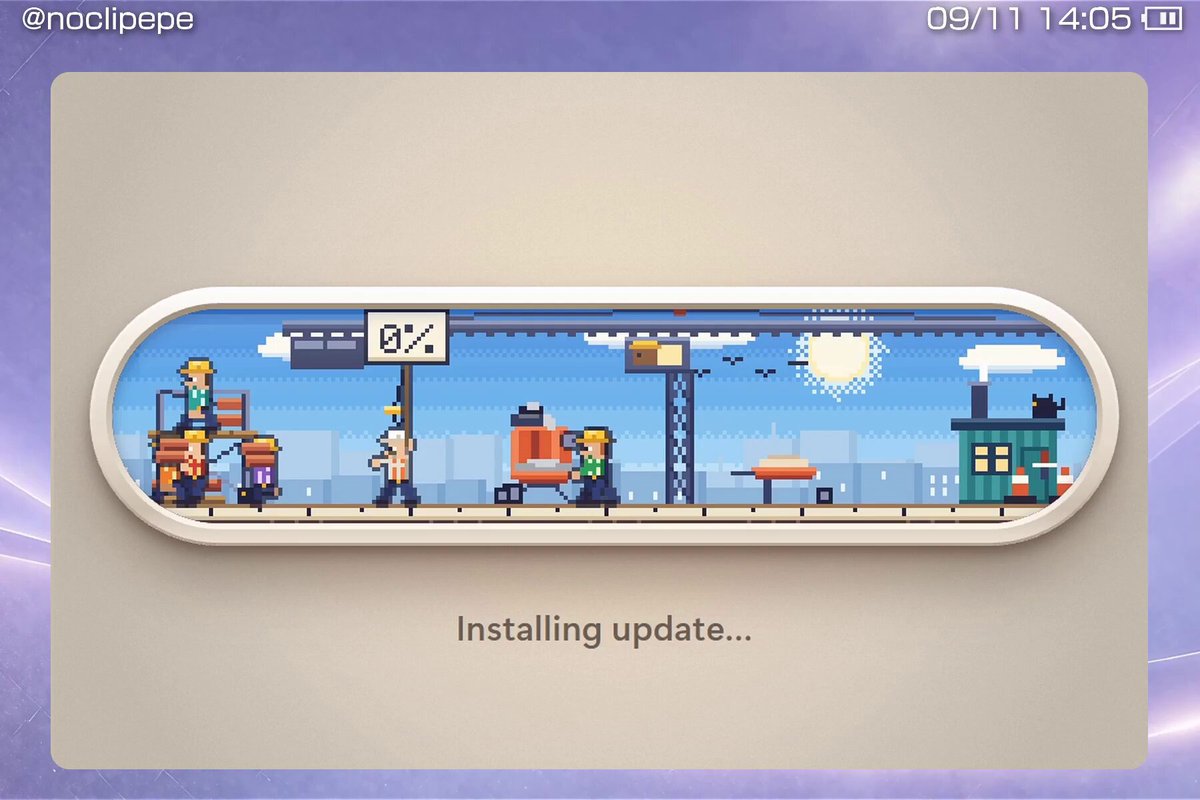
Before building, download the first frame and look at it. If ffmpeg is available, download the clip and extract frames (ffmpeg -i clip.mp4 -vf fps=2 frame-%02d.png), then study the motion frame by frame. Match what you see; the text below describes it, the frames are the truth.

ASSETS
This needs real artwork, not shapes drawn in code. Use the files the user gives you (ask where they are). If you have an image generation tool, generate them with these prompts; otherwise leave clearly marked placeholders.
- Construction crew sprite sheet: Pixel art sprite sheet of tiny construction workers in yellow hard hats seen from the side, 16x24 px characters, walking, carrying bricks, pushing a wheelbarrow and climbing a ladder, 4 frames per action, limited 16-color palette, flat colors, no anti-aliasing, transparent background, horizontal sheet.
- Construction site background: Pixel art side-view construction site panorama, blue sky with puffy clouds and a dithered sun, pale distant city skyline, a crane, scaffolding and a teal site cabin with a black cat on the roof, cheerful retro game style, limited palette, no text, very wide 5:1 aspect ratio.

BUILD: A wide, pill-shaped loading bar for an "Installing update..." screen where the fill is a living pixel-art construction site. Inside the pill a small side-view scene plays: blue sky with pixel clouds and a dithered sun, a distant pale city skyline, a crane, a site cabin, scaffolding, and a crew of tiny workers in yellow hard hats. As progress goes from 0 to 100%, the crew builds a red brick wall from the left edge to the right: bricks get carried, lifted and laid, so the wall's right edge IS the progress. A small boxed percentage label rides on top of the building front. It should feel charming and alive, like a tiny game you cannot stop watching.

DESIGN SYSTEM: Centered card about 920x580px, warm beige #d8d0c4 with 16px radius, on any page background. The bar is a horizontal capsule about 830x170px with a thick 18px cream rim (#efe8dc) and a soft inner shadow, giving a bezel or porthole look; the scene inside is clipped to the capsule. Pixel art drawn at a 4x scale with nearest-neighbor rendering (image-rendering: pixelated): sky #6fb6f0 to #a9d6f7, clouds #ffffff, sun #fff3b0 with a dithered halo, skyline #b9d4ea, bricks #b5513a with #8a3424 mortar lines, ground strip #e8c35a, crane and scaffolding #3f4a63, cabin #2f8f86, workers with #f2c230 helmets and varied shirts. The label is a white box with a 2px #1d1d1d border, pixel font about 22px, e.g. "50%". Below the bar a status line in a rounded sans, 20px, #6b6257: "Installing update..." which switches to "Almost there..." past ~30%.

MOTION:
- Progress: the wall's right edge advances brick by brick (each brick 16x8 scene px), never smoothly; one brick appears every 80-150ms with a 1-frame drop of 2px into place.
- The percentage label follows the wall front, sliding with steps(4) over 200ms, and its digits change instantly.
- Workers: 4-6 sprites with 2-4 frame walk cycles at 8 fps; some carry bricks from the right side to the wall, one pushes a wheelbarrow, one on a ladder lifts bricks; when they reach the wall front they turn and walk back.
- Crane arm swings a hanging pallet slowly (3000ms ping-pong, ease-in-out) and the clouds drift left at about 6 scene px per second; a cat on the cabin blinks every few seconds.
- At 100%: the crew jumps once (2 frames), a tiny confetti of pixel dust pops, and the status line changes to a done message.

SECTIONS: Parts: card, capsule bezel, scene layers (sky, skyline, props, wall, workers, foreground ground strip), floating percentage label, status text. States: idle (0%, crew gathered on the left), building (wall growing, workers looping), paused (workers stop and look around if progress stalls more than 2s), done (wall complete, celebration frame).

IMPLEMENTATION: Canvas 2D at a low internal resolution (about 210x45 scene pixels) scaled up with image-rendering: pixelated, driven by a requestAnimationFrame loop with a fixed 8-12 fps sprite clock. Expose a progress prop (0-1) and derive the number of laid bricks from it, so it can wrap a real install or upload. Sprites from a single sprite sheet. Under prefers-reduced-motion keep the wall growing but freeze the workers and clouds. Add role="progressbar" with aria-valuenow and an aria-live status line. Pause the loop when the tab is hidden.

ADAPT TO THE PROJECT: Reuse the project's existing design tokens, fonts and card components for the frame and status text, map colors to the closest existing tokens, and never copy logos, brand names or the original sprites; draw your own placeholder pixel sprites or generate them.

SUCCESS CHECK:
- Setting progress to 0.5 shows a wall covering about half the capsule with the label sitting on the wall's front.
- Workers keep walking and carrying bricks while progress changes, at a crisp pixel-perfect scale with no blur.
- With prefers-reduced-motion on, only the wall and the percentage update.