REFERENCE
- Gallery page: https://magpui.com/en/i/pixel-art-daynight-glass-toggle-dd45e3
- First frame (image): https://dnioievkvxejjbxgwvko.supabase.co/storage/v1/object/public/media/pixel-art-daynight-glass-toggle-dd45e3/shot.jpg
- Clip (mp4): https://dnioievkvxejjbxgwvko.supabase.co/storage/v1/object/public/media/pixel-art-daynight-glass-toggle-dd45e3/clip.mp4
- Original post: https://x.com/Lattice_Node/status/2119392949813555224 by @Lattice_Node
Before building, download the first frame and look at it. If ffmpeg is available, download the clip and extract frames (ffmpeg -i clip.mp4 -vf fps=2 frame-%02d.png), then study the motion frame by frame. Match what you see; the text below describes it, the frames are the truth.

ASSETS
This needs real artwork, not shapes drawn in code. Use the files the user gives you (ask where they are). If you have an image generation tool, generate them with these prompts; otherwise leave clearly marked placeholders.
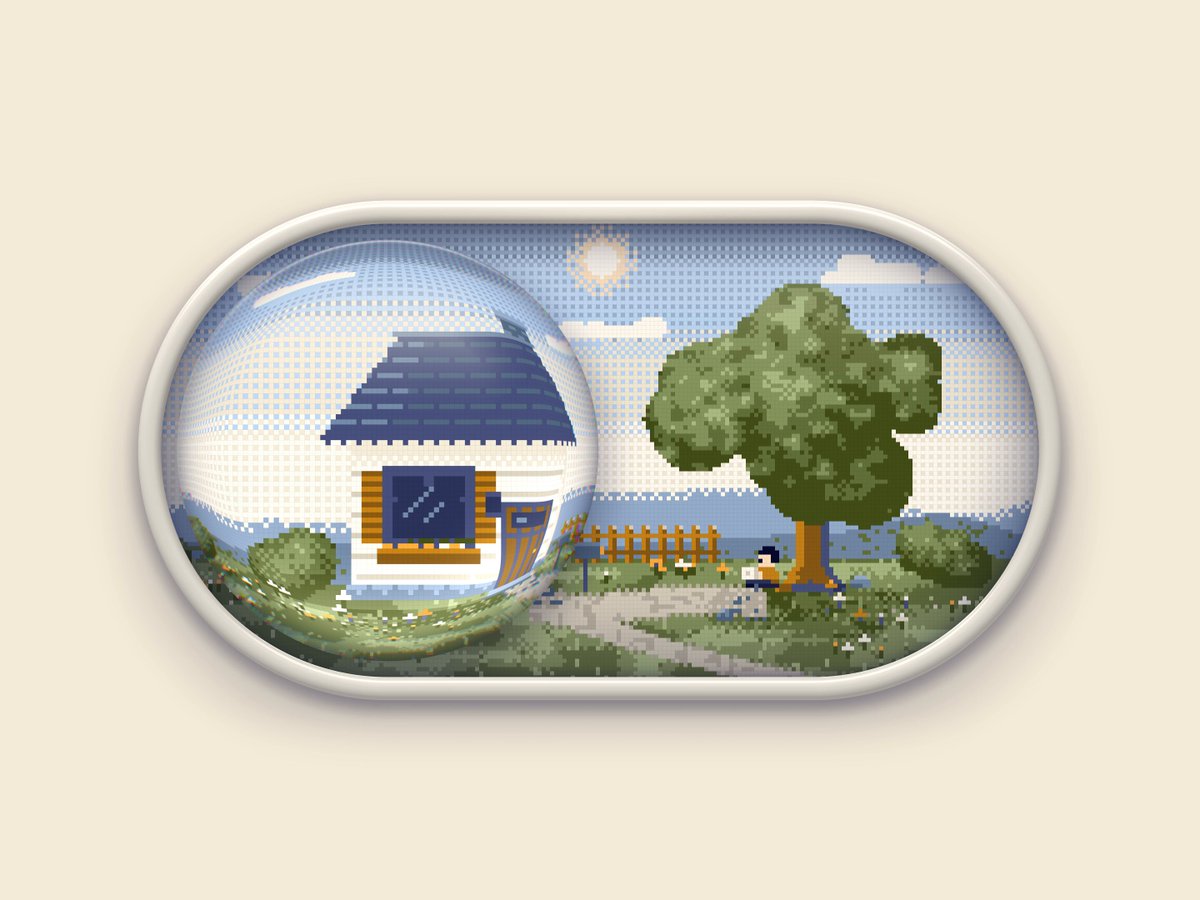
- Pixel-art cottage scene, day and night: Pixel art landscape, wide 2:1, small cottage with blue roof and white walls, wooden fence, round leafy tree, grass path, fluffy clouds and sun; second matching version at night with starry navy sky, moon, glowing yellow window and dark tree silhouette; 16-bit style, clean limited palette, no text, plain edges

BUILD: A dark-mode / light-mode toggle shaped like a large horizontal pill (about 260x130px) that frames a small pixel-art landscape: a cottage with a blue roof, a fence, a leafy tree, grass, clouds and a sun. The knob is a glossy transparent glass sphere that sits over the left or right half of the scene and magnifies what is under it. Switching to dark slides the sphere across while the scene crossfades to night: navy sky with stars and a moon, the cottage window glowing warm yellow, the tree turning to a dark silhouette. It should feel like a tactile toy, not a settings control.

DESIGN SYSTEM: Page background cream #F1EADB in light mode and deep navy #0E0B24 in dark mode (or slate #4A4A5A). Pill frame: thick bevelled rim in pale gray #E6E2DA to #C9C4BB with an inner shadow inset 0 4px 10px rgba(0,0,0,0.25) and an outer drop shadow 0 12px 30px rgba(0,0,0,0.18); radius 999px; rim about 10px. Inside, the scene is pixel art at roughly 3-4px per art pixel with image-rendering: pixelated. Day palette: sky #BFD8F0 to #E9F1F7, roof #33457A, walls #F3F1EC, grass #6FA64A, tree #4E8B3A. Night palette: sky #141A3A with white star pixels, moon #F4F1D0, window #F7C548 with a soft glow, grass #2A3A3A. Knob: a circle about 110px, nearly transparent with a white specular highlight arc at top-left, a faint rim rgba(255,255,255,0.6) and a subtle refraction of the scene behind it.

MOTION: On click or Space/Enter: knob translates from left to right edge over 600ms with cubic-bezier(0.65, 0, 0.35, 1), a slight 1.05 scale at mid-travel. Scene day-to-night crossfade over 700ms cubic-bezier(0.4, 0, 0.2, 1): sky color, then stars fade in with a 20-40ms random stagger, window light fades up 200ms after the knob lands with a gentle 1.5s pulse. Page background transitions color over 500ms. Mid-transition there is a dusk state with an orange horizon band (#E89A3C) for about 200ms. Reverse plays the same in mirror.

SECTIONS: Parts: rim frame, scene layer (day and night variants stacked), glass knob with highlight and magnification, stars, moon/sun. States: day (idle), hover (knob lifts 2px, highlight brightens), pressed (knob scales 0.96), transitioning (dusk), night (idle), focus-visible (2px outline offset 4px around the pill).

IMPLEMENTATION: A button with role=switch and aria-checked. Draw the two scenes as stacked pixel-art layers (inline SVG with crispEdges rects, or PNG sprites) and crossfade opacity; animate the knob with CSS transforms or Motion. Fake the magnifying glass with a scaled copy of the scene clipped to a circle inside the knob (transform: scale(1.15)), plus gradient highlights; backdrop-filter is optional. Respect prefers-reduced-motion by switching instantly with a 150ms fade. Keep it to transforms and opacity so it runs at 60fps.

ADAPT TO THE PROJECT: Wire it to the project's existing theme state and design tokens, map colors to the closest existing tokens for page backgrounds, reuse the project's focus ring style, and create original pixel art or placeholders rather than copying the original scene.

SUCCESS CHECK:
- Clicking or pressing Space toggles the theme and the knob slides with the scene crossfading to night and back.
- The glass knob visibly magnifies the scene beneath it and has a specular highlight.
- With prefers-reduced-motion enabled the toggle switches without the slide.