REFERENCE
- Gallery page: https://magpui.com/en/i/orbiting-flag-carousel-297f7b
- First frame (image): https://dnioievkvxejjbxgwvko.supabase.co/storage/v1/object/public/media/orbiting-flag-carousel-297f7b/shot.jpg
- Clip (mp4): https://dnioievkvxejjbxgwvko.supabase.co/storage/v1/object/public/media/orbiting-flag-carousel-297f7b/clip.mp4
- Original post: https://x.com/60fpsdesign/status/2109604725880762373 by @60fpsdesign
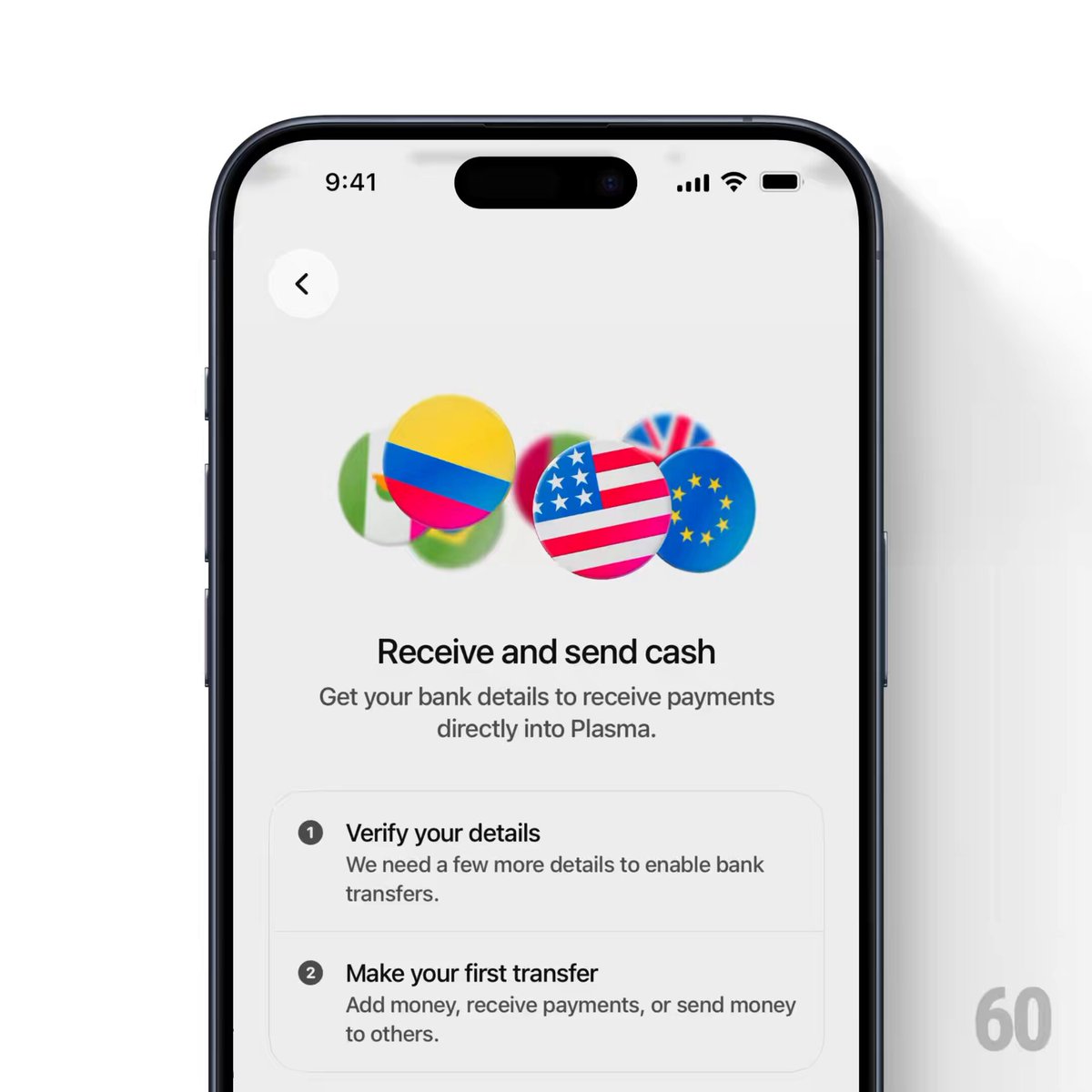
Before building, download the first frame and look at it. If ffmpeg is available, download the clip and extract frames (ffmpeg -i clip.mp4 -vf fps=2 frame-%02d.png), then study the motion frame by frame. Match what you see; the text below describes it, the frames are the truth.

BUILD: Build only a looping circular flag carousel for a transfer onboarding component, not an entire app or phone mockup. Overlapping flag discs orbit in a compact horizontal cluster and grow as they come forward.
DESIGN SYSTEM: Target a 220 by 120 px stage, an approximately 170 px-wide cluster and circular discs of 44–58 px apparent diameter. Use an off-white #F4F4F4 background with flat vivid green #42B849, blue #1566D8, red #E64049, yellow #F4D934 and white flag shapes. Use overlap instead of heavy shadows. Optional fixed caption below: neutral sans-serif, 16 px medium heading and 12 px supporting text, with a 16 px gap from the illustration.
MOTION: On mount run an endless elliptical orbit, proposed cycle 7000 ms with cubic-bezier(0,0,1,1). Distribute eight discs by equal phase offsets. Animate x over 130 px and y over 24 px; scale from 0.72 at the back to 1.08 at the front. Derive stacking order from depth so discs disappear behind their neighbors. Keep flag faces upright rather than rotating the entire cluster as a rigid group. These timings and dimensions are rebuild targets rather than measured values.
SECTIONS: Decorative orbit stage; small partially occluded rear discs; large overlapping foreground discs; optional centered heading and two-line explanatory caption. The caption remains stationary.
IMPLEMENTATION: Use Motion and a shared phase driving transform-only position and scale. Keep the token count small, avoid per-frame layout measurements and expensive filters, pause when offscreen. Draw simple placeholder flag graphics with CSS or SVG. For prefers-reduced-motion show a balanced static cluster. Hide decorative discs from assistive technology; the illustration itself is not keyboard-focusable. Preserve normal keyboard navigation and visible focus for surrounding controls.
ADAPT TO THE PROJECT: Reuse existing tokens, components and fonts. Map colors to the closest existing tokens. Never copy logos, brand names, photos or illustrations from the source; use placeholders.
SUCCESS CHECK:
- Flags exchange foreground and background positions with a seamless loop.
- The cluster fits narrow screens without moving or covering the caption.
- Reduced-motion mode freezes a balanced readable arrangement.