REFERENCE
- Gallery page: https://magpui.com/en/i/navbar-with-a-peeking-mascot-542d6f
- First frame (image): https://dnioievkvxejjbxgwvko.supabase.co/storage/v1/object/public/media/navbar-with-a-peeking-mascot-542d6f/shot.jpg
- Clip (mp4): https://dnioievkvxejjbxgwvko.supabase.co/storage/v1/object/public/media/navbar-with-a-peeking-mascot-542d6f/clip.mp4
- Original post: https://21st.dev/@jatin-yadav05/components/anime-navbar by Jatin Yadav
Before building, download the first frame and look at it. If ffmpeg is available, download the clip and extract frames (ffmpeg -i clip.mp4 -vf fps=2 frame-%02d.png), then study the motion frame by frame. Match what you see; the text below describes it, the frames are the truth.

BUILD
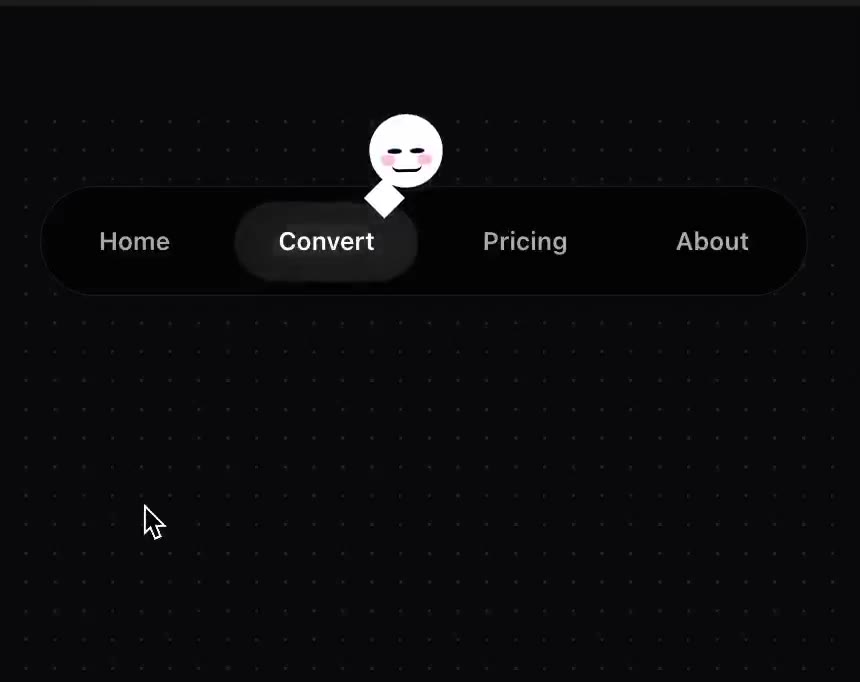
A centered dark pill navigation (Home, Convert, Pricing, About). The active tab has a lighter pill behind it, and a tiny white round mascot with a face peeks out from the top edge of that pill. Hovering another tab slides the pill and the mascot there; the mascot blinks and its expression changes (neutral, happy, sleepy).

DESIGN SYSTEM
- Background #0B0B0C with a faint grid; nav pill #141416, 1px border #FFFFFF12, radius 999px, height 40px.
- Tabs 13px medium #9A9AA0, active white on #26262A pill.
- Mascot: 26px white circle with two dot eyes and a small mouth (SVG), drop shadow, sits half above the active pill, tilted 8deg.

MOTION
- Active pill moves with a shared layout animation (spring 400/30).
- Mascot follows with 60ms delay and a small hop (y -6px then back, 300ms), rotating toward the move direction.
- Expression swap: eyes squash to lines for 120ms (blink) then the new mouth shape fades in.
- Mobile: the nav collapses to icons, mascot stays on the active icon.

SECTIONS
- Nav container, tabs, active pill, mascot (eyes, mouth states).
- States: idle (blink every 4s), hover move, active route.

IMPLEMENTATION
- Motion layoutId for the pill and a second motion element for the mascot; mascot faces as small inline SVGs.
- prefers-reduced-motion: swap the motion for a 150ms opacity change.
- Keyboard: every control focusable with a visible focus ring; same actions with Enter/Space and arrow keys where it makes sense.
- Animate only transform, opacity and filter.

ADAPT TO THE PROJECT
Reuse the project's existing design tokens, components and fonts; map colors to the closest existing tokens. Never copy logos, brand names, photos or illustrations from the original: use placeholders.

SUCCESS CHECK
- The mascot always sits on the hovered or active tab.
- It blinks when idle.
- Keyboard focus on a tab moves the pill and mascot the same way.