REFERENCE
- Gallery page: https://magpui.com/en/i/melting-wax-shapes-under-a-lamp-e7141c
- First frame (image): https://dnioievkvxejjbxgwvko.supabase.co/storage/v1/object/public/media/melting-wax-shapes-under-a-lamp-e7141c/shot.jpg
- Clip (mp4): https://dnioievkvxejjbxgwvko.supabase.co/storage/v1/object/public/media/melting-wax-shapes-under-a-lamp-e7141c/clip.mp4
- Original post: https://x.com/mrdoob/status/2117878668123095041 by @mrdoob
Before building, download the first frame and look at it. If ffmpeg is available, download the clip and extract frames (ffmpeg -i clip.mp4 -vf fps=2 frame-%02d.png), then study the motion frame by frame. Match what you see; the text below describes it, the frames are the truth.

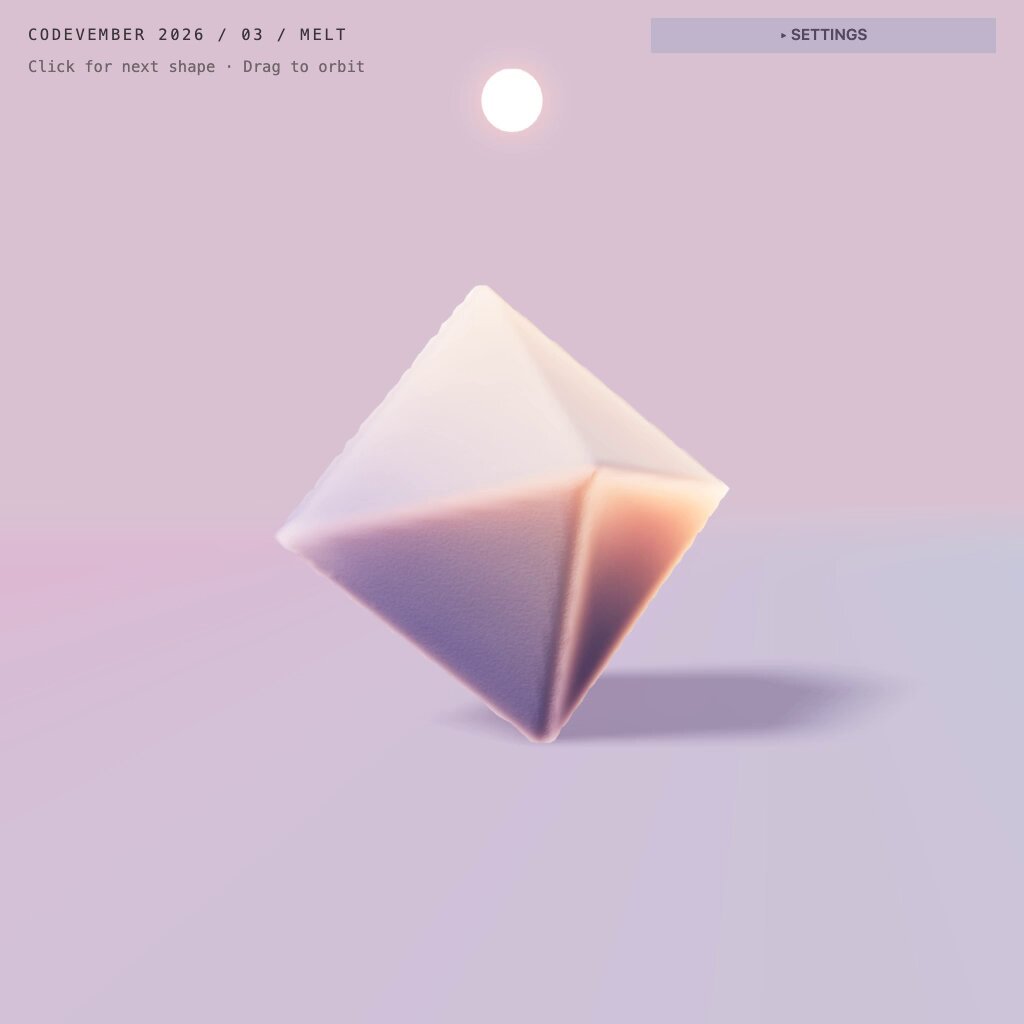
BUILD: A full-screen interactive 3D scene of solid shapes melting like warm wax. A single shape (octahedron, cube, cone, rounded torus knot, cylinder) hangs tilted above an endless pastel floor, lit by a small glowing white sphere that acts as a heat lamp just above it. Over a few seconds the shape softens: the top sags, edges round off, material slumps and flows outward until it becomes a thin, glossy, slightly rippled puddle with a soft rim. Clicking spawns the next shape, which falls in with a gentle bounce while the old puddle fades; dragging orbits the camera, scrolling zooms. It should feel quiet, tactile and satisfying, like watching candle wax in slow motion.

DESIGN SYSTEM: Full-bleed canvas, no chrome except a tiny monospace caption top-left (11px, uppercase, letter-spacing 0.08em, #5A4E5C) with a smaller hint line below it ("Click for next shape · Drag to orbit", 10px, 70% opacity), and a translucent "Settings" pill top-right (#B9AFC8 at 70%, 4px radius, 10px monospace). Background: vertical gradient from #D9C3CB (top) to #C9C6DA (horizon) with the floor in #CBBFD6 fading into fog at the horizon, so floor and sky meet in a soft band of #C2CBDD. Wax material: subsurface-looking, cream #F4E7D6 core with pink #E9A9B4 and peach #F2B07C tints where it is thick, lilac #B8A6D4 in the shade side, low roughness 0.25, clearcoat 0.6. Lamp: emissive white sphere about 4% of the viewport height with a soft bloom. Shadows: a single soft contact shadow in #8E7FA6 at 35% opacity under the shape, stretched away from the lamp.

MOTION: Spawn: the shape drops from about 1.5 units above, rotates 20-30 degrees on a random axis while falling, lands with a squash of scaleY 0.9 and returns in 500ms cubic-bezier(0.34, 1.56, 0.64, 1). Melt: starts 600ms after landing and runs about 6000ms with ease cubic-bezier(0.45, 0, 0.55, 1): vertices lower toward the floor according to a heat field that is strongest at the point nearest the lamp, height collapses to roughly 8% of the original, the footprint spreads to about 2.2x its width with a slightly noisy, wavy outline, and small drips bead up and roll down the sides in the first half. The surface keeps a slow low-frequency ripple (noise animated at 0.2 speed) once it is a puddle. Click: the puddle cools (color lerps to a paler tone and opacity to 0 over 700ms) while the next shape spawns. Orbit: damped controls (damping 0.08), polar angle clamped so the camera never goes under the floor.

SECTIONS: Parts and states: idle shape hovering (500ms), falling, landing squash, melting, puddle at rest with ripple, cooling/fade on next click. Settings panel (collapsed by default) exposes melt speed, heat radius and shape choice.

IMPLEMENTATION: Three.js with the WebGPU renderer and TSL (falls back to WebGL2). Use a densely subdivided mesh per shape (about 40k vertices) and do the melt in a compute shader or vertex shader: a per-vertex "melt" amount from distance to the lamp and time, height multiplied by (1 - melt), horizontal offset outward proportional to melt, plus 3D noise for the drips and wavy rim; recompute normals in the shader from neighbouring samples. Alternatively, a simple SPH or height-field fluid for the puddle if budget allows. Physical material with sheen/clearcoat for the wax, small bloom pass on the lamp, PCF soft shadow or a baked contact shadow plane. prefers-reduced-motion: skip the fall and show a 1200ms cross-fade from solid to final puddle. The canvas has an aria-label describing the scene; Enter or Space triggers the next shape; the Settings pill is a real button with a visible focus ring. Cap device pixel ratio at 2 and pause rendering when the tab is hidden.

ADAPT TO THE PROJECT: Reuse the project's existing design tokens, fonts and UI components for the caption and settings panel, map the pastel colors to the closest existing tokens, and never copy logos, brand names, photos or illustrations from the original; use placeholders.

SUCCESS CHECK:
- Each shape visibly sags from the side facing the lamp and ends as a thin glossy puddle with a wavy rim in about 6 seconds.
- Clicking or pressing Enter fades the puddle and drops a new shape with a short squash on landing.
- With prefers-reduced-motion the scene shows a simple cross-fade and stays above 55fps on a mid-range laptop otherwise.